
Triage LinkedIn Messages at Superhuman Speed
Label, sort, and prioritize hot leads from the noise with keyboard shortcuts and split inboxes.
What people say
LinkedIn Inbox Chaos
A cluttered LinkedIn inbox costs you sales and wastes valuable time every day.
Missed Opportunities
Hot leads get buried under less important messages, resulting in delayed responses and lost sales.
Time Drain
Hours wasted daily scrolling through unorganized messages trying to find important conversations.
Follow-up Failures
Without a reliable follow-up system, critical leads fall through the cracks and potential deals vanish.
Sort LinkedIn Messages Like a Pro
Kondo transforms your chaotic LinkedIn inbox into a streamlined, high-speed communication hub.
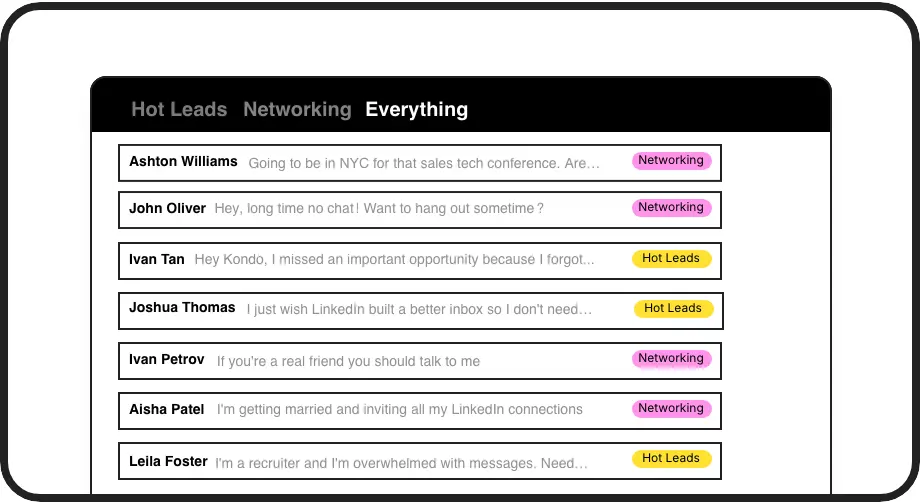
Custom Labels & Split Inboxes
Categorize conversations with labels like 'Hot Lead' or 'Client' and view them in separate inboxes. Never lose important messages in the clutter again.
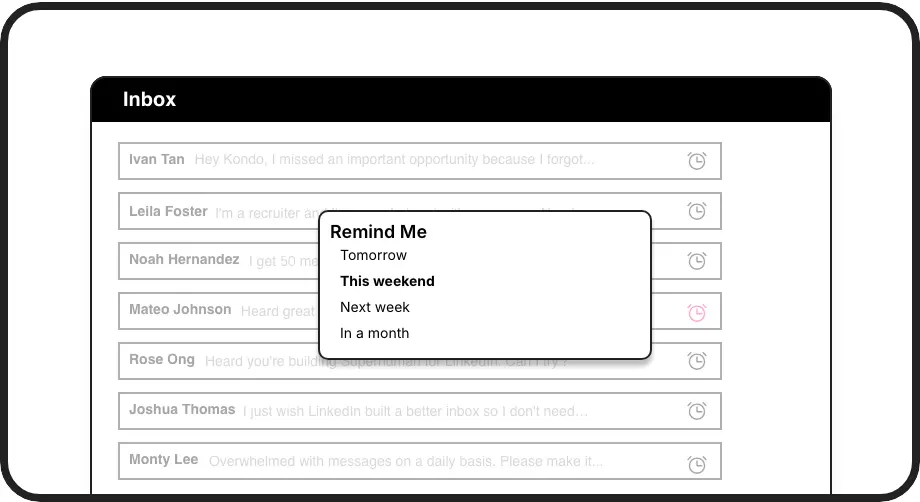
Smart Reminders
Set follow-up reminders that bring conversations back to the top of your inbox exactly when needed. Perfect timing, zero effort.
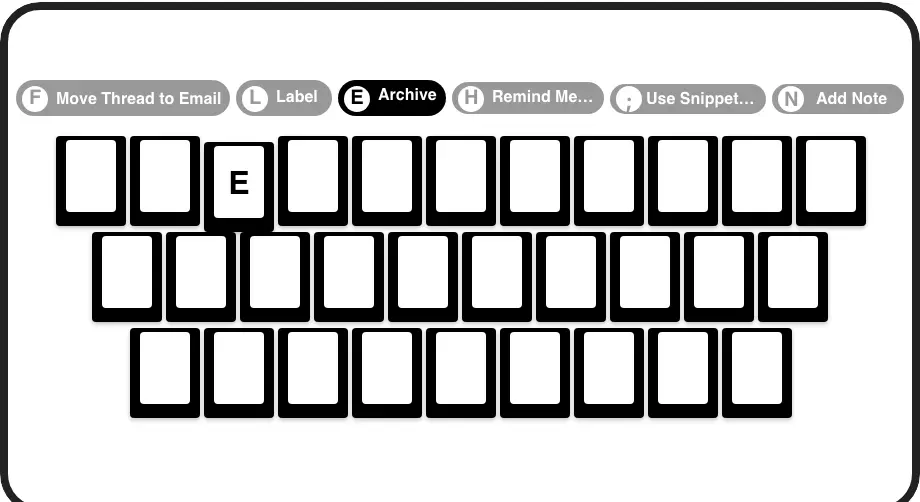
Speed-Boosting Shortcuts
Process your inbox at lightning speed with keyboard shortcuts for every action. Archive, label, set reminders and more with just one keypress.
LinkedIn left your inbox in 2000. Bring it into 2026.
Get the upgrade every power user's been waiting decades for.


More Sales. Less Effort. Zero Missed Leads.
50%
Less time sorting
Zero
Missed hot leads
10hrs
Saved weekly
FAQs
How does Kondo help me triage LinkedIn messages faster?
Kondo speeds up LinkedIn message triage with custom labels, split inboxes, and keyboard shortcuts. You can instantly categorize conversations (e.g., 'Hot Lead'), view them in separate inboxes, and navigate your entire inbox without touching your mouse. This system prevents important messages from getting buried and saves hours of scrolling time.
Is Kondo safe to use with my LinkedIn account?
Yes, Kondo is completely safe. It's a native desktop app that doesn't scrape LinkedIn data, inject code, or automate prohibited LinkedIn actions. Kondo simply provides an enhanced interface for managing your LinkedIn messages while maintaining full compliance with LinkedIn's terms of service.
Can I sync my LinkedIn conversations with my CRM?
Yes, Kondo's Business tier offers CRM & System Sync capabilities. You can connect Kondo to tools like HubSpot, Salesforce (via Zapier/Make), Google Sheets, Notion and more using webhooks or native integrations. This logs your LinkedIn activity and conversation details automatically, saving manual data entry time.
How do reminders work for follow-ups?
Kondo's reminder feature (also called Snooze) lets you set a specific time for a conversation to reappear at the top of your inbox. Simply hit the 'H' shortcut, choose when you want to follow up (tomorrow, next week, or a custom date), and the message disappears until the scheduled time. If the person responds before then, the reminder automatically cancels.
Can I save time on repetitive messages?
Absolutely! Kondo's Snippets feature lets you save frequently used messages as templates that can be quickly inserted with the ';' shortcut. You can include variables like {firstName} for personalization, eliminating repetitive typing. This is perfect for common responses, follow-ups, or introducing yourself to new connections.