
Your LinkedIn Prospecting Tool - Stop Losing Leads Today
Kondo organizes your LinkedIn DMs, ensuring you never miss a lead. Prospecting made easy.
What people say
Is your LinkedIn inbox costing you deals and sanity?
You're battling a cluttered inbox, missing follow-ups, and losing promising sales opportunities daily.
Leads Vanish Daily
Crucial prospect messages (like pricing requests!) get buried in noise. This disorganization costs you time and potential deals.
Follow-ups Forgotten
No easy way to track who needs a reply or when. Promising conversations go cold, impacting your pipeline.
Hours Wasted Sorting
Manually sifting through DMs, copy-pasting to CRMs, and trying to stay organized steals hours from actual selling.
Kondo: Finally, LinkedIn Prospecting Inbox Sanity Achieved.
Organize DMs with labels, set follow-up reminders, and sync to your CRM. Turn LinkedIn chaos into prospecting power.
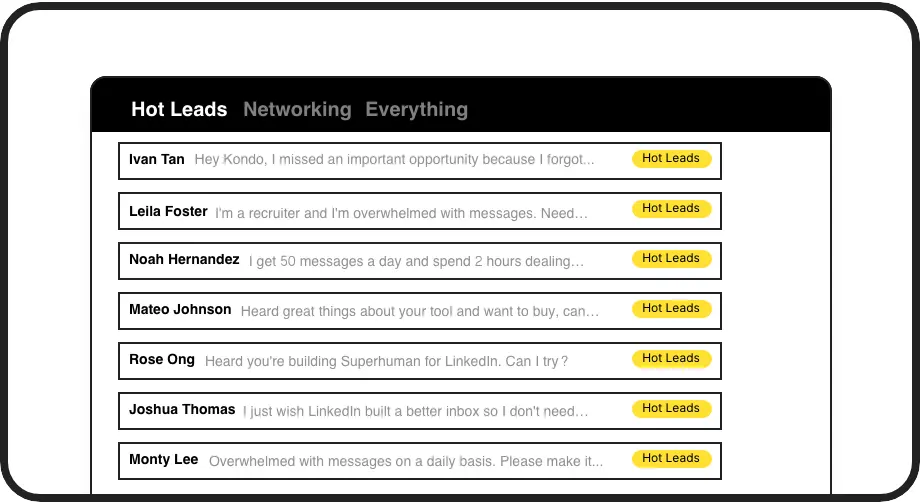
Label & Prioritize Leads
Organize LinkedIn DMs using custom labels like 'Hot Lead' or 'Follow Up Q3'. View them in separate inboxes to focus on high-value prospects and never miss a conversion opportunity.

Never Miss Follow-ups
Snooze conversations and set precise reminders. Kondo brings DMs back to your attention exactly when needed, ensuring timely follow-ups that nurture prospects through your sales funnel.
Log DMs to CRM
Automatically push LinkedIn conversation data, notes, and labels to HubSpot, Salesforce (via Zapier/Make), or Notion. Keep your sales prospecting records complete and visible across your team.
LinkedIn left your inbox in 2000. Bring it into 2026.
Get the upgrade every power user's been waiting decades for.


Close More Deals, Faster from LinkedIn.
5+ hrs
saved per week
30%
more meetings booked
0
hot leads missed
FAQs
How does Kondo help with LinkedIn prospecting?
Kondo transforms your messy LinkedIn inbox into a prospecting powerhouse. Use labels to categorize leads (e.g., 'Hot Prospect', 'Needs Follow-up'), set reminders so you never miss a touchpoint, and use snippets for fast, personalized outreach. This ensures you efficiently manage your pipeline directly within LinkedIn, converting more conversations into opportunities.
Is Kondo safe to use for LinkedIn prospecting?
Yes, Kondo is designed for safety. It doesn't scrape profiles, modify LinkedIn's UI excessively, or perform prohibited automation. It works like a smart layer over your existing LinkedIn, using your browser session and IP. This focuses on organizing *your* DMs, not risky mass outreach, keeping your prospecting efforts secure. Always adhere to LinkedIn's terms of service for outreach volume.
Can Kondo sync my LinkedIn leads to my CRM?
Yes, Kondo's Business tier offers robust integrations. You can sync LinkedIn conversation data, including messages, labels, and notes, to CRMs like HubSpot and Salesforce (via Zapier/Make.com), or tools like Notion and Google Sheets. This automates data entry, keeping your prospect information updated and accessible for your sales team, streamlining your prospecting workflow.
How does Kondo compare to LinkedIn Sales Navigator?
Kondo complements Sales Navigator. While Sales Navigator excels at finding and researching prospects, Kondo supercharges your LinkedIn *messaging* inbox where you engage those prospects. Kondo provides labels, reminders, snippets, and CRM sync for your DMs—features Sales Navigator's inbox lacks. Use them together for a powerful prospecting toolkit: find with Sales Nav, manage communication with Kondo.
How does Kondo help sales teams prioritize high-value LinkedIn prospects?
Kondo's labeling system transforms how sales teams identify and focus on their most promising LinkedIn prospects. Create custom labels like Decision Maker, Budget Holder, or Hot Lead to instantly categorize conversations based on potential value or sales stage. These visual indicators appear directly in your inbox, allowing you to quickly spot high-priority prospects among hundreds of conversations. The system also enables filtering to show only specific prospect categories when you need to focus on particular segments.