
Sales Navigator Tool That Unifies Your Inboxes
Stop losing leads by switching between LinkedIn and Sales Navigator. Kondo combines both inboxes into one streamlined feed so you never miss important messages again.
What people say
Missed Opportunities Cost Sales
LinkedIn's fragmented inbox system creates real challenges for sales professionals:
Divided Attention
Toggling between LinkedIn and Sales Navigator inboxes wastes time and leads to missed messages from potential clients.
Buried Messages
Critical leads get lost under notifications and less important conversations, resulting in delayed responses and lost deals.
Manual Tracking
Without organization tools, managing follow-ups across two platforms becomes overwhelming and error-prone.
One Inbox, Maximum Productivity
Kondo transforms how sales professionals manage LinkedIn communications with powerful tools designed for efficiency:
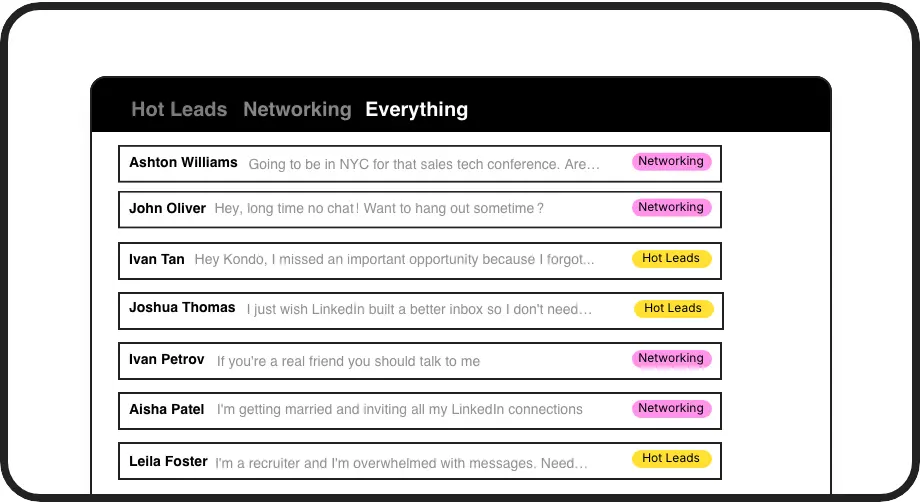
Smart Inbox Organization
Label conversations as 'Hot Lead', 'Client', or 'Prospect' and view them in separate inboxes. Never lose an important lead in the clutter again.
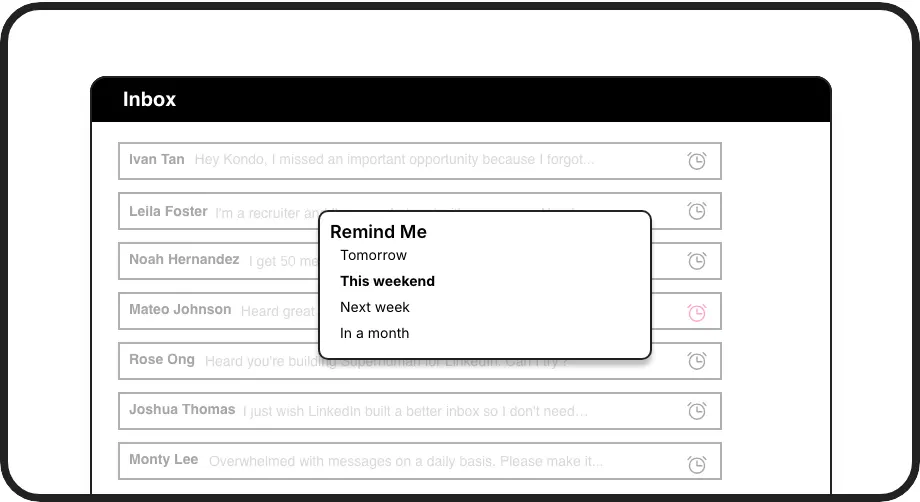
Automated Follow-ups
Set reminders that bring conversations back to the top of your inbox at the perfect time. Ensure timely follow-ups without relying on memory or external tools.
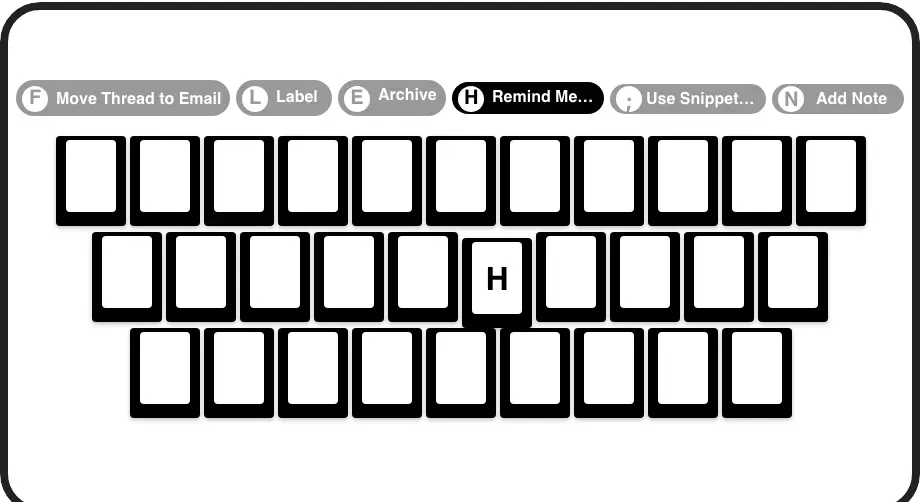
Lightning-Fast Navigation
Process your inbox at record speed with shortcuts for archiving, labeling, and setting reminders. Navigate both LinkedIn and Sales Navigator messages without touching your mouse.
LinkedIn left your inbox in 2000. Bring it into 2026.
Get the upgrade every power user's been waiting decades for.


Save Time, Close More, Miss Nothing
100%
Inbox Visibility
2X
Response Speed
5hrs
Saved Weekly
FAQs
How does Kondo combine LinkedIn and Sales Navigator inboxes?
Kondo creates a unified view of both your regular LinkedIn messages and Sales Navigator conversations in one streamlined interface. This integration requires the Business plan and initial setup by opening your Sales Navigator inbox. Once configured, you can toggle between viewing all messages or specific inbox types using the command palette (Cmd+K).
Is Kondo compliant with LinkedIn's terms of service?
Yes. Kondo is a native desktop application that doesn't scrape data, inject code, or automate prohibited LinkedIn actions. It provides an enhanced interface for your LinkedIn messaging while maintaining compliance with LinkedIn's platform policies.
What kind of professionals benefit most from Kondo?
Kondo is especially valuable for sales professionals who use Sales Navigator alongside regular LinkedIn, including SDRs, account managers, and business development representatives. Recruiters, founders, and consultants who manage high volumes of LinkedIn communications also see significant productivity gains.
How does the labeling system help sales professionals?
Kondo lets you create custom labels like 'Hot Lead', 'Follow-up', or 'Decision Maker' and view these conversations in dedicated inboxes. You can apply multiple labels to create hierarchies (e.g., Lead > Hot) and customize label colors/icons for visual organization, making lead management significantly more efficient.
Can Kondo connect with my CRM system?
Yes, Kondo's Business tier offers CRM & System Sync capabilities. This allows you to push LinkedIn conversation data to external systems like HubSpot, Salesforce (via Zapier/Make), Google Sheets, Notion, and more. You can sync the latest message or entire conversation history, either manually or automatically when updates occur.