
Track Leads in DMs Without Losing Hot Prospects
Organize LinkedIn messages with labels, reminders, and CRM sync to ensure timely follow-ups.
What people say
Missed Opportunities Cost Sales
LinkedIn's native inbox makes tracking leads nearly impossible, resulting in lost deals and wasted time.
Buried Hot Leads
Critical messages from prospects get lost under notifications and networking chats, leading to missed follow-ups.
Manual Follow-ups
Without a system, you waste hours scrolling to find important conversations and tracking who needs a response.
Disorganized Inbox
LinkedIn's one-size-fits-all inbox mixes leads, clients, and casual connections, making prioritization impossible.
Transform How You Track Leads in LinkedIn DMs
Kondo brings structure and speed to your LinkedIn inbox, helping you capture more opportunities with less effort.
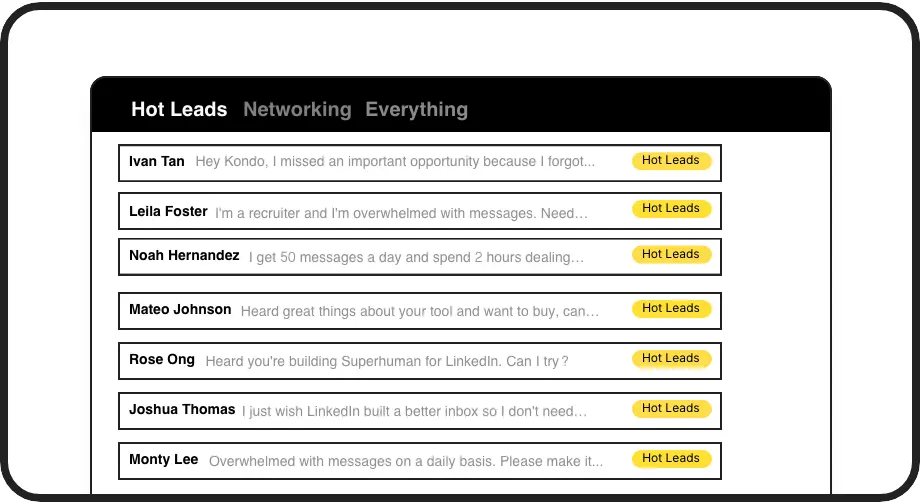
Label Hot Prospects
Categorize conversations with custom labels like 'Hot Lead' and view them in separate inboxes. Never lose an important lead in the clutter again.
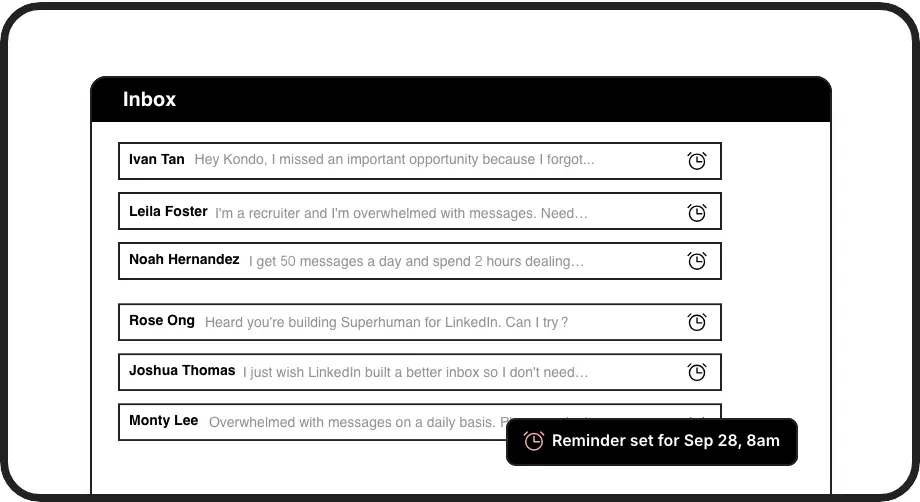
Timely Follow-ups
Set follow-up reminders that bring conversations back to the top of your inbox exactly when needed. No more missed opportunities or manual tracking.
Instant CRM Sync
Push LinkedIn conversation data directly to HubSpot, Salesforce, Notion or Google Sheets. Keep your systems updated without tedious copy-pasting.
LinkedIn left your inbox in 2000. Bring it into 2026.
Get the upgrade every power user's been waiting decades for.


Track, Respond, Convert - All Faster
80%
Fewer missed leads
3x
Faster follow-ups
7hrs
Saved weekly
FAQs
How does Kondo help me track leads in LinkedIn DMs?
Kondo lets you organize conversations with custom labels (like 'Hot Lead'), set follow-up reminders, and view prioritized messages in separate inboxes. This ensures important leads never get buried in your inbox, and you can follow up at exactly the right time without manual tracking.
Can Kondo sync my LinkedIn messages to my CRM?
Yes, Kondo's Business tier includes CRM integration. You can sync your LinkedIn conversations to systems like HubSpot, Salesforce (via Zapier/Make), Google Sheets, Notion, and others using webhooks or native integrations. This eliminates manual data entry and provides visibility into your LinkedIn conversations.
Is Kondo safe to use with my LinkedIn account?
Absolutely. Kondo is a native desktop app that doesn't scrape data, inject code, or automate prohibited LinkedIn actions. It works alongside LinkedIn's official platform while adding organizational capabilities that respect LinkedIn's terms of service.
What features does Kondo offer for sales professionals?
Kondo offers labels for categorizing prospects, reminders for timely follow-ups, keyboard shortcuts for speed, reusable message snippets, and CRM integration. These features help sales professionals organize their DMs, prioritize hot leads, ensure consistent follow-ups, and maintain accurate CRM records.
How does Kondo's reminder feature work?
When you set a reminder (using the 'H' shortcut), the conversation temporarily disappears from your inbox and automatically resurfaces at the top when it's due. The reminder cancels if a new message arrives before the due time, ensuring you never miss following up with leads at the right moment.