
Tag LinkedIn Conversations by Campaign, Never Lose a Lead Again
Organize, prioritize, and track outreach with custom labels and split inboxes for every campaign
What people say
LinkedIn Inbox Chaos
Mixing leads from different campaigns leads to missed opportunities and confused follow-ups.
Lost Campaign Leads
Valuable prospects get buried in your crowded LinkedIn inbox, leading to missed follow-ups and lost deals.
Campaign Confusion
Without proper tagging, it's impossible to track which outreach campaigns are generating quality conversations.
Follow-up Failures
Important leads slip through the cracks when campaigns mix together, resulting in inconsistent response times.
Organize Campaigns, Close More Deals
Kondo transforms your chaotic LinkedIn inbox into a campaign management powerhouse with these essential features:
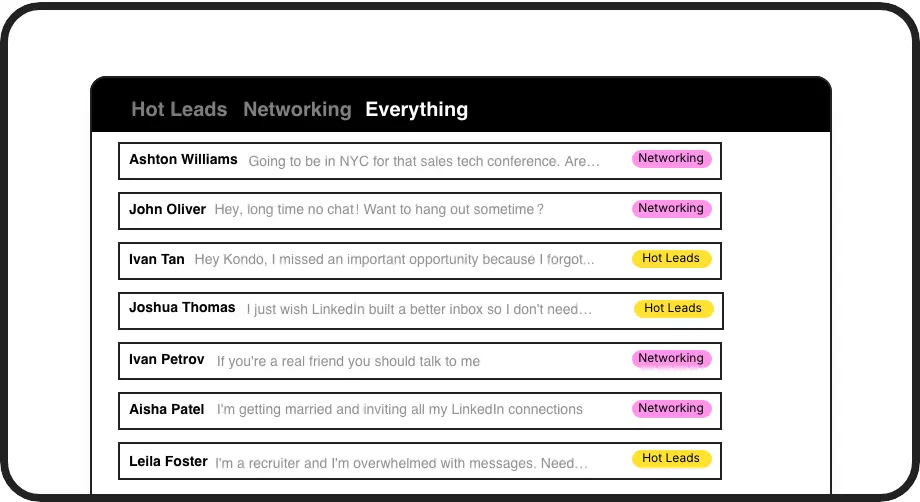
Campaign Tagging System
Label conversations by campaign, lead quality, or stage. Create split inboxes to instantly filter and prioritize hot leads from each campaign.
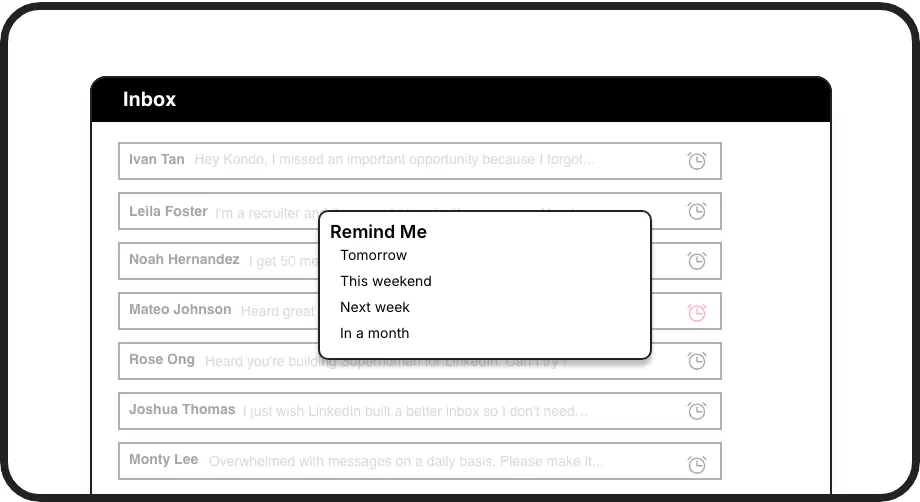
Campaign Follow-ups
Set automated reminders for campaign leads that resurface at the perfect follow-up time. Never let a hot prospect slip through the cracks again.
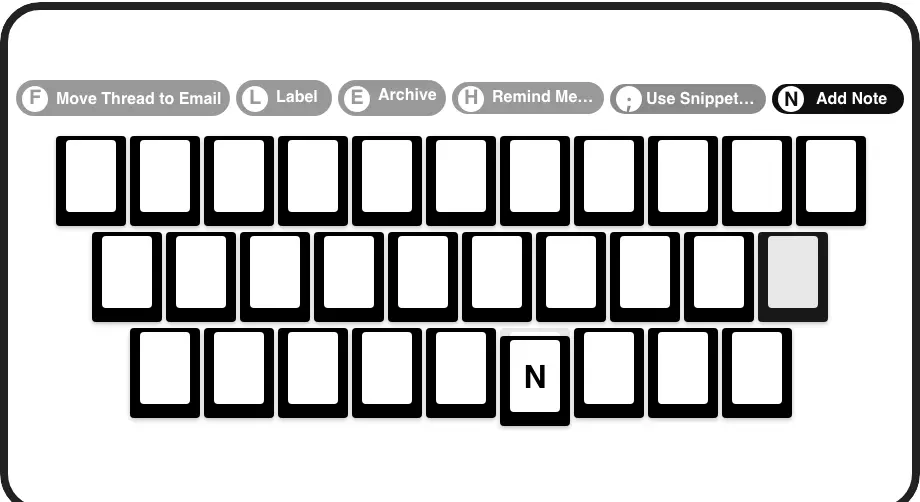
Lightning-Fast Processing
Process campaign messages at 2x speed with keyboard shortcuts. Label, archive, remind, and navigate without lifting your hands from the keyboard.
LinkedIn left your inbox in 2000. Bring it into 2026.
Get the upgrade every power user's been waiting decades for.


Campaign Success, By The Numbers
100%
Campaign Lead Visibility
3x
Faster Follow-ups
Zero
Missed Campaign Leads
FAQs
How does Kondo's campaign tagging work?
Kondo lets you create custom labels for different campaigns (e.g., 'Q3 Email Campaign', 'LinkedIn Ads Leads', 'Webinar Attendees'). With the 'L' keyboard shortcut, you can instantly tag any conversation. These labeled conversations appear in dedicated split inboxes, allowing you to view and manage leads from each campaign separately.
Can I track campaign performance with Kondo?
Yes! By consistently tagging conversations by campaign source, you can visually see which campaigns generate more engagement. For deeper analytics, Business tier users can sync conversation data, including campaign labels, to CRMs like HubSpot or spreadsheets for reporting on campaign performance.
Is Kondo compliant with LinkedIn's terms of service?
Absolutely. Kondo is a native desktop application that works alongside LinkedIn without scraping data or automating prohibited actions. It enhances your workflow while respecting LinkedIn's platform rules and your data security.
Can I use Kondo with multiple team members running the same campaign?
Yes. Each team member can use Kondo on their LinkedIn account with consistent labeling conventions for campaigns. Business tier users can sync conversation data to shared systems like CRMs to maintain visibility across the team's campaign activities.
How much time will I save managing campaign leads with Kondo?
Users report saving several hours weekly by eliminating the need to manually track which conversations came from which campaigns. The combination of labels, split inboxes, reminders, and keyboard shortcuts dramatically speeds up campaign lead management and ensures consistent follow-up.