
Private Notes for LinkedIn Profiles That Convert
Organize LinkedIn conversations with smart labels and private notes directly on profiles. Never lose track of leads or candidates again with Kondo's powerful inbox management.
What people say
LinkedIn Notes Holding You Back?
The native LinkedIn experience makes tracking important conversations nearly impossible:
Buried Important Messages
Critical messages from leads and candidates get lost in cluttered inboxes, resulting in missed opportunities and delayed responses.
Disorganized Profile Notes
Native LinkedIn notes lack context, making it difficult to remember important details about connections and conversations.
Manual Follow-up Tracking
Without a system for tracking follow-ups, important conversations fall through the cracks and lead to lost deals.
Smart Profile Notes & Organized Conversations
Kondo transforms how you manage LinkedIn profiles and conversations with powerful tools designed for professionals:
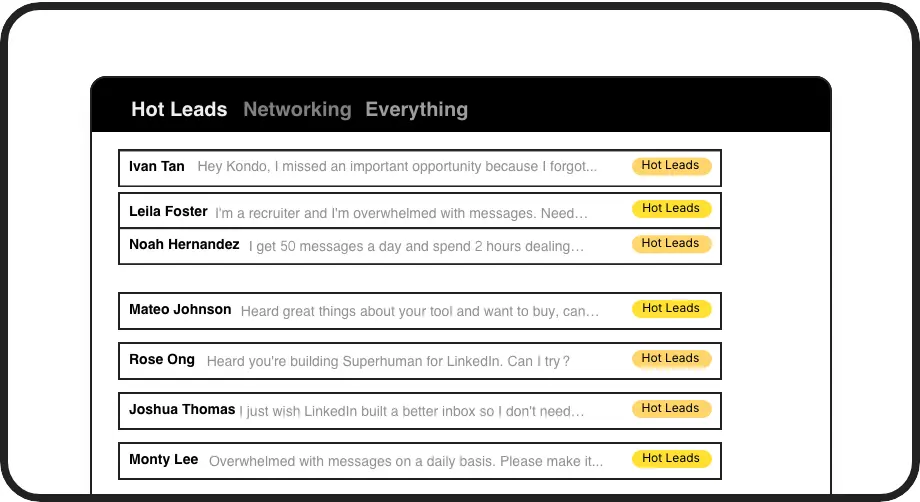
Smart Profile Labels
Add custom labels to conversations (Hot Lead, Candidate, Client) and view them in separate inboxes. Create context for each profile that stays with your conversations.

Profile Follow-ups
Set timed reminders on conversations that bring profiles back to the top of your inbox when it's time to follow up. Never forget to reconnect with important contacts.
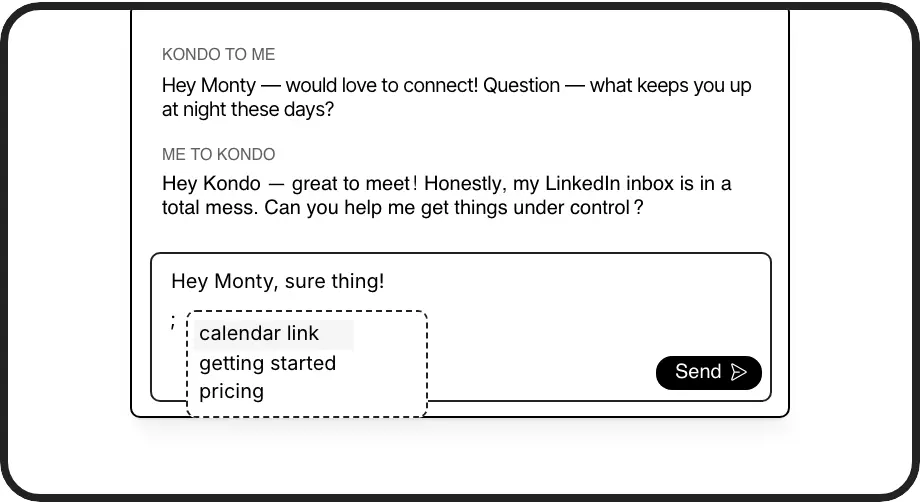
Quick Response Notes
Save common messages as templates with personalized variables like {firstName}. Access your private notes and snippets instantly when communicating with any LinkedIn profile.
LinkedIn left your inbox in 2000. Bring it into 2026.
Get the upgrade every power user's been waiting decades for.


Organize. Track. Convert.
60%
Less Time Sorting
100%
Follow-ups Completed
Zero
Missed Opportunities
FAQs
How are Kondo's private notes different from LinkedIn's native notes?
Kondo's private notes are contextual and directly tied to conversations, unlike LinkedIn's basic profile notes. You can add custom labels that organize profiles into dedicated inboxes, set timed reminders for follow-ups, and access notes right when you need them during conversations.
Can other LinkedIn users see my private notes and labels?
No. All notes, labels, and reminders you create in Kondo are completely private and visible only to you. They're stored securely and never visible to your connections or anyone else on LinkedIn.
How does Kondo help me organize my LinkedIn profiles?
Kondo lets you apply custom labels (like 'Hot Lead' or 'Candidate') to conversations, view them in separate inboxes, set follow-up reminders that resurface conversations at the right time, and save message templates with personalization variables for quick responses.
Is Kondo compliant with LinkedIn's terms of service?
Yes. Kondo is a native desktop application that does not scrape LinkedIn data, inject code, or automate prohibited LinkedIn actions. It works alongside LinkedIn to enhance your experience while respecting platform guidelines.
Can I sync my LinkedIn profile notes to my CRM?
Yes, with Kondo's Business tier. You can sync LinkedIn conversations, labels, and notes to external systems like HubSpot, Salesforce (via Zapier/Make), Notion, Google Sheets, and more. This eliminates manual data entry and keeps your systems in sync.