
Managing LinkedIn Inbox Spam Made Simple
Stop losing opportunities in a cluttered inbox. Kondo helps you label important messages, set follow-up reminders, and process LinkedIn DMs with keyboard shortcuts for maximum productivity.
What people say
Inbox Chaos Costs Opportunities
LinkedIn users face critical challenges when spam drowns out valuable conversations:
Buried Important Messages
Valuable leads and connections get lost under a deluge of irrelevant notifications, leading to missed opportunities.
Follow-Up Failures
Without a system to track conversations, critical follow-ups fall through the cracks, damaging relationships and deals.
Time-Consuming Management
Hours wasted daily sorting through LinkedIn DMs manually, with no way to prioritize or organize important conversations.
Tame Your LinkedIn Inbox With Powerful Tools
Kondo transforms LinkedIn messaging from chaotic to organized with features designed for productivity and focus:
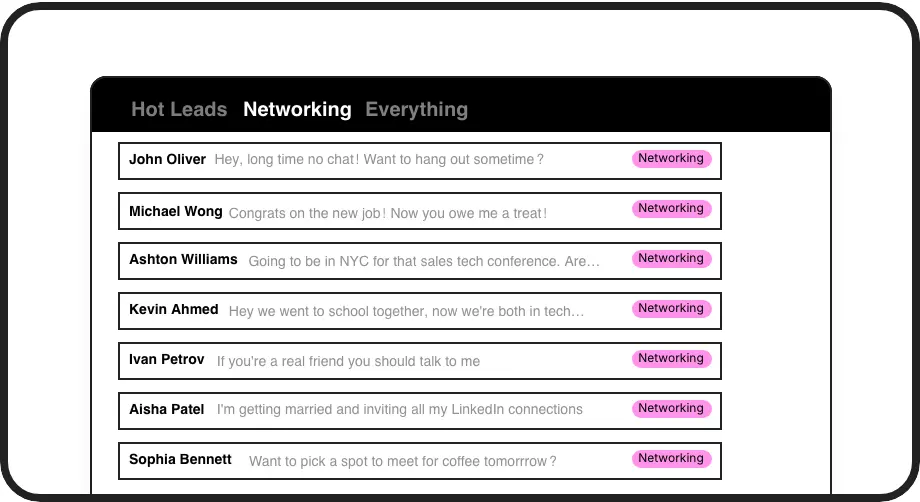
Label & Split Your Inbox
Create custom labels like 'Hot Lead' or 'Candidate' to categorize conversations into separate inboxes. Never lose important messages in the spam again.

Never Miss Follow-ups
Set reminders with one keystroke to make conversations reappear at the top of your inbox exactly when needed. Ensure timely responses without extra tools.
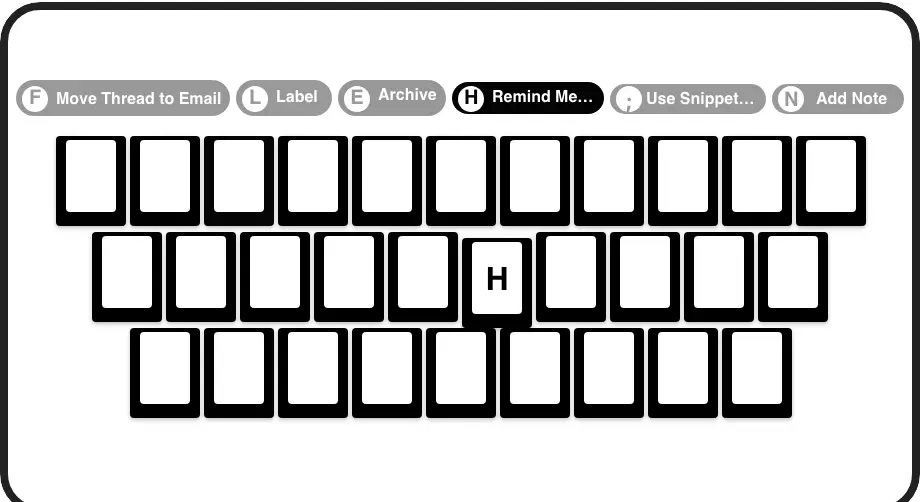
Process DMs Faster
Navigate, archive, set reminders, and apply labels with simple keyboard shortcuts. Process your LinkedIn inbox at lightning speed without touching your mouse.
LinkedIn left your inbox in 2000. Bring it into 2026.
Get the upgrade every power user's been waiting decades for.


Focus on Connections, Not Spam Management
70%
Less Inbox Clutter
Zero
Missed Important Messages
5+ hrs
Saved Weekly
FAQs
How does Kondo help manage spam in my LinkedIn inbox?
Kondo lets you categorize conversations with custom labels and view them in separate inboxes, ensuring important messages don't get buried under spam. You can quickly archive irrelevant messages with keyboard shortcuts and set reminders for follow-ups to keep your inbox organized and focused on what matters.
Can I prioritize certain messages over others in Kondo?
Yes, Kondo's labeling system allows you to prioritize conversations by creating custom labels (like 'Hot Lead' or 'Priority') and viewing them in dedicated inboxes. You can apply multiple labels to create hierarchies and customize label colors/icons for visual prioritization, ensuring important conversations stand out from spam.
Does Kondo work with Sales Navigator messages?
Yes, Kondo combines messages from both your regular LinkedIn inbox and Sales Navigator inbox into a single, unified view. This eliminates the need to switch between separate inboxes and helps ensure no important messages are lost among spam or promotional content.
Is Kondo compliant with LinkedIn's terms of service?
Yes, Kondo is designed as a native desktop app that respects LinkedIn's terms of service. It does not scrape data, inject code, or automate prohibited LinkedIn actions. Kondo simply provides an enhanced interface for managing your LinkedIn communications safely and securely.
Can I integrate Kondo with my CRM system?
Yes, Kondo's Business tier offers CRM & System Sync that allows you to push LinkedIn conversation data to external systems like HubSpot, Salesforce (via Zapier/Make), Google Sheets, or Notion. This helps ensure your LinkedIn communications are documented in your primary systems without manual data entry.