
Manage Referrals Messages on LinkedIn With Zero Missed Opportunities
Label, track, and set reminders for referral messages so top talent never gets lost in your cluttered inbox.
What people say
LinkedIn Inbox Chaos
When referrals get buried in your LinkedIn inbox, you lose valuable candidates and opportunities.
Buried Referrals
Important referral messages disappear under promotional notifications, leading to missed connections with top talent.
Delayed Follow-ups
Without a system to track conversations, follow-ups fall through the cracks, causing candidates to accept offers elsewhere.
Wasted Time
Constantly scrolling through messages to find referrals wastes hours weekly that could be spent on high-value activities.
Transform How You Manage Referrals on LinkedIn
Kondo brings organization and efficiency to your LinkedIn inbox, ensuring referral messages get the attention they deserve.
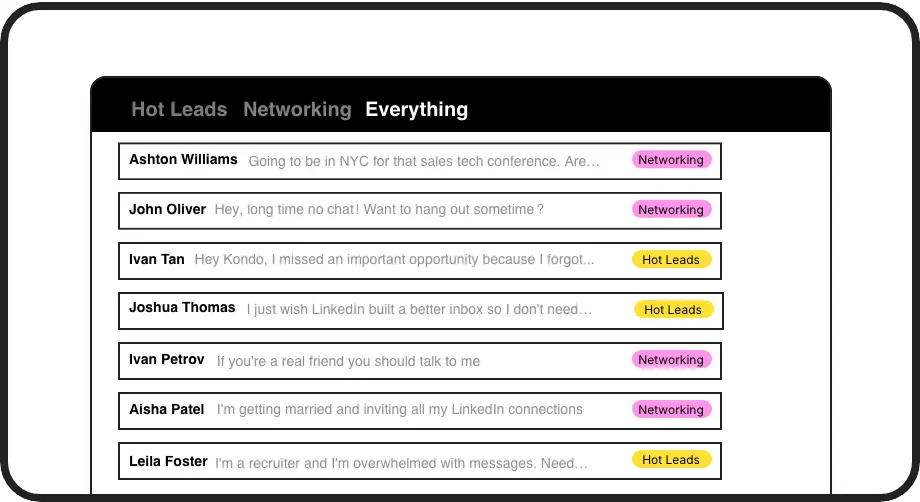
Label & Organize Referrals
Create custom labels for different referral types and view them in separate inboxes. Instantly find all candidates for a specific role without endless scrolling.
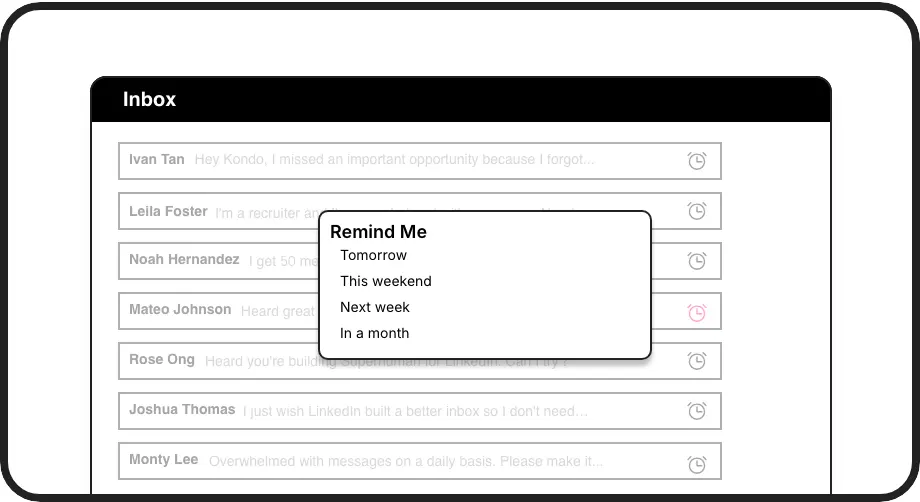
Never Miss Follow-ups
Set follow-up reminders that bring referral messages back to the top of your inbox exactly when needed. No more calendar reminders or forgotten candidates.
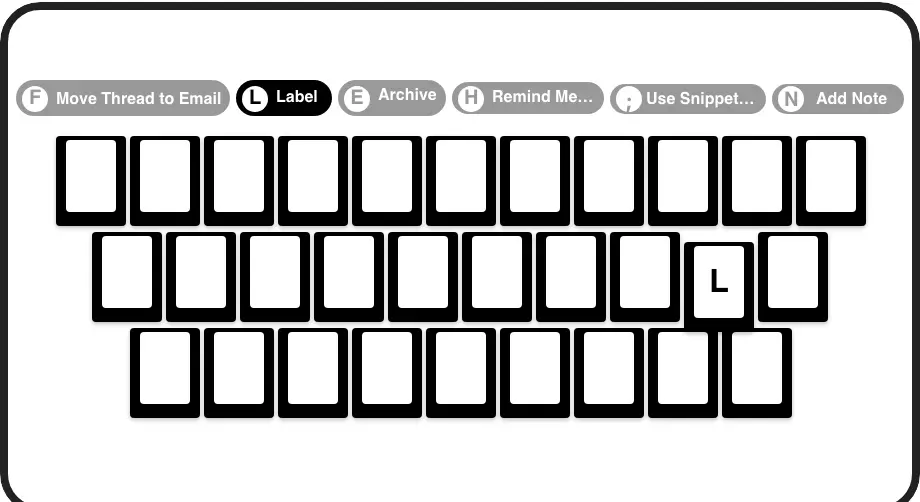
Process Referrals Faster
Navigate, label, and set reminders with simple keyboard shortcuts. Process your referral messages in seconds rather than minutes per conversation.
LinkedIn left your inbox in 2000. Bring it into 2026.
Get the upgrade every power user's been waiting decades for.


More Referrals. Less Chaos. Better Hires.
100%
Referral follow-up rate
5x
Faster message processing
0
Missed referral opportunities
FAQs
How does Kondo help me manage referral messages specifically?
Kondo allows you to create custom labels like 'Referral', 'Hot Candidate', or 'Follow-up Required' to organize referral messages. You can view these in separate inboxes, set timed reminders for follow-ups, and use keyboard shortcuts to quickly process messages. This system ensures referrals never get buried in your general inbox.
Is Kondo safe to use with my LinkedIn account?
Yes, Kondo is completely safe. It's a native desktop application that doesn't scrape LinkedIn, inject code, or automate prohibited actions. Kondo simply provides an enhanced interface for managing your LinkedIn messages while respecting LinkedIn's terms of service.
Can I sync referral data to my recruiting tools or ATS?
Yes, with Kondo's Business tier, you can sync LinkedIn conversation data to external systems via webhooks or integrations with tools like Zapier and Make.com. This works with HubSpot, Salesforce, Google Sheets, Notion, and other platforms, allowing you to log referral conversations automatically.
How do the reminder features work for referral follow-ups?
With Kondo's reminder feature, you can 'snooze' a referral message until a specific time (tomorrow, next week, or a custom date). The message temporarily disappears from your inbox and resurfaces at the top when it's time to follow up. If the candidate replies before your reminder, the reminder automatically cancels.
Can I save template messages for responding to referrals?
Absolutely. Kondo's snippets feature lets you create reusable message templates with variables like {firstName} that automatically personalize your responses. This is perfect for acknowledging referrals, scheduling interviews, or sending follow-up messages, saving you from typing the same responses repeatedly.