
Manage LinkedIn Messages Without An Assistant: Never Miss A Lead
Turn your chaotic LinkedIn inbox into a powerful sales tool with labels, reminders, and keyboard shortcuts.
What people say
LinkedIn Inbox Chaos
Your LinkedIn inbox is where opportunities hide and die, costing you deals and relationships.
Buried Hot Leads
Critical messages from potential clients get lost in the flood of notifications, resulting in missed opportunities.
Manual Follow-ups
Tracking who needs follow-up becomes a full-time job, leading to inconsistent outreach and lost deals.
Inbox Overwhelm
Without organization tools, your productivity plummets as you waste hours searching for important conversations.
Organize Your LinkedIn Inbox Like A Pro
Kondo transforms how you manage LinkedIn messages with powerful tools designed for sales professionals who need speed and organization.
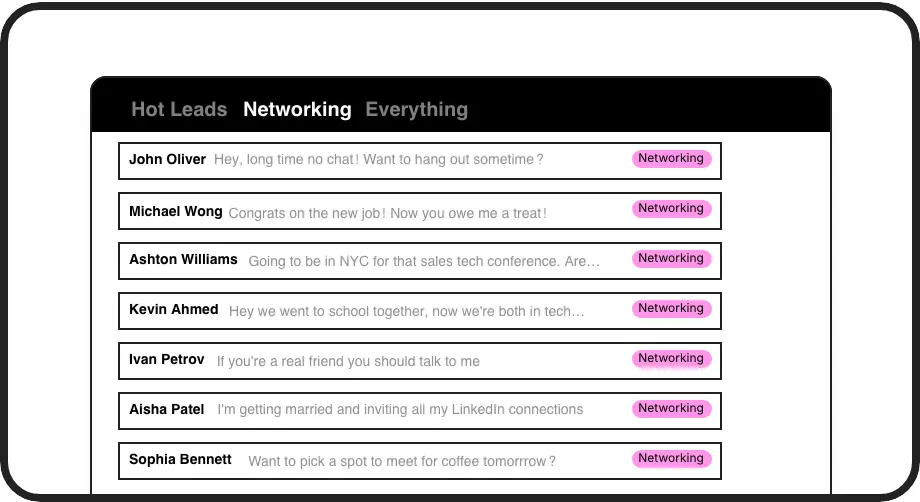
Label & Prioritize
Categorize conversations with custom labels like 'Hot Lead' or 'Client' and view them in separate inboxes so important messages never get buried again.
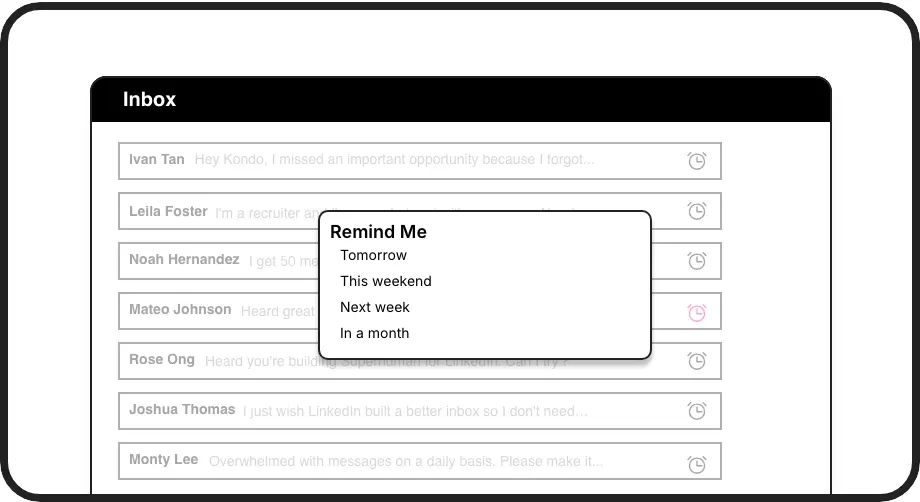
Smart Follow-ups
Set reminders with one keystroke (H) and messages reappear at the top of your inbox exactly when needed, ensuring perfect follow-up timing every time.
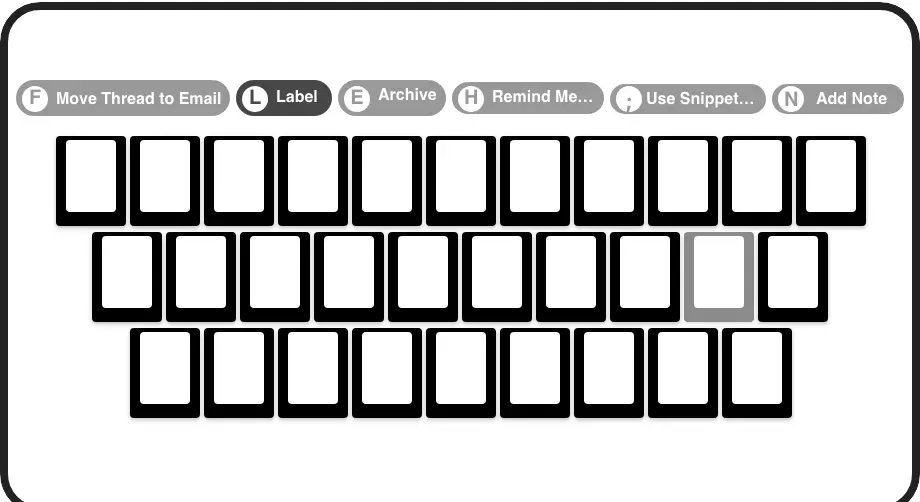
Lightning Speed
Process your inbox at 2x speed with shortcuts for everything - archive messages, set reminders, apply labels, and navigate without touching your mouse.
LinkedIn left your inbox in 2000. Bring it into 2026.
Get the upgrade every power user's been waiting decades for.


More Leads, Less Work, Better Results
70%
Less time managing messages
100%
Follow-ups completed
Zero
Missed lead opportunities
FAQs
How does Kondo help me manage LinkedIn messages without an assistant?
Kondo brings Inbox Zero methodology to LinkedIn with tools that automate manual tasks: labels organize conversations by priority, reminders ensure timely follow-ups, and keyboard shortcuts dramatically speed up inbox processing. These features handle the organizational work an assistant would do, letting you focus on meaningful conversations instead of inbox management.
Is Kondo safe to use with my LinkedIn account?
Yes, Kondo is built as a native desktop app that doesn't scrape, inject code, or automate prohibited LinkedIn actions. It works alongside the LinkedIn platform rather than manipulating it, keeping your account safe and compliant with LinkedIn's terms of service.
How do labels and split inboxes work?
You can create custom labels (e.g., 'Hot Lead', 'Client', 'Candidate') and apply them to conversations using the 'L' shortcut. These labeled conversations appear in dedicated inboxes in your sidebar, allowing you to focus on specific conversation types. You can customize label colors/icons and apply multiple labels to create hierarchical groups.
What happens when I set a reminder for a message?
When you set a reminder (using the 'H' shortcut), the conversation is temporarily archived until the specified time. At the scheduled time, the message automatically reappears at the top of your inbox, ensuring you follow up exactly when intended. If the contact replies before the reminder time, the reminder is automatically canceled.
Can Kondo connect with my CRM system?
Yes, the Business tier offers CRM & System Sync to seamlessly push LinkedIn conversation data to external systems like HubSpot, Salesforce (via Zapier/Make), Google Sheets, or Notion using webhooks or native integrations. This logs your LinkedIn activity automatically, providing crucial visibility and eliminating manual data entry.