
LinkedIn Productivity Tool for SDRs: Never Miss a Hot Lead Again
Transform your cluttered LinkedIn inbox into an organized sales machine with labels, reminders, and shortcuts.
What people say
SDR Inbox Chaos
LinkedIn's native messaging experience is costing you sales opportunities every day.
Buried Hot Leads
Important messages from potential customers get lost in the clutter, resulting in missed sales opportunities.
Forgotten Follow-ups
Without a reliable reminder system, critical follow-up messages fall through the cracks, killing your conversion rate.
Time-Consuming Management
Hours wasted scrolling through unorganized conversations instead of focusing on qualified prospects and closing deals.
Supercharge Your LinkedIn Prospecting Workflow
Kondo brings speed, structure, and organization to your LinkedIn messages so you can focus on what matters: closing deals.
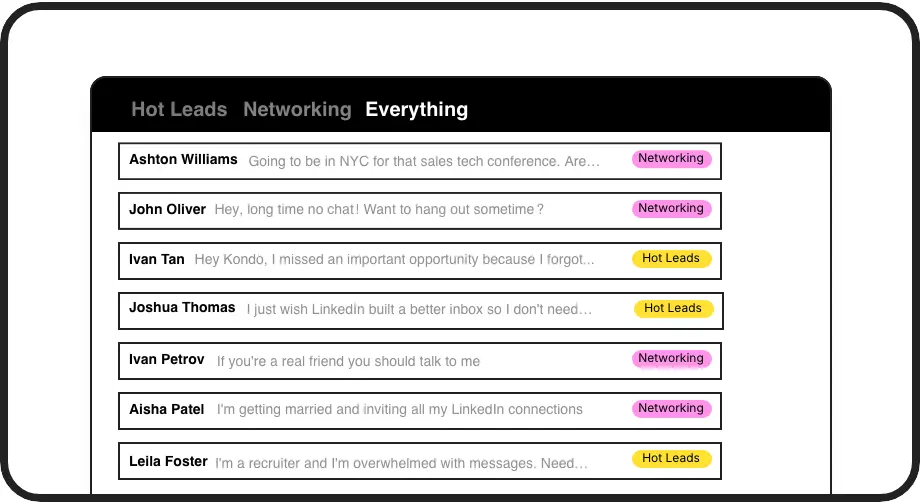
Priority Lead Inbox
Create custom labels like 'Hot Lead' or 'Follow Up' and view conversations in separate, prioritized inboxes. Never lose an important prospect in the clutter again.

Smart Follow-ups
Set reminders with a single keystroke. Messages disappear until the scheduled time, then resurface at the top of your inbox when it's time to follow up.
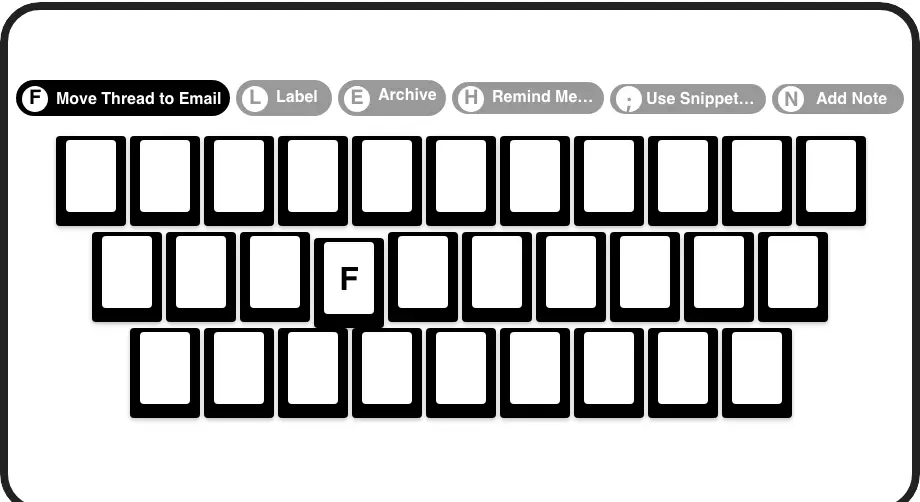
Speed Through DMs
Process your inbox at lightning speed with keyboard shortcuts for everything. Archive, label, remind, and navigate without ever touching your mouse.
LinkedIn left your inbox in 2000. Bring it into 2026.
Get the upgrade every power user's been waiting decades for.


More Leads, Less Chaos, Higher Conversions
3x
Faster inbox processing
100%
Follow-up reliability
0
Missed opportunities
FAQs
Is Kondo safe to use with my LinkedIn account?
Yes, Kondo is completely safe. Our native desktop app doesn't scrape LinkedIn data, inject code, or automate prohibited LinkedIn actions. We prioritize account safety and comply with LinkedIn's terms of service.
How does Kondo help SDRs specifically?
Kondo helps SDRs prioritize hot leads with custom labels, never miss follow-ups with smart reminders, respond quickly with keyboard shortcuts and snippets, and maintain a clean, organized inbox. These tools directly address the challenges of high-volume LinkedIn prospecting.
Can Kondo integrate with my CRM system?
Yes, our Business tier offers CRM integration. You can sync LinkedIn conversations with HubSpot, Salesforce (via Zapier/Make), Google Sheets, Notion, and other systems. This eliminates manual data entry and ensures your CRM has complete visibility of LinkedIn interactions.
How quickly can I get started with Kondo?
Getting started with Kondo takes just minutes. Download the desktop app, connect your LinkedIn account, and immediately begin organizing your inbox with labels, reminders, and shortcuts. There's no complex setup or lengthy onboarding process.
Can I use message templates for outreach?
Absolutely! Kondo's Snippets feature allows you to save and reuse message templates with a simple keyboard command (;). You can include variables like {firstName} for personalization, saving time while maintaining a personal touch in your outreach.