
LinkedIn Productivity Tool That Helps Freelancers Win More Clients
Stop losing opportunities in your cluttered LinkedIn inbox with Kondo's labels, reminders, and shortcuts.
What people say
Freelancer Inbox Chaos
LinkedIn's native inbox makes it easy to miss critical client messages, costing you valuable business opportunities.
Missed Opportunities
Important client messages get buried under notifications and low-priority chats, causing missed business opportunities.
Delayed Responses
Without a system to prioritize messages, you respond too late to potential clients who have already hired someone else.
Wasted Time
Hours spent scrolling through unorganized conversations trying to find important messages from prospects and clients.
Freelancer-Focused LinkedIn Tools
Transform your LinkedIn inbox into a client acquisition powerhouse with features designed specifically for freelancers.
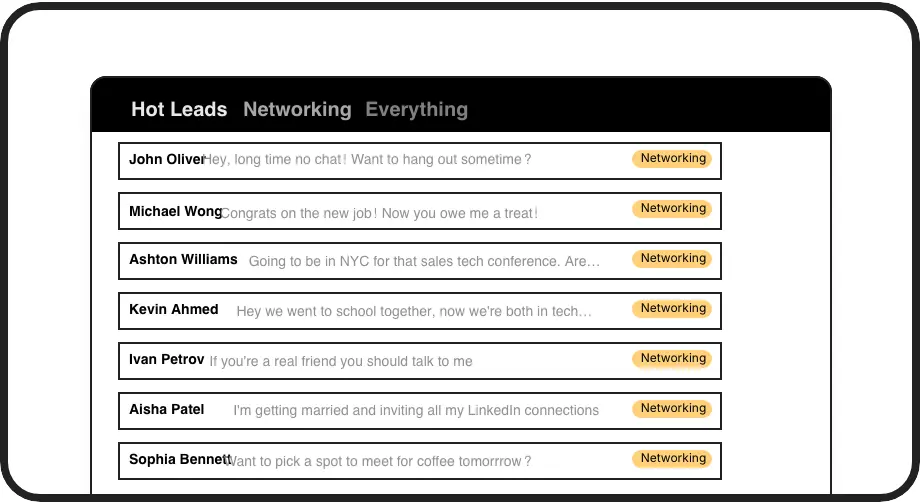
Custom Client Labels
Categorize conversations with labels like 'Hot Lead' or 'Active Client' and view them in separate inboxes, ensuring potential clients never get lost in the clutter.
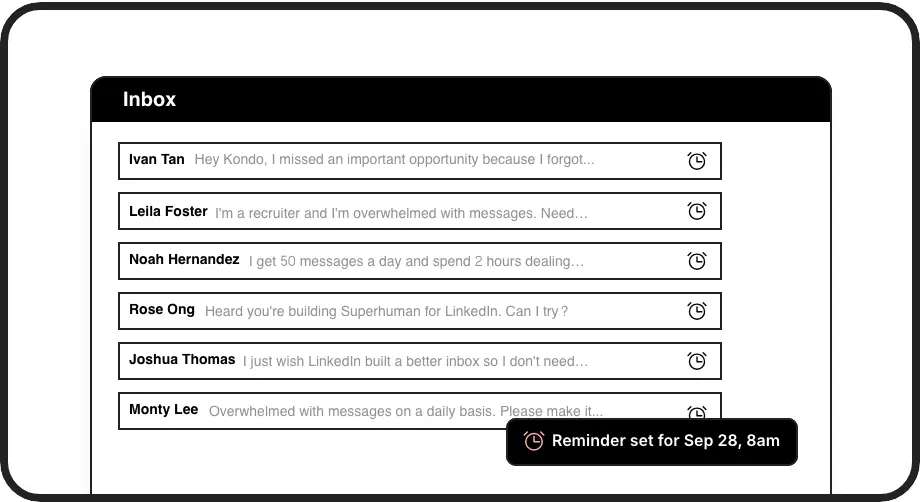
Smart Follow-ups
Set reminders that bring conversations back to the top of your inbox at the perfect follow-up time, ensuring you never drop the ball with potential clients.
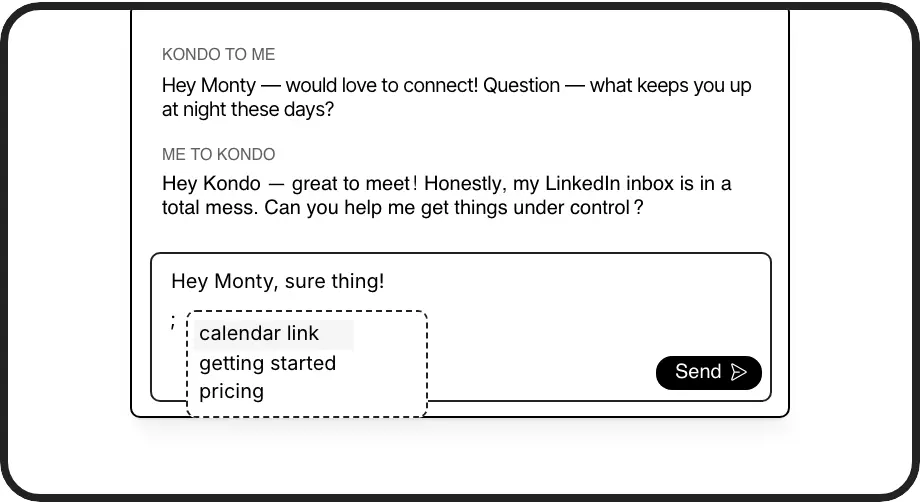
Quick Response Templates
Save frequently used proposals, pricing details, and availability responses as snippets with auto-filled name variables, responding to clients faster and more consistently.
LinkedIn left your inbox in 2000. Bring it into 2026.
Get the upgrade every power user's been waiting decades for.


Win More Clients, Save Time, Stay Organized
50%
Less Time Managing
100%
Follow-ups Completed
Zero
Missed Opportunities
FAQs
How does Kondo help freelancers specifically?
Kondo helps freelancers by organizing LinkedIn conversations with custom labels like 'Potential Client' or 'Active Project,' setting follow-up reminders to ensure timely responses, and providing message templates for consistent client communication. These features ensure you never miss client opportunities and can manage multiple conversations efficiently.
Is Kondo safe to use with my LinkedIn account?
Yes, Kondo is completely safe. It's a native desktop app that doesn't scrape data, inject code, or automate prohibited LinkedIn actions. Kondo works alongside LinkedIn's official functionality while enhancing your experience with additional organizational tools.
How do the reminder features work?
Kondo's reminder feature lets you 'snooze' conversations until you need to follow up. Simply press 'H' and select when you want the conversation to reappear at the top of your inbox. You can choose preset times (tomorrow, weekend, next week) or set custom dates. If the client responds before your reminder, the reminder automatically cancels.
Can I use Kondo with my existing client management system?
Yes, Kondo's Business Tier offers integration with popular CRM and productivity tools through webhooks, Zapier, and Make.com. It offers native integrations with HubSpot, Notion, Google Sheets, and more. This allows you to sync your LinkedIn conversations with your existing client management systems.
How do message snippets save freelancers time?
Kondo's snippets feature lets you save frequently used messages like project proposals, pricing information, or availability updates as templates. These can include variables like {firstName} for personalization. Insert any snippet with the ';' shortcut, eliminating repetitive typing while maintaining a personal touch in your client communications.