
LinkedIn Productivity Tool for Consultants: Organize Your Inbox
Stop losing clients in a chaotic inbox. Label conversations, set reminders, and speed up follow-ups.
What people say
LinkedIn Chaos Costs You
As a consultant, your LinkedIn inbox is overwhelming your productivity and costing you opportunities.
Missed Opportunities
Important client messages get buried under notifications, causing delayed responses and lost business.
Follow-up Failures
Without a system, you forget to follow up with promising leads, letting potential clients slip away.
Wasted Time
Hours spent searching for conversations and retyping the same responses drain your billable time.
Superhuman Productivity for LinkedIn Consultants
Transform your chaotic LinkedIn inbox into a streamlined communication hub with these powerful tools.
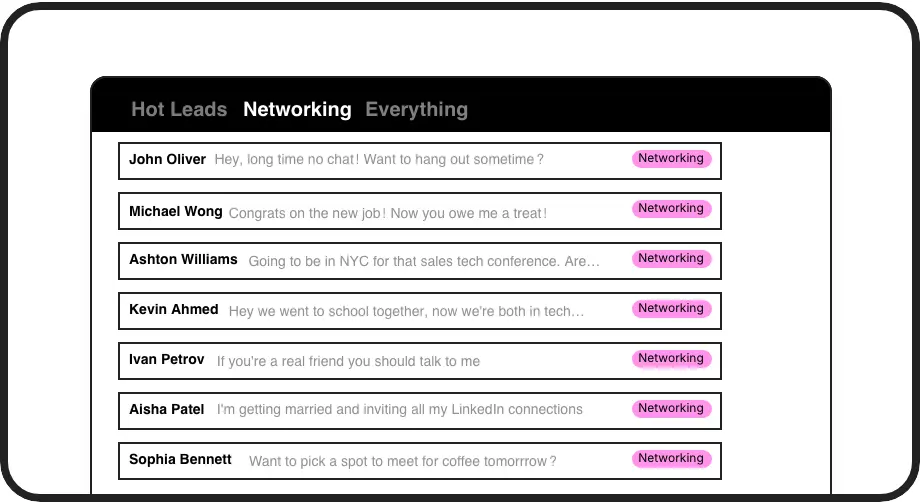
Organized Conversations
Categorize messages with custom labels like 'Hot Lead' or 'Client' and view them in separate inboxes. Never lose an important conversation in the clutter again.
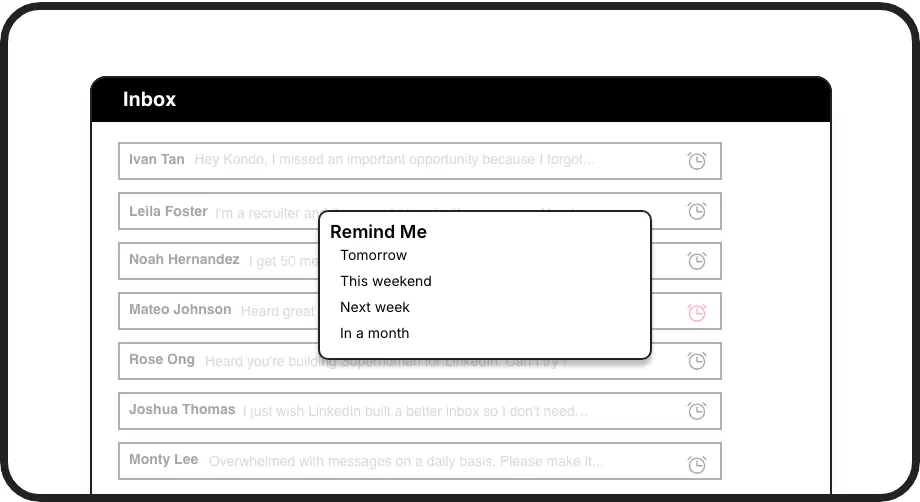
Perfect Follow-ups
Set reminders that bring conversations back to your inbox exactly when needed. Messages resurface automatically, ensuring no follow-up opportunity is missed.
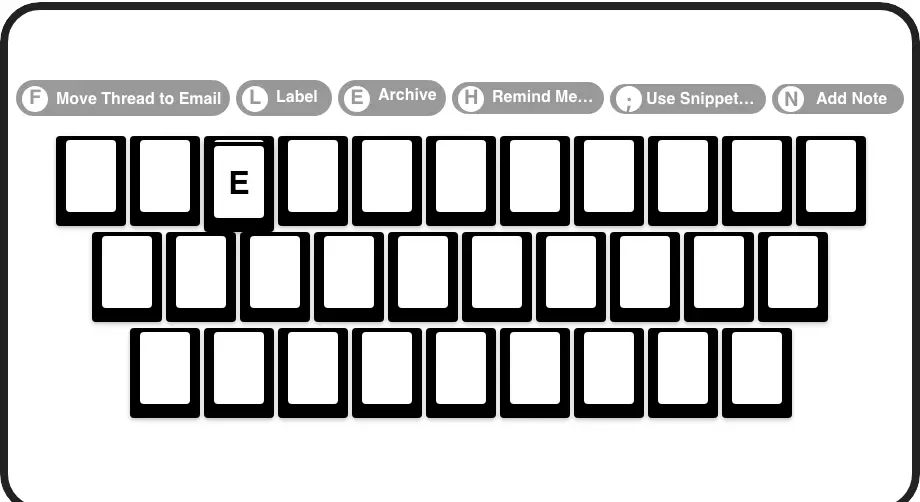
Lightning Speed
Process your inbox at 2x speed with shortcuts for archiving (E), setting reminders (H), applying labels (L), and more. Navigate without touching your mouse.
LinkedIn left your inbox in 2000. Bring it into 2026.
Get the upgrade every power user's been waiting decades for.


Save Time, Win Clients, Boost Revenue
70%
Less inbox management
Zero
Missed client messages
5+ hours
Saved weekly
FAQs
How is Kondo different from the standard LinkedIn inbox?
Kondo adds organization tools missing from LinkedIn's native interface: custom labels with split inboxes, follow-up reminders that resurface conversations automatically, keyboard shortcuts for speed, message templates with variables, and more. It's designed specifically to help consultants manage high-value client communications efficiently.
Is Kondo safe to use with my LinkedIn account?
Yes. Kondo is a native desktop app that doesn't scrape LinkedIn, inject code, or automate prohibited actions. It works alongside LinkedIn's official interface to enhance your productivity while respecting LinkedIn's terms of service.
Can I integrate Kondo with my existing systems?
Yes. Kondo's Business tier includes CRM & System Sync capabilities that connect with tools like HubSpot, Salesforce (via Zapier/Make), Google Sheets, Notion, and more through webhooks or native integrations. This allows you to log LinkedIn activity without manual data entry.
How can Kondo help me follow up with potential clients?
Kondo's reminder feature lets you set specific times for conversations to resurface at the top of your inbox. When the reminder time arrives, the conversation automatically reappears, ensuring you never forget to follow up with important prospects. Reminders cancel if a new message arrives before the due time.
Can I use Kondo to save time on repetitive messages?
Absolutely. Kondo's Snippets feature lets you save frequently used messages as templates that can be quickly inserted into replies using the ';' shortcut. Templates can include variables like {firstName} for personalization, eliminating repetitive typing while maintaining a personal touch.