
LinkedIn Inbox Enhancer: Never Miss Hot Leads Again
Organize your chaotic LinkedIn DMs with labels, reminders, and shortcuts to close more deals.
What people say
Drowning in LinkedIn DMs?
Your most valuable opportunities are getting buried in a sea of messages.
Missed Opportunities
Hot leads and important messages get lost in cluttered inboxes, costing you valuable deals and connections.
Slow Response Times
Without proper organization, response delays frustrate prospects and damage your professional reputation.
Wasted Time
Manually sorting through LinkedIn messages consumes hours that could be spent on high-value activities.
Transform Your LinkedIn Inbox Experience
Kondo brings structure, speed, and organization to your LinkedIn messages with powerful tools designed for busy professionals.
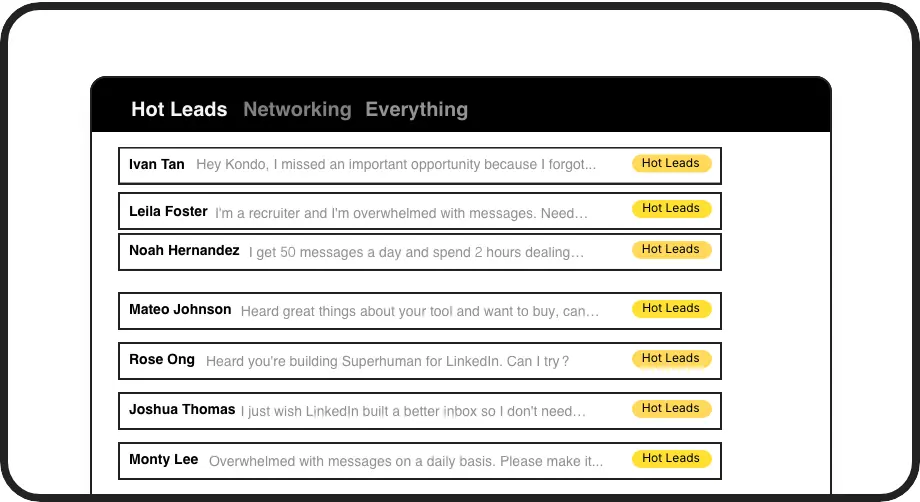
Smart Message Labels
Create custom labels (Hot Lead, Client, Candidate) and view conversations in separate inboxes. Never lose important messages in the clutter again.

Follow-up Reminders
Set reminders with one keystroke and messages reappear when it's time to follow up. Perfect for nurturing leads through long sales cycles.
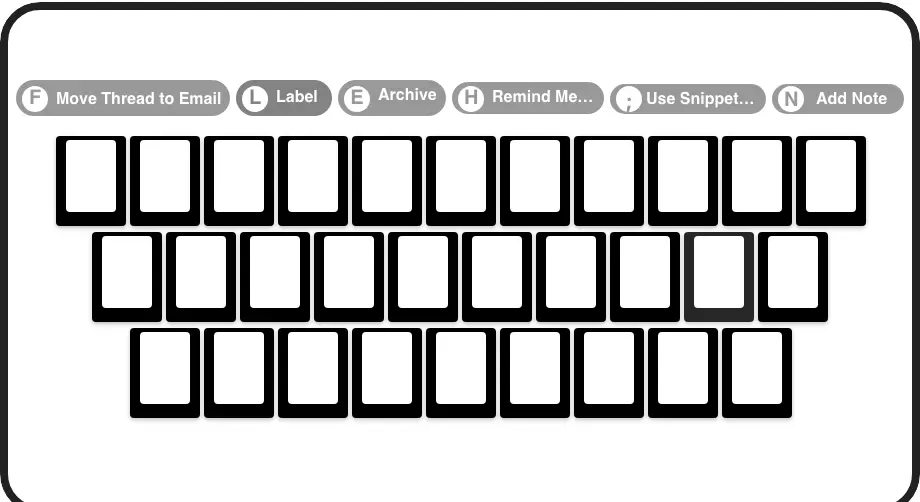
Lightning Fast Shortcuts
Process messages at superhuman speed with keyboard shortcuts for archiving, labeling, reminders, and more. No more time-consuming clicking.
LinkedIn left your inbox in 2000. Bring it into 2026.
Get the upgrade every power user's been waiting decades for.


More Deals, Less Effort, Zero Missed Opportunities
50%
Less inbox time
100%
Follow-ups completed
Zero
Missed hot leads
FAQs
Is Kondo safe to use with my LinkedIn account?
Yes, Kondo is completely safe. Our native desktop app doesn't scrape LinkedIn data, inject code, or automate prohibited LinkedIn actions. We prioritize security and compliance with LinkedIn's terms of service.
How does Kondo help me manage sales leads?
Kondo lets you label conversations as 'Hot Lead', set follow-up reminders, and use snippets for quick responses. This ensures no lead falls through the cracks, you follow up at the perfect time, and maintain consistent messaging—all while saving hours of manual organization.
Can I integrate Kondo with my existing CRM?
Yes, Kondo's Business tier offers CRM integration with HubSpot, Salesforce (via Zapier/Make), Notion, Google Sheets, and other systems. This allows you to automatically sync LinkedIn conversations, eliminating manual data entry and ensuring your CRM always has the latest interaction data.
What makes Kondo different from LinkedIn's native inbox?
Kondo adds essential productivity features missing from LinkedIn: custom labels and split inboxes, follow-up reminders, keyboard shortcuts, message snippets, and desktop voice notes. It transforms the chaotic LinkedIn inbox into a streamlined communication hub focused on helping you never miss opportunities.
How quickly can I get started with Kondo?
You can start using Kondo immediately after installation. The intuitive interface and keyboard shortcuts are designed to feel natural from day one. Most users report significant time savings and improved organization within their first week of use.