
LinkedIn Cold Message Templates That Get Replies
Stop using generic scripts. Create personalized templates with Kondo's snippets for truly tailored outreach that converts.
What people say
Cold Outreach Challenges
Generic LinkedIn messages get ignored. Personalization at scale is nearly impossible with the native inbox.
Low Response Rates
Generic templates blend in with hundreds of other messages, leading to ignored outreach and lost opportunities.
Time-Consuming Process
Personalizing each message manually takes hours, making it impossible to scale your outreach effectively.
Missed Follow-ups
Critical conversations get buried in your LinkedIn inbox, resulting in dropped leads and missed connections.
Personalized Templates That Scale
Kondo transforms your LinkedIn outreach with powerful tools designed for high-converting cold messages that stand out.
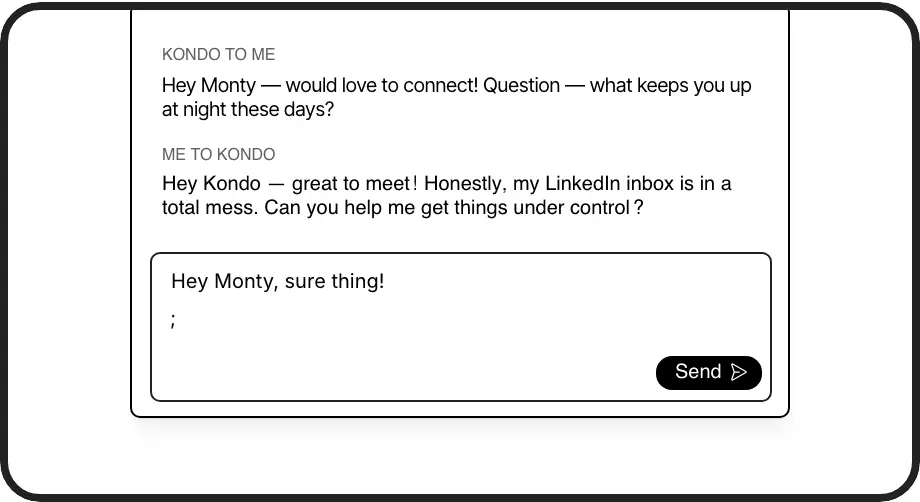
Smart Message Templates
Create reusable templates with variables like {firstName} that auto-personalize each message. Save hours while maintaining a personal touch in every outreach.
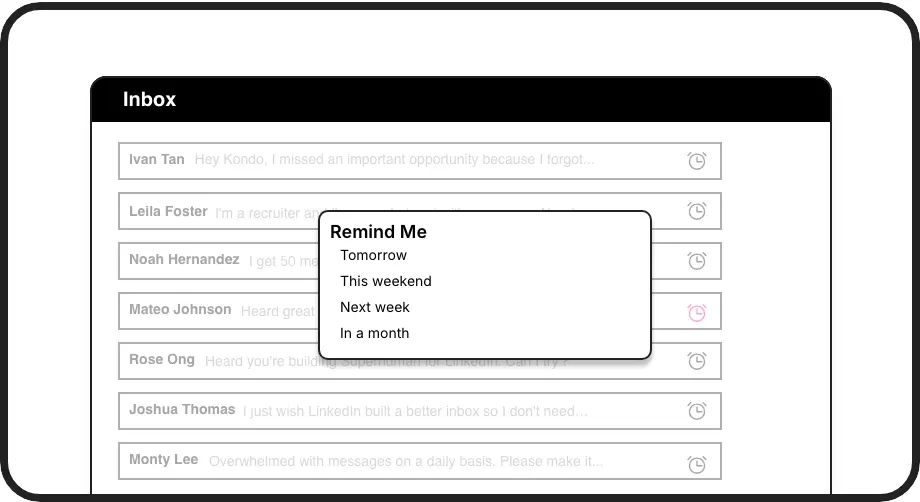
Perfect Follow-ups
Set timed reminders that bring conversations back to the top of your inbox. Never miss a follow-up opportunity with prospects who don't respond immediately.
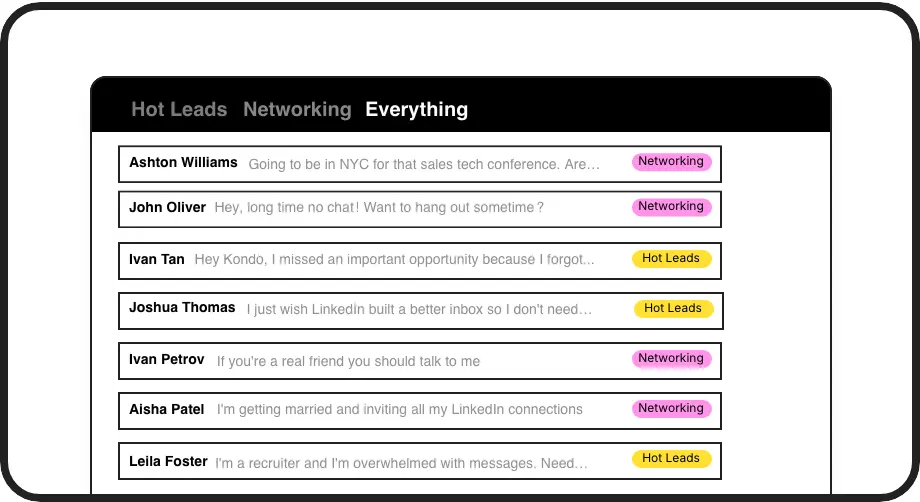
Organized Outreach
Label and organize prospects by priority, campaign, or stage. Filter conversations into separate inboxes so hot opportunities never get lost in the clutter.
LinkedIn left your inbox in 2000. Bring it into 2026.
Get the upgrade every power user's been waiting decades for.


More Replies, Less Work, Better Results
60%
Higher response rates
5hrs
Saved weekly
100%
Follow-ups nailed
FAQs
How do Kondo's snippets improve my LinkedIn cold messages?
Kondo's snippets let you save and reuse personalized message templates with variables like {firstName} that automatically fill in recipient details. This ensures each cold message feels tailored yet takes seconds to send. You can create different templates for various outreach scenarios while maintaining consistency in your messaging.
Can I track which cold message templates perform best?
Yes! With Kondo's labeling system, you can categorize conversations by template used, making it easy to see which messages get the most replies. This organized approach helps you refine your outreach strategy by clearly showing which templates convert best.
How does Kondo help me follow up on cold messages?
Kondo's reminder feature lets you set follow-up times for any conversation. When the reminder is due, the conversation automatically resurfaces at the top of your inbox. This ensures you never forget to follow up with promising leads, significantly improving your conversion rates.
Is Kondo safe to use with my LinkedIn account?
Absolutely. Kondo is a native desktop app that doesn't scrape LinkedIn or inject code. It doesn't automate prohibited actions on LinkedIn, keeping your account completely safe while enhancing your messaging capabilities.
How quickly can I start using message templates in Kondo?
You can start using Kondo's snippets immediately after installation. Simply create your first template, add personalization variables where needed, and insert them into messages using the ';' shortcut. Most users are creating effective personalized outreach within minutes of setup.