
LinkedIn Automation Chrome Extension for Sales Teams to Hit Quota
Automate tedious LinkedIn DM tasks with snippets, reminders, and organization to never miss a lead again.
What people say
LinkedIn DM Chaos
Sales reps waste hours managing LinkedIn messages, leading to missed opportunities and quota failures.
Buried Hot Leads
Critical messages from potential clients get lost in cluttered inboxes, resulting in missed opportunities and lost revenue.
Forgotten Follow-ups
Without systematic reminders, important follow-up messages slip through the cracks, derailing your sales cadence.
Repetitive Typing
Rewriting the same outreach messages and responses wastes valuable time that could be spent closing deals.
Superhuman for LinkedIn DMs
Kondo transforms your cluttered LinkedIn inbox into a streamlined sales tool with productivity features designed for quota-hitting SDRs.
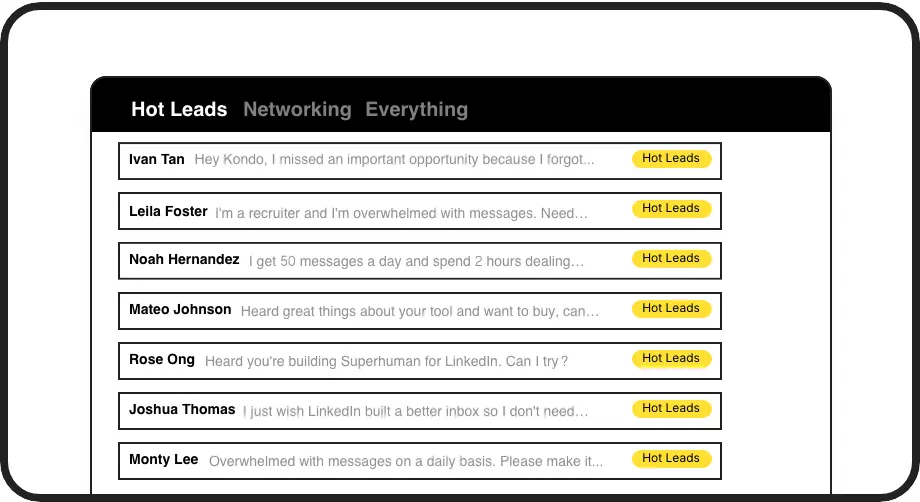
Organize Hot Leads
Label conversations and view them in separate inboxes for easy prioritization. Instantly spot hot opportunities without scrolling through notification clutter.

Never Miss Follow-ups
Set reminders with one keystroke and have conversations reappear at the top of your inbox exactly when needed. Perfect your follow-up timing without extra tools.
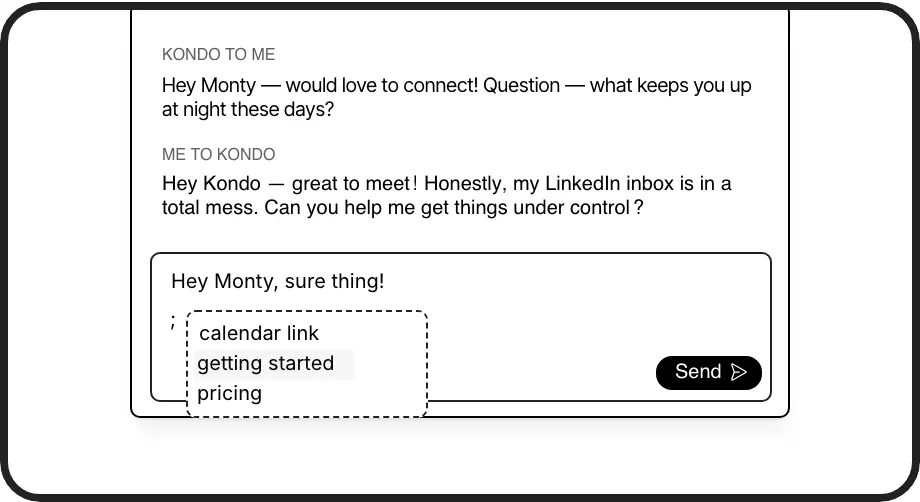
Instant Message Templates
Save common messages as snippets that auto-fill prospect names and details. Send personalized outreach in seconds instead of minutes per message.
LinkedIn left your inbox in 2000. Bring it into 2026.
Get the upgrade every power user's been waiting decades for.


More Leads. Less Work. Higher Quota.
60%
faster DM processing
Zero
missed opportunities
5hrs
saved weekly
FAQs
Is Kondo safe to use with LinkedIn?
Yes, Kondo is completely safe. Unlike other automation tools, Kondo doesn't scrape data or inject code into LinkedIn. It's a native desktop app that works alongside LinkedIn, focusing on organizing and enhancing your messaging experience without violating LinkedIn's terms of service.
What makes Kondo different from other LinkedIn automation tools?
Kondo focuses specifically on inbox management and messaging productivity rather than automated connection requests or mass messaging. It brings proven inbox management concepts (labels, reminders, snippets) to LinkedIn DMs, helping you stay organized and efficient without risking your account with prohibited automation.
Can Kondo sync with my CRM system?
Yes, with Kondo's Business tier, you can integrate with HubSpot, Salesforce (via Zapier/Make), Google Sheets, Notion, and other systems. This allows you to automatically push LinkedIn conversation data, labels, and notes to your CRM, eliminating manual data entry and ensuring your systems have visibility into LinkedIn activities.
How do keyboard shortcuts help with LinkedIn automation?
Kondo's keyboard shortcuts dramatically speed up inbox management. You can navigate (J/K), archive (E), set reminders (H), apply labels (L), view profiles (I), and insert message templates (;) all without touching your mouse. This allows you to process your LinkedIn inbox in a fraction of the time compared to the native interface.
Will Kondo help me follow up with leads on time?
Absolutely. Kondo's reminder feature lets you set specific times for conversations to resurface at the top of your inbox. Just hit 'H' and select when you want to follow up. The message disappears until it's time to act, ensuring you never forget important follow-ups without cluttering your inbox or relying on external reminder tools.