
LinkedIn Inbox Browser Extension That Saves Deals & Time
Transform your cluttered LinkedIn messages into an organized hub with labels, reminders, and shortcuts.
What people say
LinkedIn DM Chaos
Your LinkedIn inbox is costing you opportunities every day.
Buried Hot Leads
Important messages get lost in notification clutter, leading to missed sales opportunities and revenue loss.
Manual Follow-ups
No built-in reminder system means forgotten conversations and dropped leads in your sales pipeline.
Slow Processing
Click-heavy inbox navigation wastes hours weekly, reducing your prospecting time and sales efficiency.
Transform Your LinkedIn Inbox Experience
Kondo brings speed, organization, and reliability to your LinkedIn messages so you never miss an opportunity again.
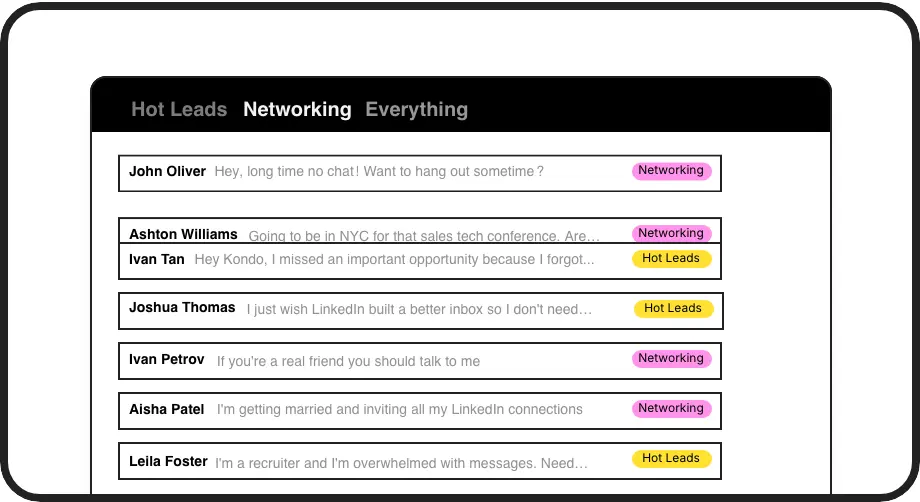
Label & Prioritize Leads
Categorize conversations with custom labels like 'Hot Lead' and view them in separate inboxes. Instantly spot high-value opportunities without endless scrolling.
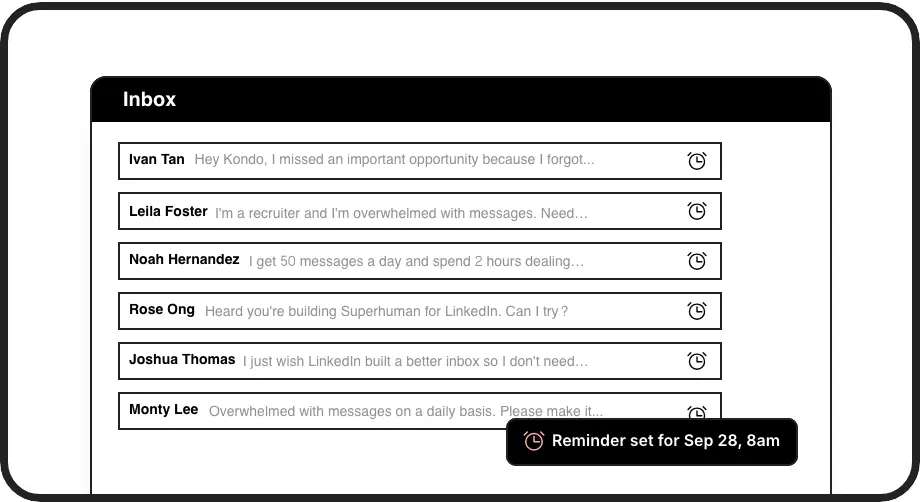
Never Miss Follow-ups
Set follow-up reminders that bring important conversations back to the top of your inbox exactly when needed. Perfect for nurturing leads through your sales cycle.
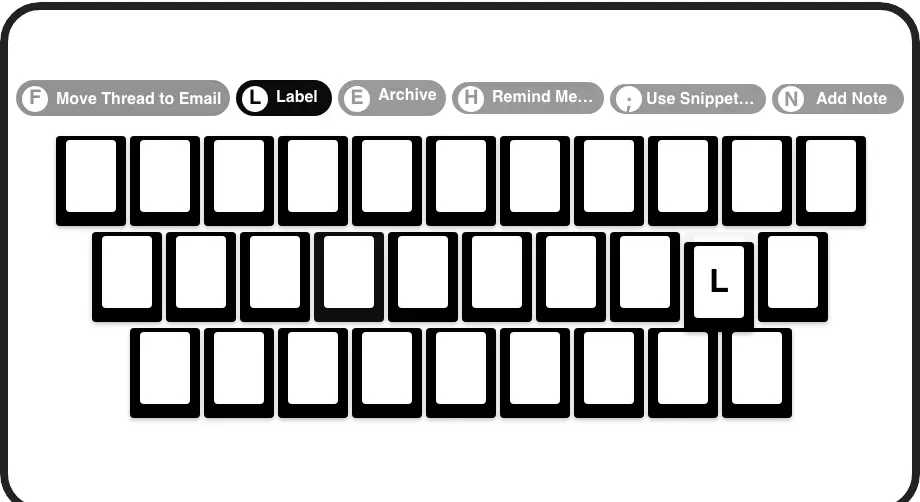
Speed Through Messages
Process your inbox at lightning speed with keyboard shortcuts for everything. Archive, remind, label, and more with just one keypress - no more endless clicking.
LinkedIn left your inbox in 2000. Bring it into 2026.
Get the upgrade every power user's been waiting decades for.


More Deals, Less Stress, Zero Missed Opportunities
50%
Less Time Sorting
100%
Follow-ups Completed
0
Hot Leads Missed
FAQs
How does Kondo's browser extension work with LinkedIn?
Kondo works as a native desktop app that enhances your LinkedIn messaging experience. It adds organizational features like labels, reminders, and shortcuts directly to your LinkedIn inbox without scraping data or injecting code, ensuring complete safety and compliance with LinkedIn's terms.
Will using Kondo put my LinkedIn account at risk?
No. Kondo is designed with safety as a priority. Unlike some browser extensions, Kondo doesn't scrape data, inject code, or automate prohibited actions on LinkedIn. It works alongside LinkedIn's official functionality to enhance your messaging experience while respecting platform guidelines.
Can I integrate Kondo with my CRM system?
Yes. Kondo's Business tier offers CRM & System Sync capabilities that connect with tools like HubSpot, Salesforce (via Zapier/Make), Google Sheets, Notion, and more. You can push LinkedIn conversation data, including messages, labels, and notes, to external systems automatically.
How does the reminder feature help with sales follow-ups?
Kondo's reminder feature lets you temporarily archive conversations and set them to reappear at a specific time. When the reminder is due, the conversation moves to the top of your inbox, ensuring you never forget to follow up with important leads. You can set reminders with a quick keyboard shortcut (H) and choose preset times or custom dates.
How do the labeling and split inbox features work?
Kondo lets you create custom labels (like 'Hot Lead', 'Client', 'Candidate') and apply them to conversations with a simple keyboard shortcut (L). You can then view these labeled conversations in separate, dedicated inboxes, making it easy to focus on high-priority messages. Labels can be customized with different colors and icons for quick visual recognition.