
Automated LinkedIn Recruitment Inbox for Top Talent Discovery
Label candidates, set follow-ups, and never lose qualified applicants in your overflowing LinkedIn DMs.
What people say
Drowning in LinkedIn DMs?
Recruiters face overwhelming challenges managing candidate conversations on LinkedIn's cluttered platform.
Missed Opportunities
Qualified candidates get buried in notifications, leading to delayed responses and lost talent acquisition.
Chaotic Follow-ups
Without structured reminders, critical candidate follow-ups fall through the cracks during hiring cycles.
Manual Workflow
LinkedIn's native inbox lacks organization tools, forcing time-consuming manual candidate tracking.
Streamline Your Recruitment Process
Kondo transforms your LinkedIn inbox into a powerful recruitment command center with features designed for hiring efficiency.
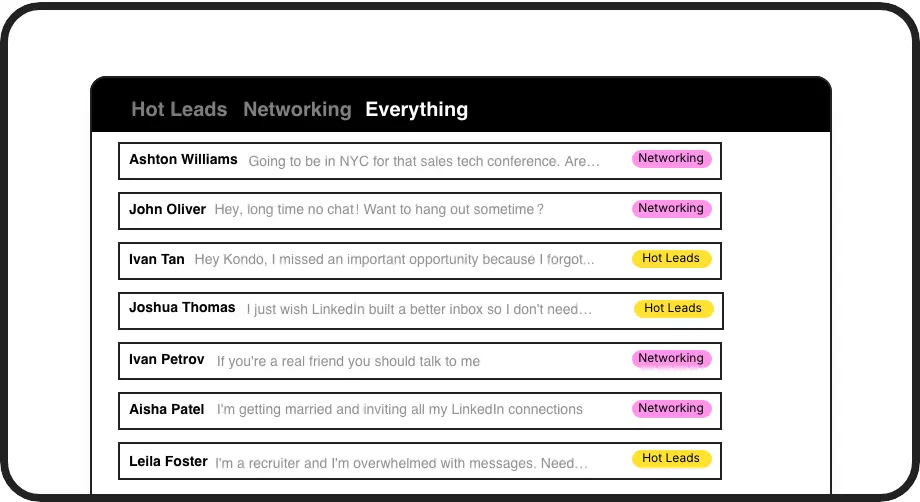
Candidate Organization
Label conversations by role, stage, or priority to create separate inboxes for each candidate category, ensuring top talent never gets lost in the shuffle.
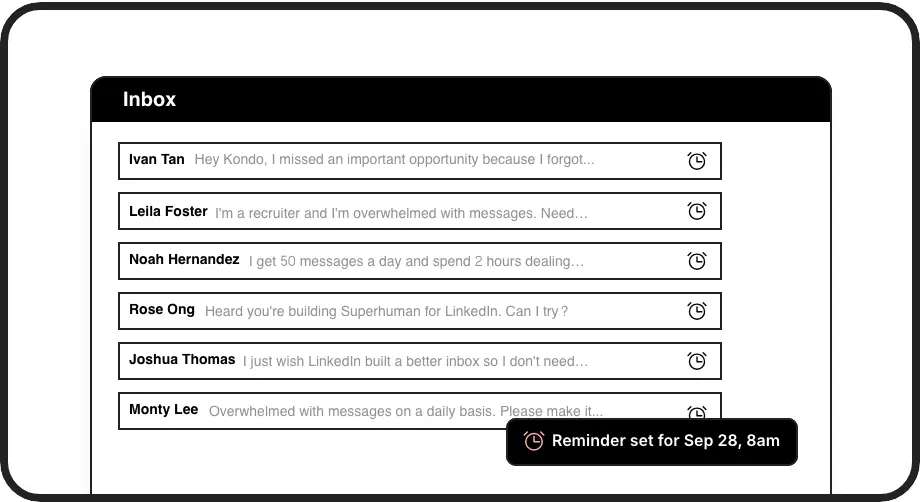
Smart Follow-ups
Set timed reminders that bring candidate conversations back to the top of your inbox exactly when needed, ensuring perfect follow-up timing.
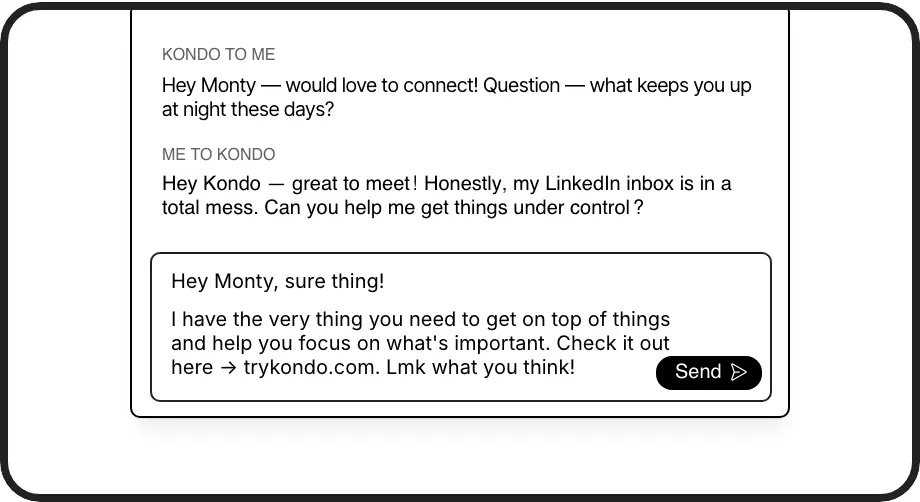
Response Templates
Create personalized message templates with auto-filled candidate names for consistent, professional communication without repetitive typing.
LinkedIn left your inbox in 2000. Bring it into 2026.
Get the upgrade every power user's been waiting decades for.


Recruit Faster, Better, Smarter
60%
Less Time Managing
100%
Follow-up Rate
Zero
Missed Candidates
FAQs
How does Kondo help with automated LinkedIn recruitment?
Kondo brings automation to your LinkedIn recruitment process through organized labeling of candidate conversations, timed follow-up reminders, keyboard shortcuts for rapid navigation, and reusable message templates. This creates a structured system that prevents qualified candidates from getting lost and ensures consistent communication throughout the hiring process.
Is Kondo compliant with LinkedIn's terms of service?
Yes, Kondo is fully compliant with LinkedIn's terms. It works as a native desktop app that enhances the LinkedIn experience without scraping data, injecting code, or automating prohibited actions on the platform.
Can I integrate Kondo with my existing recruitment tools?
For Business tier users, Kondo offers integration with popular systems through webhooks or native connections. This includes HubSpot, Salesforce (via Zapier/Make), Google Sheets, Notion, and other platforms, allowing you to sync LinkedIn conversation data with your existing recruitment workflow.
How does the labeling system work for candidate management?
Kondo allows you to create custom labels (e.g., Junior Developer, Senior Role, Shortlisted) and apply them to conversations using the 'L' shortcut. You can then view candidates in separate, dedicated inboxes based on these labels. The system supports multiple labels per conversation, customizable colors/icons, and sidebar organization.
What makes Kondo different from using LinkedIn's native messaging?
Unlike LinkedIn's cluttered native inbox, Kondo brings structure and productivity features specifically designed for high-volume recruiters. The ability to set reminders, use keyboard shortcuts, organize candidates with labels, create message templates, and potentially integrate with your CRM system transforms LinkedIn from a basic messaging platform into a powerful recruitment tool.