
Authentic LinkedIn Engagement That Drives Real Responses
Transform generic outreach into personal connections with voice notes, smart labels, and timely follow-ups.
What people say
LinkedIn Messaging Challenges
Generic templates and cluttered inboxes are killing your response rates and wasting valuable opportunities.
Buried Important Messages
Critical leads and candidate messages get lost in the chaos of notifications, leading to missed opportunities.
Generic Templates Fail
Standard copy-paste messages are instantly recognized and ignored, resulting in dismal conversion rates.
Forgotten Follow-ups
Without a system, timely follow-ups fall through the cracks, and potential connections go cold.
Tools for Authentic Engagement That Converts
Kondo transforms your LinkedIn inbox into a streamlined hub for building genuine connections that lead to measurable results.
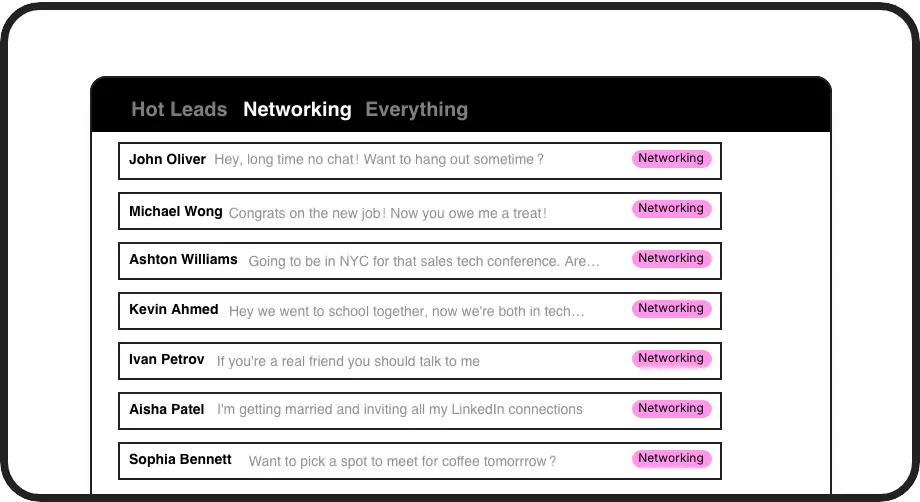
Prioritize Hot Leads
Label conversations with custom tags like 'Hot Lead' or 'Active Candidate' and view them in separate inboxes, ensuring important opportunities never get buried.
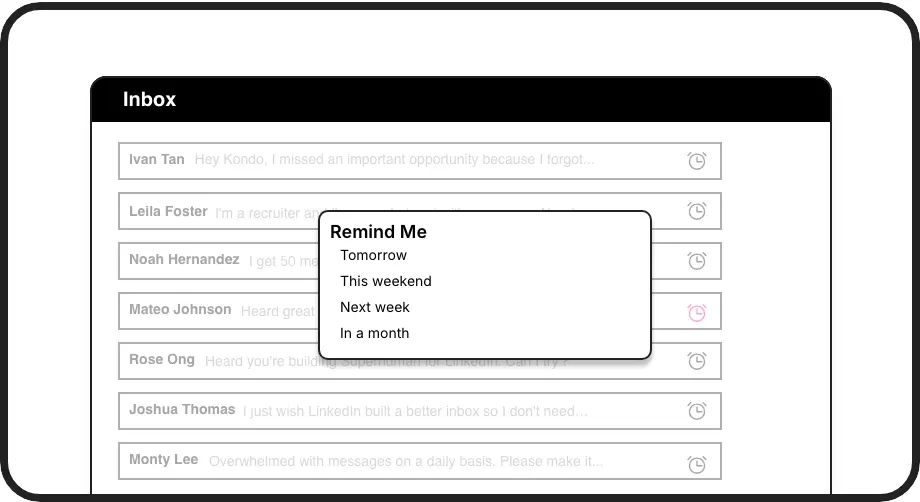
Perfect Timing
Set smart follow-up reminders that bring important conversations back to the top of your inbox exactly when needed, creating a reliable follow-up cadence.
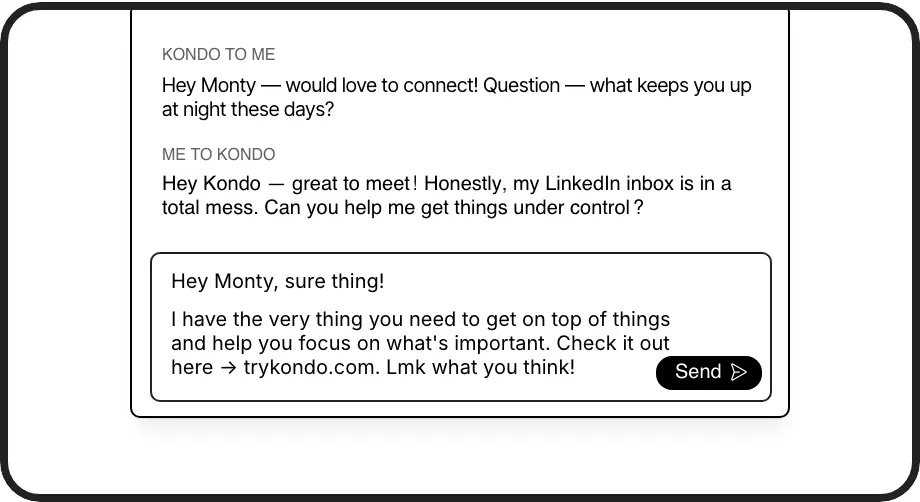
Personal Templates
Create authentic message templates with auto-filled name variables for personalized outreach that feels genuine while saving hours of repetitive typing.
LinkedIn left your inbox in 2000. Bring it into 2026.
Get the upgrade every power user's been waiting decades for.


Engage Better. Convert More. Save Time.
3x
Higher Response Rates
8hrs
Saved Weekly
100%
Follow-up Consistency
FAQs
How does Kondo help create more authentic engagement on LinkedIn?
Kondo enables authentic engagement by providing tools that personalize your outreach and follow-ups. You can send voice notes directly from desktop, use smart snippets with auto-filled variables, set perfectly timed reminders, and organize conversations by priority. This helps you move beyond generic templates to build genuine relationships.
Is Kondo safe to use with my LinkedIn account?
Yes, Kondo is completely safe. It's a native desktop app that doesn't scrape LinkedIn data, inject code, or automate any prohibited LinkedIn actions. Kondo works alongside LinkedIn's official platform while enhancing your messaging experience.
How does the reminder feature work for follow-ups?
With Kondo's reminder feature, you can temporarily archive a conversation and set a specific time for it to reappear at the top of your inbox. Simply use the 'H' shortcut to set a reminder for tomorrow, next week, or a custom date. The conversation will automatically resurface when it's time to follow up, ensuring no important lead is forgotten.
Can I organize different types of conversations on LinkedIn with Kondo?
Absolutely. Kondo's labeling system allows you to categorize conversations with custom labels like 'Hot Lead,' 'Candidate,' or 'Client' and view them in separate, prioritized inboxes. You can apply multiple labels, customize colors and icons, and instantly declutter your main inbox to focus on what matters most.
How does Kondo save time compared to the regular LinkedIn inbox?
Kondo dramatically increases efficiency through keyboard shortcuts for all actions, smart snippets for quick replies, automatic follow-up reminders, and organized split inboxes. By implementing an Inbox Zero workflow, you can process messages faster, ensure timely responses, and eliminate the time spent searching for important conversations in a cluttered inbox.