LinkedIn Inbox Chaos? Get Superhuman for LinkedIn Control.
Kondo: Your Superhuman for LinkedIn to conquer inbox chaos, save hours, and capture leads.
What people say
LinkedIn DMs: A Black Hole for Opportunities?
Your cluttered, disorganized LinkedIn inbox means missed follow-ups, lost leads, and hours wasted scrolling.
Leads Go Cold
Crucial replies from prospects, investors, or candidates get buried in the noise, costing you deals, funding, or top hires. Opportunities vanish.
Hours Wasted Daily
Manually sifting through DMs, searching for context, and tracking follow-ups devours your valuable time and kills your productivity daily.
Constant Inbox Dread
The constant fear of missing something vital in your LinkedIn inbox creates stress, making LinkedIn a source of anxiety, not opportunity.
Meet Kondo: Your LinkedIn Inbox, Supercharged.
With labels, reminders, and lightning-fast shortcuts, you'll manage LinkedIn DMs in minutes, not hours, and never miss an important message again.
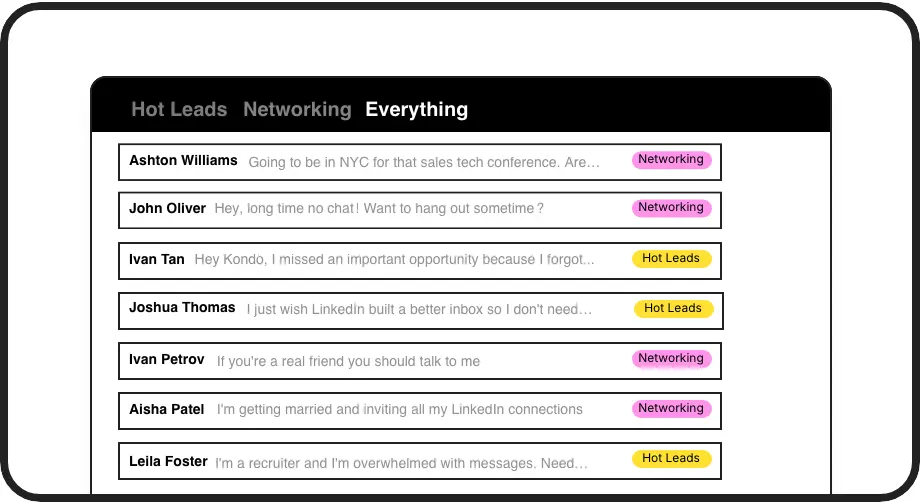
Label & Conquer DMs
Organize DMs with custom labels (e.g., Hot Lead, Follow Up, Candidate). View them in separate, prioritized inboxes. Never lose a key conversation in the chaos again, ensuring you focus on revenue-generating chats or critical candidate messages.
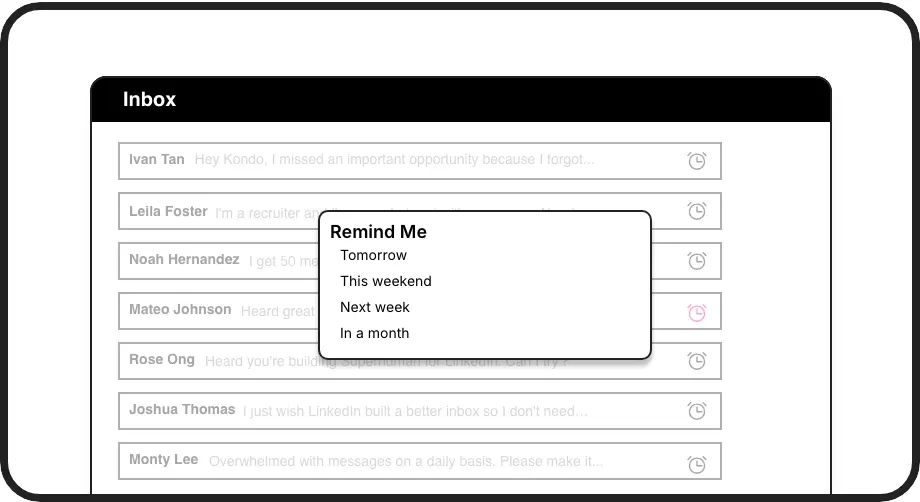
Never Miss Follow-ups
Snooze messages and set precise reminders for follow-ups. Kondo brings them back to the top of your inbox when they're due. Effortlessly manage your sales pipeline and candidate communication, ensuring timely engagement without relying on external tools or memory.
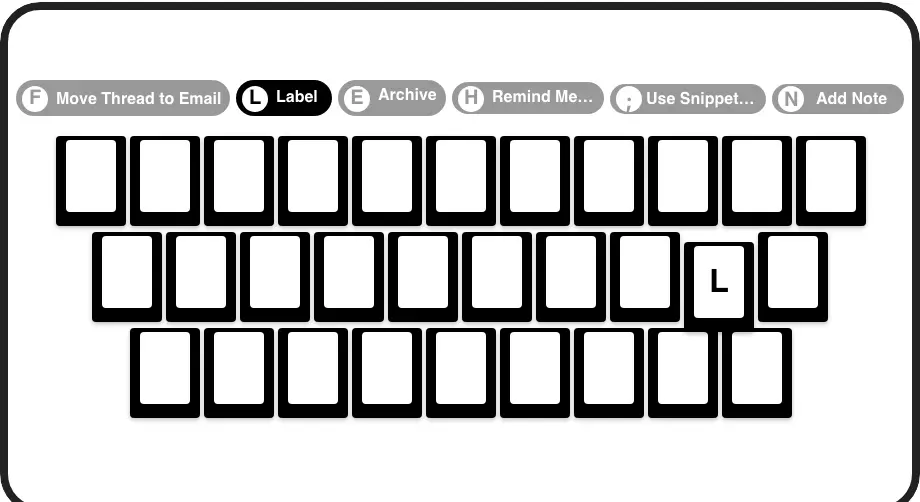
Inbox Zero, Faster
Fly through your LinkedIn DMs with Superhuman-like keyboard shortcuts for everything. Archive, snooze, label, and reply in seconds. Drastically cut down the time spent managing your inbox and significantly boost your daily productivity on LinkedIn.
Give Your AI Access to Your LinkedIn Inbox
Let Claude, ChatGPT, or Cursor triage your LinkedIn inbox. Your agent reads messages on your computer, can draft replies, add labels, and set reminders.
Explore the LinkedIn MCP serverlist_chats “pricing”6 foundread_chat× 6set_chat_draft× 6set_chat_label “Hot”× 6
LinkedIn left your inbox in 2000. Bring it into 2026.
Get the upgrade every power user's been waiting decades for.


More Replies. Faster Responses. Hours saved.
5+ hrs
saved per week
2x
faster replies
100%
key DMs seen
FAQs
Is Kondo safe to use with LinkedIn?
Yes, Kondo is designed for safety. It doesn't scrape profiles, modify LinkedIn's UI, or perform prohibited automation. It uses your existing browser session/IP and doesn't inject code into LinkedIn pages, operating much like a standard browser extension focusing on your inbox experience.
How is Kondo different from native LinkedIn?
Kondo supercharges your LinkedIn inbox with features like labels, split inboxes, reminders (snooze), snippets, and keyboard shortcuts – delivering a Superhuman-like experience for your DMs. This helps you organize, prioritize, and rapidly process messages, preventing missed opportunities and saving you hours daily.
Does Kondo automate sending messages?
No, Kondo is not an automation tool for sending messages. It focuses on making *you* more efficient at managing your *existing* conversations. It helps organize, prioritize, and speed up your manual messaging workflows with tools like snippets, labels, and keyboard shortcuts, but it does not automate outreach or replies.
How quickly can I start using Kondo?
Kondo is intuitive, allowing you to start organizing your inbox in minutes. Keyboard shortcuts mirror other productivity tools, and features like labels and reminders are straightforward. We provide quick tutorials, and most users feel comfortable within their first session, instantly feeling the Superhuman-like efficiency.
Can Kondo sync LinkedIn data to my CRM?
Yes, Kondo's Business tier offers robust integrations. You can sync LinkedIn conversation data, including messages, labels, and notes, to systems like HubSpot, Salesforce (via Zapier/Make.com), Notion, Google Sheets, and Attio. This keeps your critical business systems updated automatically.