LinkedIn multi-channel campaign DMs overwhelming your team?
Kondo streamlines LinkedIn outreach, managing all your campaign conversations in one place.
What people say
Campaign success buried in LinkedIn chaos?
You're running great multi-channel campaigns, but LinkedIn DMs become a bottleneck, losing leads and slowing engagement.
Scattered Campaign DMs
Leads from webinars, content, and partnerships mix, making it impossible to track or prioritize follow-ups effectively.
Missed Opportunities
Important replies from potential partners or hot leads get buried, costing you deals and slowing campaign momentum.
Manual Data Silos
No easy way to link LinkedIn insights to CRM, leading to hours of wasted manual data entry.
One Hub for All Your Campaign Conversations.
Kondo transforms your LinkedIn inbox into a campaign command center, connecting every touchpoint to your broader strategy seamlessly.
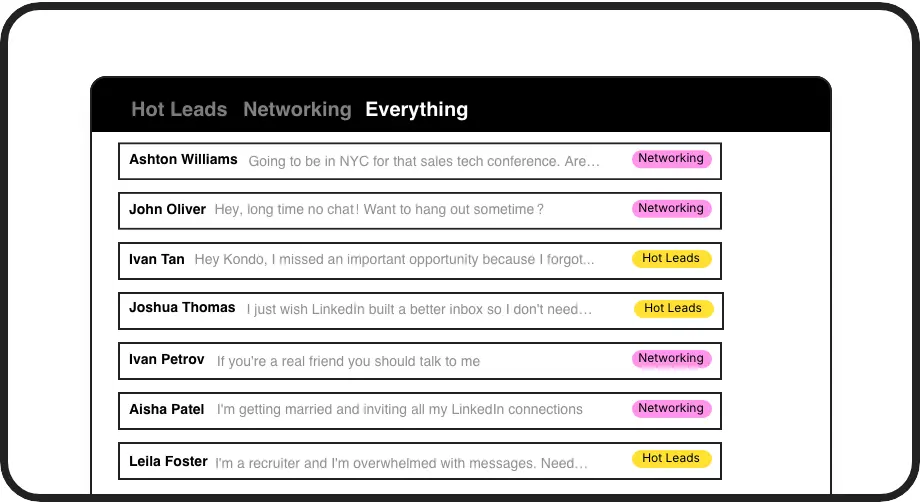
Organize by Campaign
Label conversations by campaign (e.g., 'Webinar Q4', 'Partner Outreach') and view them in dedicated inboxes. Track progress and prioritize engagement across all your initiatives from one place, maximizing campaign impact.
Sync Campaign Data
Automatically push LinkedIn conversation details, labels, and notes to your CRM or marketing tools. Ensure campaign reporting is complete and your team has full visibility on every interaction, bridging data gaps.
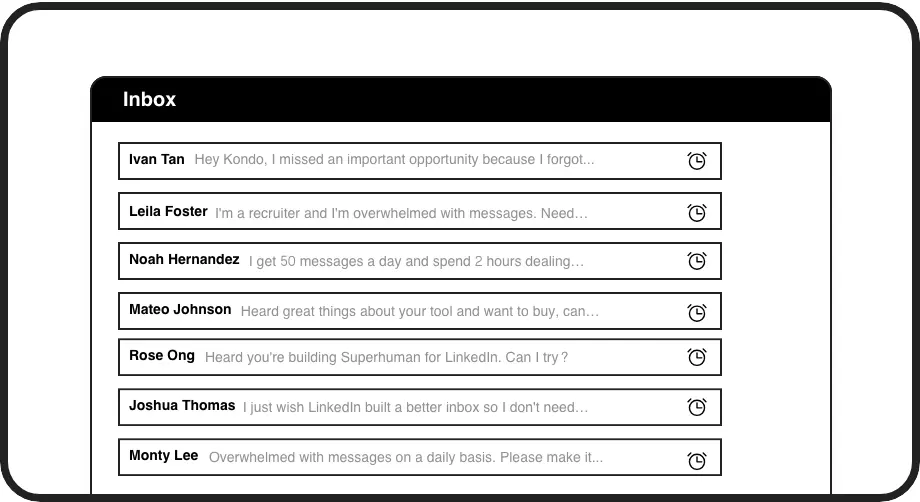
Never Miss Follow-ups
Set reminders on leads from specific campaigns or partnership discussions. Ensure timely follow-ups that convert interest into tangible outcomes, keeping your campaign momentum and pipeline velocity strong.
Give Your AI Access to Your LinkedIn Inbox
Let Claude, ChatGPT, or Cursor triage your LinkedIn inbox. Your agent reads messages on your computer, can draft replies, add labels, and set reminders.
Explore the LinkedIn MCP serverlist_chats “pricing”6 foundread_chat× 6set_chat_draft× 6set_chat_label “Hot”× 6
LinkedIn left your inbox in 2000. Bring it into 2026.
Get the upgrade every power user's been waiting decades for.


Amplify Campaign ROI with Streamlined Communication.
30%
More Leads Captured
5hr/wk
Saved on Admin
100%
CRM Sync Accuracy
FAQs
How does Kondo help manage multiple LinkedIn campaigns?
Kondo allows you to create custom labels for each campaign or initiative (e.g., 'Webinar Leads Q4', 'Influencer Outreach', 'Partner Program'). Each label gets its own inbox, so you can easily segment and prioritize conversations related to specific campaigns. Combined with reminders and CRM sync, you can track progress and ensure consistent follow-up for all campaign touchpoints within LinkedIn.
Can I connect Kondo to my marketing tools?
Yes, Kondo offers integrations with popular CRMs like HubSpot and Salesforce (via Zapier/Make.com), as well as tools like Notion and Google Sheets. Our Business tier includes webhooks for custom integrations, allowing you to sync LinkedIn conversation data, notes, and labels to your marketing automation platforms or campaign management systems.
Is Kondo safe for LinkedIn campaign use?
Absolutely. Kondo is designed to be safe and avoid LinkedIn detection. It doesn't scrape profiles, modify LinkedIn's UI directly in a way that violates terms, or perform prohibited automation. It enhances your existing browser session securely. We focus on organizing your *actual* conversations, not automating outreach in a risky way.
How can Kondo improve team campaign collaboration?
By syncing LinkedIn conversation data and context (like labels indicating campaign source) to your shared CRM or project tools, Kondo ensures everyone on the team has visibility. This reduces duplicate effort, ensures consistent messaging, and helps in attributing results back to specific LinkedIn campaign activities.
How does Kondo help manage leads from multi-channel marketing campaigns?
Kondo transforms your LinkedIn inbox into a centralized hub for multi-channel campaign management with its powerful labeling system. Create custom labels like Email Campaign Respondents or Twitter Follow-ups to categorize conversations by source channel. The split inbox feature lets you view all related conversations in one dedicated space, while the reminder system ensures timely follow-ups across different touchpoints.