Reminder to Send Messages on LinkedIn
Kondo ensures no message slips through with smart reminders, right in your LinkedIn inbox.
What people say
Is Your LinkedIn Inbox a Black Hole for Follow-Ups?
Important LinkedIn conversations get buried in a chaotic inbox, leading to missed opportunities and frantic, inefficient catch-ups.
Opportunities Vanish
Promising leads and crucial replies get lost in the clutter, costing you revenue, partnerships, or top candidates daily.
Follow-Up Frustration
Relying on memory or messy notes? Spend hours sifting through messages instead of engaging, and still miss critical follow-ups.
Reputation at Risk
Delayed or forgotten responses make you look unprofessional, damaging relationships with prospects, clients, or key contacts.
Master Your LinkedIn Follow-Ups with Kondo
Our smart features ensure every important LinkedIn conversation gets the attention it deserves, exactly when it needs it, so you can focus on building relationships.
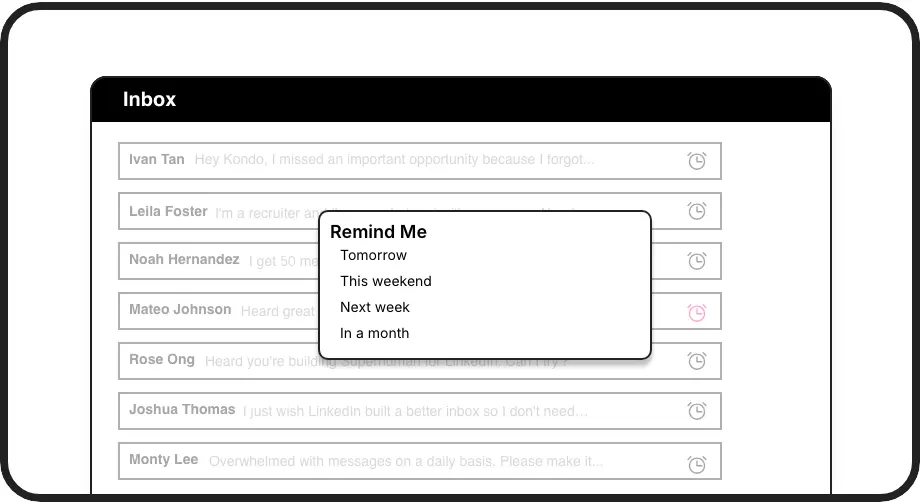
Never Miss Again
Snooze conversations and have them reappear at the top of your inbox. Set custom dates for perfect timing, ensuring every critical follow-up happens and no opportunity is missed.
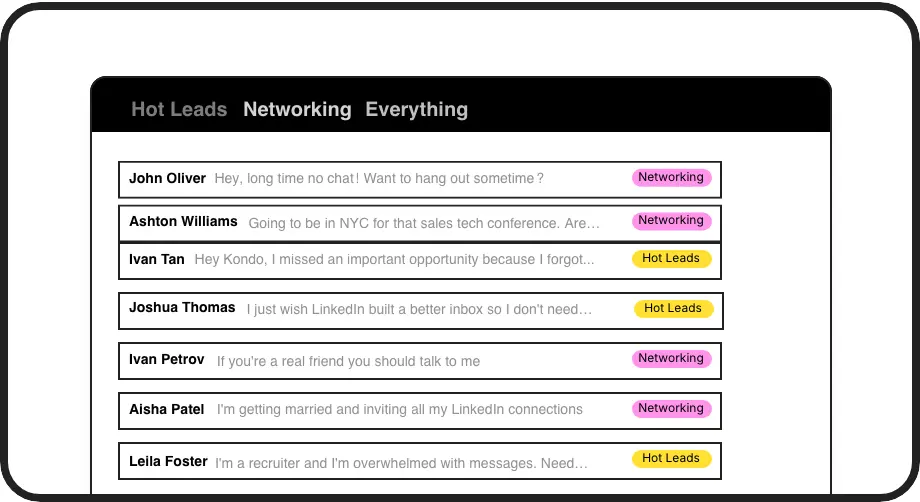
Prioritize Follow-Ups
Label conversations like 'Urgent Follow-Up' or 'Key Prospect'. View them in dedicated inboxes to easily identify who needs a reminder or immediate action, cutting through the clutter.
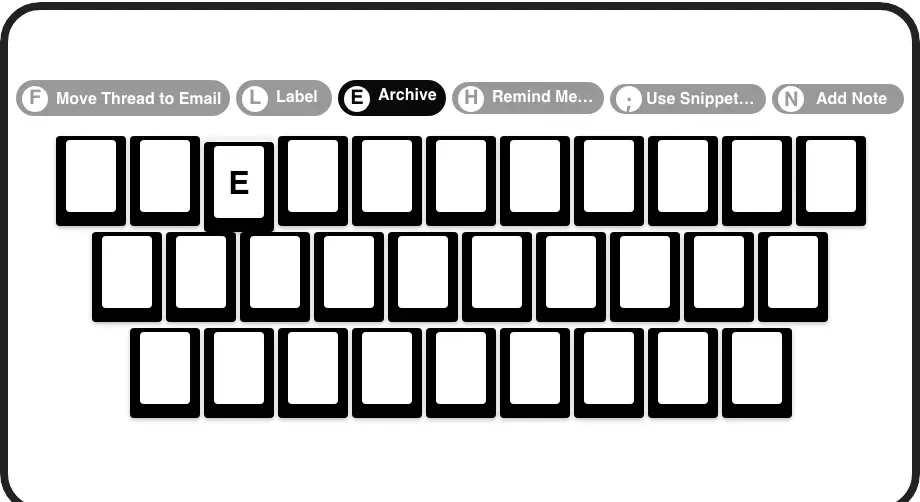
Act Faster
Use keyboard shortcuts (like 'H' for Remind) to manage your LinkedIn inbox rapidly. Process reminded messages and set new follow-ups in seconds, not minutes, boosting your efficiency.
Give Your AI Access to Your LinkedIn Inbox
Let Claude, ChatGPT, or Cursor triage your LinkedIn inbox. Your agent reads messages on your computer, can draft replies, add labels, and set reminders.
Explore the LinkedIn MCP serverlist_chats “pricing”6 foundread_chat× 6set_chat_draft× 6set_chat_label “Hot”× 6
LinkedIn left your inbox in 2000. Bring it into 2026.
Get the upgrade every power user's been waiting decades for.


Turn Forgotten Follow-Ups into Real Results
90%
fewer missed follow-ups
5+ hrs
saved per week
+25%
higher reply rates
FAQs
How do reminders work in Kondo?
You can snooze any LinkedIn message using the 'H' shortcut or the menu. Choose a preset time (e.g., tomorrow, next week) or set a custom date and time. The message is temporarily archived and will reappear at the top of your inbox when it's due. If a new reply arrives before the reminder time, the reminder is automatically cancelled.
Can I set recurring LinkedIn reminders?
Kondo's reminders are designed for specific, one-time follow-ups by 'snoozing' a conversation. For tasks that need to repeat, you would set a new reminder after the current one triggers and you've completed your follow-up. This ensures each interaction is intentional and timely.
Is it safe to use Kondo for reminders?
Kondo is built with safety as a priority. It enhances your LinkedIn messaging experience without performing automation that violates LinkedIn's Terms of Service. Setting reminders manages messages within your existing browser session and doesn't involve risky external automation, keeping your account safe.
What if I get a reply before reminder?
If the person you're messaging replies before your set reminder time, the conversation will automatically come back to your inbox. The reminder you had set for that conversation will be cancelled, so you're always seeing the latest message first and won't get a redundant notification.
How does Kondo help remember *who* to follow up with?
Kondo helps in two ways: First, use Labels like 'Follow-Up Q3' or 'Hot Prospect' to categorize conversations. You can view these as separate inboxes. Second, once identified, use the Reminders feature to ensure those specific conversations resurface at the right time. This combination ensures you track and act on follow-ups effectively.