Stop Losing Leads: Master LinkedIn Message Labelling Now.
Kondo lets you label, categorize, and conquer your LinkedIn inbox with ease.
What people say
Your LinkedIn Inbox: Chaos, Clutter, and Lost Deals?
Important messages get buried, follow-ups slip, and opportunities vanish in the noise.
Critical DMs Lost
Key prospect replies, client requests, and urgent updates disappear in a sea of notifications, costing you deals and reputation.
Endless Scrolling
Wasting precious hours daily sifting through irrelevant messages instead of focusing on revenue-generating conversations and tasks.
Follow-Up Fumbles
Forgetting to follow up on promising leads or important contacts because there's no easy way to track them within LinkedIn.
Finally, LinkedIn DM Organization That Works.
Kondo introduces powerful labelling and inbox management to transform your LinkedIn messaging experience, ensuring you never miss what matters.
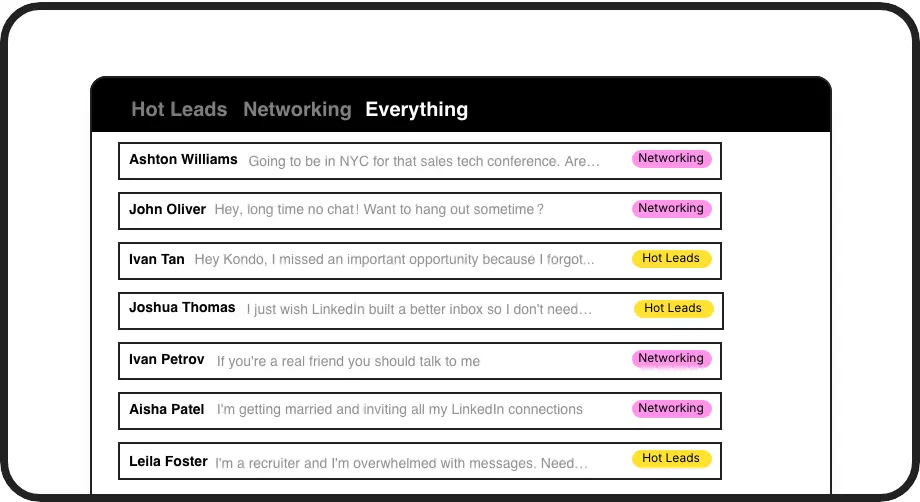
Smart DM Labelling
Create custom labels (e.g., 'Hot Lead', 'Client Query', 'Follow Up Q4') and assign them to DMs. View conversations in dedicated, clutter-free inboxes for ultimate focus.
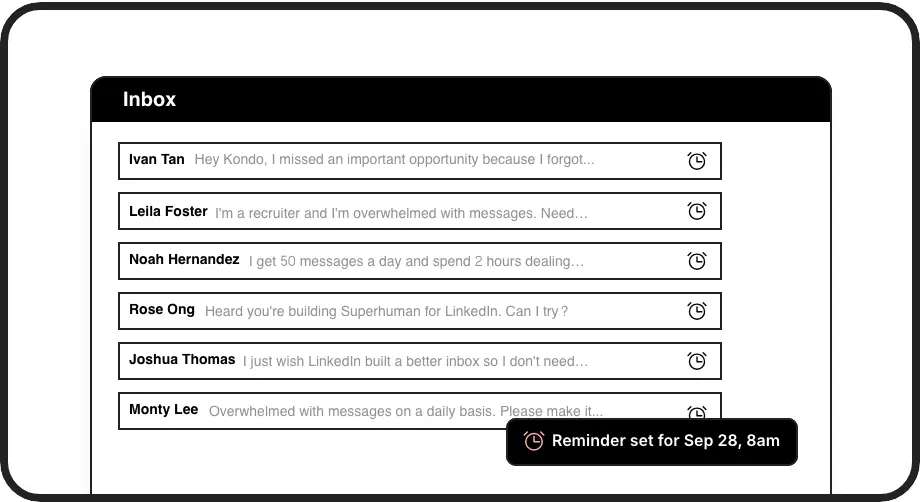
Reliable Follow-Up Reminders
Label a conversation and set a reminder. Kondo brings it back to your attention at the right time, ensuring no follow-up ever slips through the cracks again.
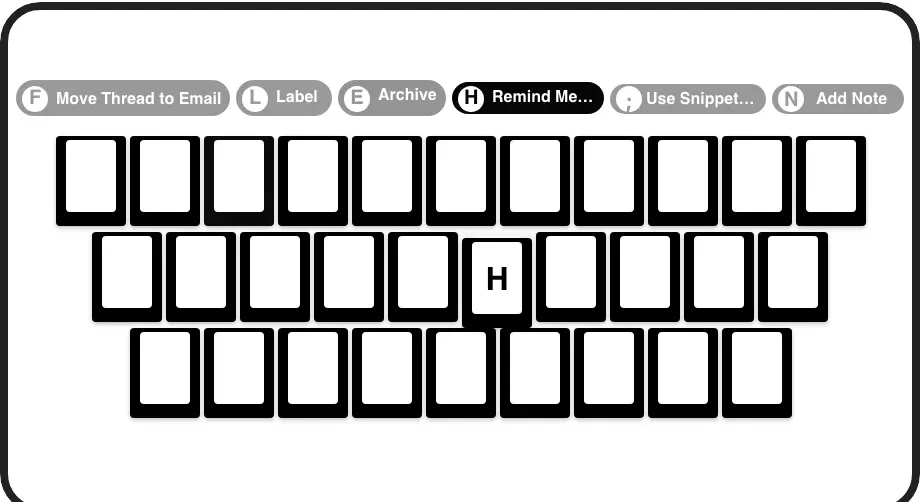
One-Key Labelling
Apply labels to conversations in a flash using simple keyboard shortcuts. Organize your entire inbox with speed and efficiency, no mouse-clicking marathons needed.
Give Your AI Access to Your LinkedIn Inbox
Let Claude, ChatGPT, or Cursor triage your LinkedIn inbox. Your agent reads messages on your computer, can draft replies, add labels, and set reminders.
Explore the LinkedIn MCP serverlist_chats “pricing”6 foundread_chat× 6set_chat_draft× 6set_chat_label “Hot”× 6
LinkedIn left your inbox in 2000. Bring it into 2026.
Get the upgrade every power user's been waiting decades for.


See Real Results with Organized DMs.
80%
Fewer Missed Messages
45 min
Saved Daily Organizing
100%
Clarity on Priorities
FAQs
How does Kondo's message labelling work?
Kondo allows you to create custom labels like 'Hot Lead', 'Client', or 'Urgent'. You can then assign these labels to any LinkedIn conversation. Each label gets its own dedicated inbox view, so you can quickly see all messages belonging to a specific category, separate from your main inbox clutter.
Can I customize labels for my specific workflow?
Absolutely! You can create any labels you need – by project, priority, client type, sales stage, candidate status, etc. Tailor Kondo's labelling system to perfectly match how you work and think, whether you're in sales, recruiting, or marketing.
Does labelling help me find important DMs faster?
Yes, significantly. Instead of endlessly scrolling, just click on a label (e.g., 'Investor Prospect') to see only those conversations. It’s like having powerful, instant filters for your LinkedIn messages, ensuring critical DMs are always easy to find.
Can I use multiple labels on one conversation?
Yes, Kondo supports applying multiple labels to a single conversation. This allows for more granular organization, like tagging a DM with both 'Key Account' and 'Needs Follow-Up'. You can create hierarchies or groups to manage complex communication pipelines effectively.
Do labels auto-archive messages?
Labelling organizes messages into specific views but doesn't automatically archive them. For Inbox Zero, combine labels with archiving ('E') or reminders ('H'). This clears your main inbox while keeping DMs neatly categorized under their respective labels for easy access.