Never Miss a Lead: Dominate LinkedIn Lead Generation.
Kondo organizes your DMs: turn LinkedIn chaos into qualified leads.
What people say
Your LinkedIn Inbox: Where Hot Leads Go To Die.
Juggling countless DMs means missed follow-ups, lost context, and valuable opportunities slipping away daily.
Leads Vanish Daily
Important prospect replies get buried under noise, costing you deals and revenue. Each missed message is a lost sale.
Follow-ups Forgotten
Manually tracking who to message next is impossible. Promising leads go cold waiting for your delayed response.
Hours Wasted Sorting
Endless scrolling and sifting through irrelevant DMs kills productivity, draining hours better spent on actual selling.
Turn LinkedIn Chaos into a Lead Generation Machine.
Kondo gives you the power to manage DMs efficiently, ensuring every lead is captured and nurtured. Stop missing out.
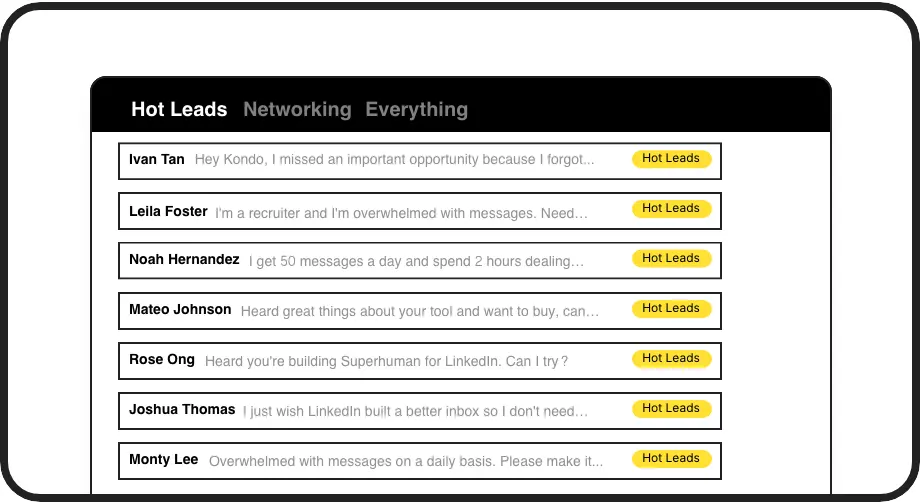
Prioritize Hot Leads
Use custom labels like 'Hot Lead' or 'Needs Follow-Up' to categorize DMs. View them in dedicated inboxes, instantly focusing on revenue-generating conversations and never letting a key prospect slip through the cracks.

Never Miss Follow-ups
Set reminders for any LinkedIn DM. Kondo brings it back to your attention at the perfect time, ensuring timely follow-ups that convert leads into customers. Automate your persistence without external tools.
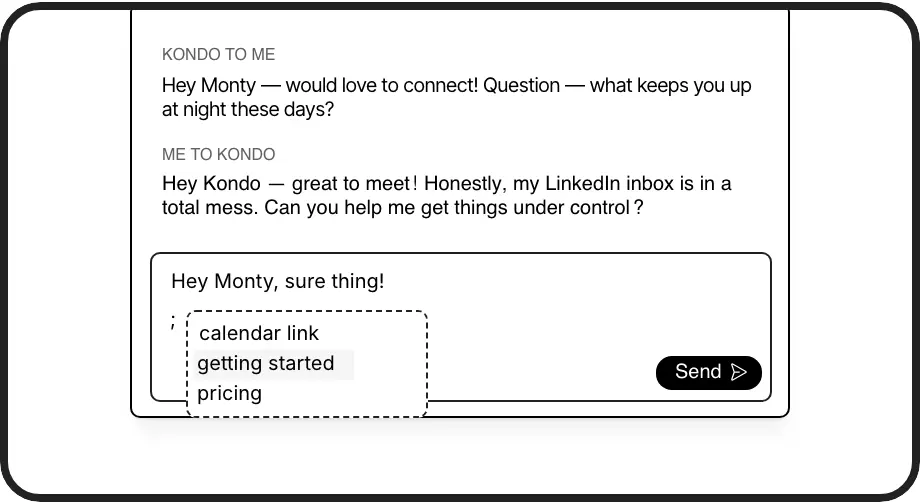
Reply Faster, Consistently
Create personalized message templates for common outreach or replies. Insert them instantly with a shortcut, saving hours and ensuring consistent, high-quality communication that scales your lead engagement efforts effectively.
Give Your AI Access to Your LinkedIn Inbox
Let Claude, ChatGPT, or Cursor triage your LinkedIn inbox. Your agent reads messages on your computer, can draft replies, add labels, and set reminders.
Explore the LinkedIn MCP serverlist_chats “pricing”6 foundread_chat× 6set_chat_draft× 6set_chat_label “Hot”× 6
LinkedIn left your inbox in 2000. Bring it into 2026.
Get the upgrade every power user's been waiting decades for.


Unlock More Leads, Less Effort with Kondo.
2+ hrs
saved daily
30%+
more leads engaged
2x
faster responses
FAQs
How does Kondo help generate more leads on LinkedIn?
Kondo doesn't directly find new leads, but it supercharges your ability to manage incoming interest and outreach. By organizing your inbox with labels, ensuring timely follow-ups with reminders, and speeding up replies with snippets, you'll convert more existing conversations into qualified leads and prevent opportunities from being lost in the clutter. This means more efficient lead nurturing.
Is Kondo safe to use with LinkedIn for lead generation?
Yes, Kondo is designed for safety. It doesn't perform unauthorized automation, scrape profiles, or modify LinkedIn's UI in prohibited ways. It works like a smart layer over your existing LinkedIn session, helping you manage your DMs more effectively. We prioritize your account's security. Many sales and marketing professionals rely on Kondo daily for their lead generation activities.
Can I sync my LinkedIn leads to my CRM?
Absolutely! Our Business tier offers integrations with popular CRMs like HubSpot and Notion, and tools like Zapier or Make.com. This allows you to automatically or manually push conversation data, including leads generated via LinkedIn DMs, to your central systems, ensuring seamless lead tracking and sales team alignment. This helps bridge the gap between LinkedIn engagement and your sales pipeline.
How quickly can I see results in my lead flow?
Many users report feeling more organized and less overwhelmed within the first day. By consistently using features like labels and reminders, you'll start seeing improvements in response times and fewer missed lead opportunities within the first week. The time saved by using snippets and keyboard shortcuts also adds up quickly, freeing you for more strategic lead generation tasks.
How does Kondo's reminder system help prevent missed opportunities?
Kondo's powerful Reminders (Snooze) feature transforms how you manage LinkedIn follow-ups. When you receive a message that needs attention later, simply press the H shortcut key to temporarily archive it and set a specific time for it to reappear at the top of your inbox.