LinkedIn Follow-Ups Lost? Never Again with Kondo.
Kondo brings sanity to your LinkedIn DMs: set reminders, label chats, and follow up like a pro.
What people say
Your LinkedIn Inbox: Where Follow-Ups Go to Die
Promising leads and crucial updates are getting buried, costing you deals and opportunities daily.
Leads Slip Away
Hot prospects reply, but their messages vanish in clutter, costing you sales and momentum. Missed follow-ups directly impact revenue.
Endless Scrolling Hell
Hours wasted sifting through DMs to find who to follow up with next, instead of engaging and closing.
Nagging Follow-Up Dread
The constant fear of forgetting crucial follow-ups, damaging relationships and your professional reputation. It’s stressful!
Kondo: Your LinkedIn Follow-Up Supercharger
Effortlessly track, manage, and execute timely LinkedIn follow-ups with smart reminders, powerful organization, and efficient workflows.
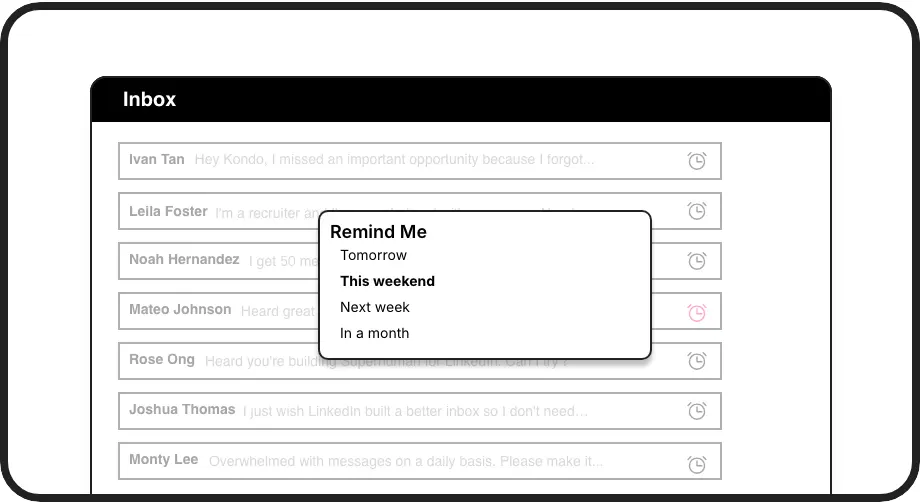
Never Forget Follow-Ups
Set smart reminders for any LinkedIn chat. Kondo snoozes it and brings it back to your inbox when it's time to act. Ensures timely engagement and no missed opportunities.
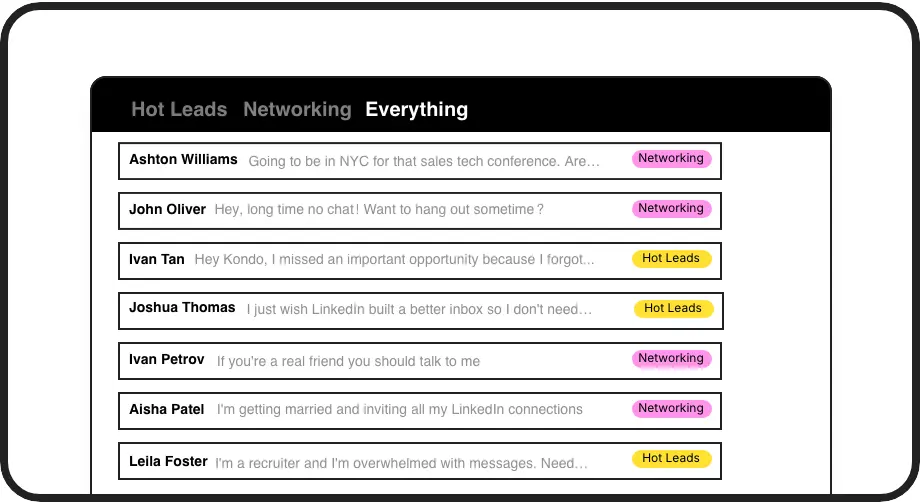
Organize for Follow-Up
Label conversations (e.g., 'Follow Up Q2', 'Hot Lead') and view them in dedicated inboxes. Instantly know who needs attention, making your follow-up process systematic and efficient.
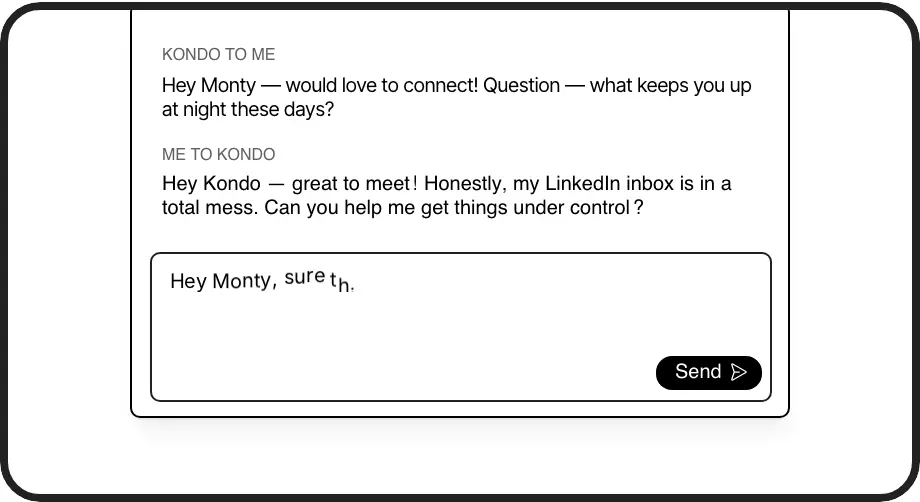
Faster Follow-Up Replies
Use pre-saved message snippets with personalization for common follow-up scenarios. Save time typing, maintain consistency, and respond to more leads, faster.
Give Your AI Access to Your LinkedIn Inbox
Let Claude, ChatGPT, or Cursor triage your LinkedIn inbox. Your agent reads messages on your computer, can draft replies, add labels, and set reminders.
Explore the LinkedIn MCP serverlist_chats “pricing”6 foundread_chat× 6set_chat_draft× 6set_chat_label “Hot”× 6
LinkedIn left your inbox in 2000. Bring it into 2026.
Get the upgrade every power user's been waiting decades for.


Boost Your Follow-Up Success
4+ hrs
saved each week
2x
reply rates
90%
fewer missed opportunities
FAQs
How do reminders help with LinkedIn follow-ups?
Kondo's reminders let you 'snooze' a LinkedIn conversation. It disappears from your main inbox and reappears at the top at your chosen time (e.g., 'next Tuesday' or a custom date). This ensures you follow up consistently without relying on memory or external tools, preventing leads from going cold. If they reply before the reminder, it's automatically cancelled.
Can I label conversations for follow-up stages?
Yes! Create custom labels like 'Initial Follow-Up', 'Proposal Sent', 'Needs Nurturing'. Apply these to conversations to see them in organized, dedicated inboxes. This gives you a clear overview of your follow-up pipeline directly within LinkedIn, helping you prioritize and manage different stages effectively. You can even apply multiple labels for more granular tracking.
How does Kondo save time writing follow-ups?
Kondo's Snippets feature allows you to save frequently used follow-up messages as templates. You can insert these into replies instantly using a shortcut. Snippets can include variables like '{firstName}' for personalization, so you send tailored, timely follow-ups in seconds, not minutes. This speeds up your workflow significantly.
Is Kondo safe for LinkedIn follow-ups?
Kondo is designed with safety as a priority. It doesn't automate actions that violate LinkedIn's terms, like sending messages or connection requests automatically. It enhances your existing LinkedIn messaging interface without scraping profiles or injecting intrusive code. It operates within your browser session, focusing on helping you manage *your* activity more efficiently and reliably for follow-ups.
Can Kondo sync follow-up data to my CRM?
Yes, Kondo's Business tier offers integrations. You can sync LinkedIn conversation data, including messages and labels relevant to your follow-ups, to CRMs like HubSpot and Salesforce (via Zapier/Make), or tools like Notion and Google Sheets. This keeps your main business systems updated with your LinkedIn follow-up activities automatically, saving manual data entry and providing team visibility.