Missed Leads? Achieve LinkedIn DM Automation & Control.
Kondo uses labels, reminders & shortcuts for efficient LinkedIn DM automation.
What people say
Your LinkedIn Inbox: A Graveyard of Missed Opportunities?
Endless scrolling, missed follow-ups, and lost deals are costing you more than just time.
Buried in DMs
Critical messages from leads and clients get lost in a sea of notifications, costing you deals and reputation.
Follow-ups Forgotten
Promising conversations stall and die because you lack a reliable system to track and schedule crucial follow-ups.
Manual Data Nightmare
Wasting hours copy-pasting LinkedIn conversations into your CRM, leading to errors and incomplete sales intelligence.
Automate Your LinkedIn Workflow, Reclaim Your Time.
Kondo brings intelligent automation to your DMs: smart labeling, effortless reminders, and seamless CRM sync. Stop missing out.
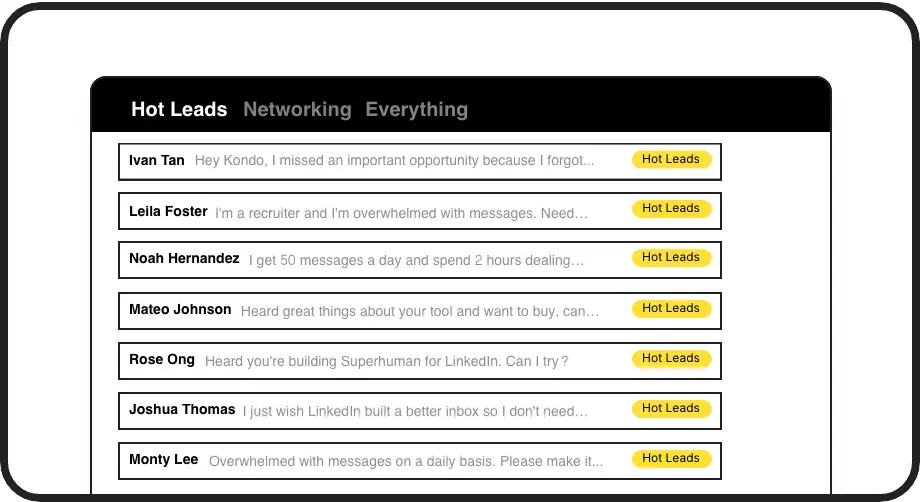
Smart DM Triage
Automatically categorize DMs with custom labels (e.g., 'Hot Lead', 'Follow Up'). View them in dedicated inboxes, ensuring high-priority conversations always get your immediate attention and opportunities are never overlooked.

Effortless Follow-ups
Never miss a follow-up. Snooze conversations and have them reappear at the top of your inbox exactly when needed. Ensure timely engagement and nurture leads effectively directly within LinkedIn.
Seamless CRM Sync
Automatically push LinkedIn conversation data, notes, and labels to your CRM (HubSpot, Salesforce via Zapier/Make, etc.). Keep records updated, eliminate manual entry, and provide full team visibility.
Give Your AI Access to Your LinkedIn Inbox
Let Claude, ChatGPT, or Cursor triage your LinkedIn inbox. Your agent reads messages on your computer, can draft replies, add labels, and set reminders.
Explore the LinkedIn MCP serverlist_chats “pricing”6 foundread_chat× 6set_chat_draft× 6set_chat_label “Hot”× 6
LinkedIn left your inbox in 2000. Bring it into 2026.
Get the upgrade every power user's been waiting decades for.


Unlock Real Results: Save Time, Close More Deals.
5+ hrs
saved per week
30%
more qualified replies
Zero
missed hot leads
FAQs
Is Kondo safe to use with LinkedIn?
Yes, Kondo is designed for safety. It doesn't scrape profiles, modify LinkedIn's UI in prohibited ways, or perform unauthorized automation. It works like a smart layer over your existing LinkedIn session, focusing on inbox organization and workflow efficiency, not risky automated outreach. We prioritize your account's security.
How does Kondo automate LinkedIn DMs?
Kondo automates your *workflow*, not message sending. It helps you triage DMs with labels, set reminders for follow-ups, use snippets for faster replies, and sync data to your CRM. This streamlines manual tasks, ensuring you efficiently manage conversations and never miss opportunities, rather than sending automated bulk messages.
Which CRMs does Kondo integrate with?
Kondo offers native integrations with tools like HubSpot and Notion. For other CRMs such as Salesforce, Pipedrive, and more, you can easily connect Kondo using Zapier or Make.com webhooks. This allows you to sync conversation data, ensuring your LinkedIn interactions are logged and visible within your primary sales or business systems.
Can I try Kondo before committing?
Absolutely! Kondo offers a free trial so you can experience firsthand how it transforms your LinkedIn inbox management. Discover features like labels, reminders, and keyboard shortcuts to see the productivity gains for yourself before choosing a plan. No credit card required to start.
How does Kondo's reminder system help prevent missed opportunities?
Kondo typically saves users 5-7 hours weekly on LinkedIn message management. The combination of keyboard shortcuts, labeling system, and templated responses dramatically speeds up workflow.