LinkedIn Chrome Extension That Prevents Lost Leads
Organize your chaotic LinkedIn inbox with labels, reminders, and CRM integration. Never miss important messages from hot prospects, candidates, or clients again.
What people say
LinkedIn DMs Are a Mess
Important messages get buried, opportunities slip through the cracks, and follow-ups fall behind.
Buried Important Messages
Critical leads and opportunities get lost in the clutter of your LinkedIn inbox, leading to missed connections and lost revenue.
Forgotten Follow-Ups
Without a system for tracking conversations, timely follow-ups get missed and promising leads go cold.
Manual CRM Updates
Copy-pasting LinkedIn conversations into your CRM wastes valuable time and creates inconsistent data.
Transform Your LinkedIn Inbox Experience
Kondo brings Superhuman-like efficiency to LinkedIn messaging, helping you organize, prioritize, and never miss important conversations.
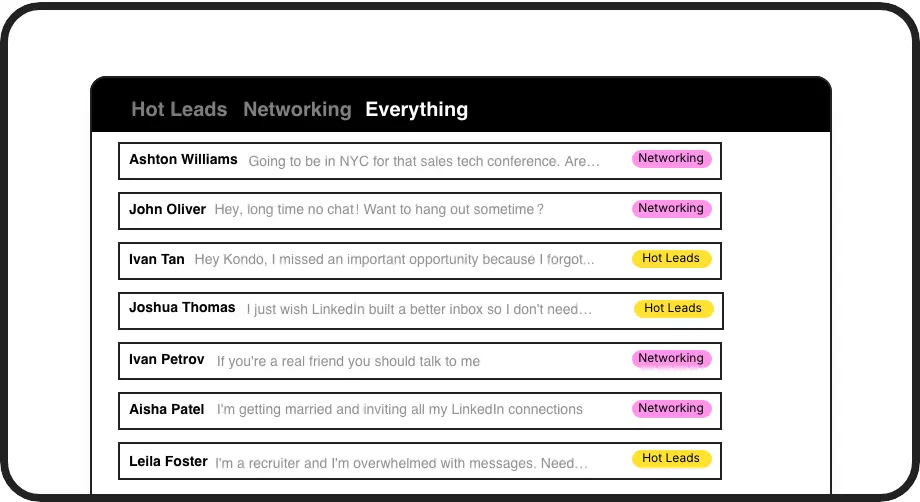
Organize with Smart Labels
Create custom labels like 'Hot Lead' or 'Candidate' to categorize conversations into separate inboxes. Instantly prioritize what matters most.
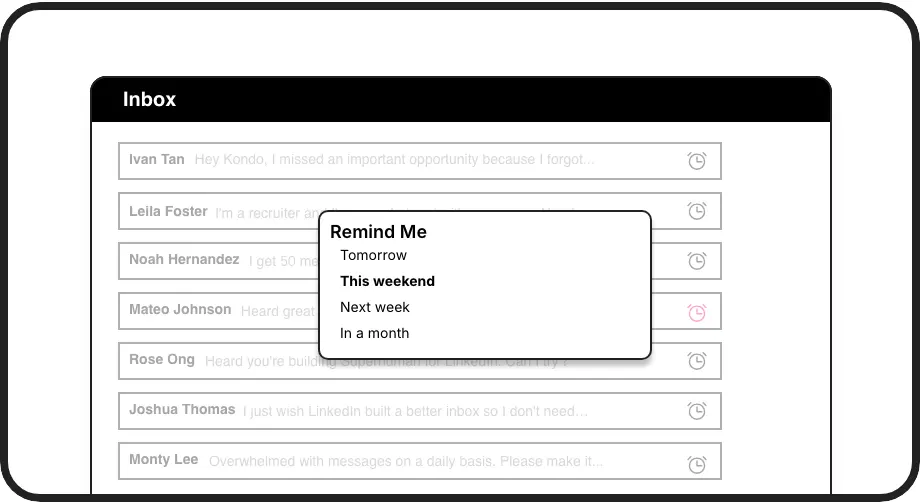
Never Miss Follow-Ups
Set reminders with a single keystroke. Messages resurface automatically at the perfect time, ensuring no important conversation slips through the cracks.
Seamless CRM Integration
Connect to HubSpot, Salesforce, Notion or other systems to automatically sync LinkedIn conversations, eliminating manual data entry and ensuring complete visibility.
Give Your AI Access to Your LinkedIn Inbox
Let Claude, ChatGPT, or Cursor triage your LinkedIn inbox. Your agent reads messages on your computer, can draft replies, add labels, and set reminders.
Explore the LinkedIn MCP serverlist_chats “pricing”6 foundread_chat× 6set_chat_draft× 6set_chat_label “Hot”× 6
LinkedIn left your inbox in 2000. Bring it into 2026.
Get the upgrade every power user's been waiting decades for.


More Leads, Less Work, Better Results
75%
Less Time Managing DMs
2x
More Leads Captured
0
Hot Opportunities Missed
FAQs
Is the Kondo LinkedIn Chrome extension safe to use?
Yes, Kondo is completely safe. Unlike other extensions, Kondo is a native desktop app that doesn't scrape data, inject code, or automate prohibited LinkedIn actions. It simply enhances your LinkedIn messaging experience while respecting LinkedIn's terms of service.
How does Kondo improve my LinkedIn messaging workflow?
Kondo transforms your LinkedIn inbox with organizational tools like custom labels, split inboxes, follow-up reminders, and keyboard shortcuts. This helps you process messages faster, ensure timely follow-ups, and prevent important conversations from getting lost in the clutter.
Can I sync my LinkedIn conversations to my CRM?
Yes, with Kondo's Business tier, you can sync your LinkedIn conversations to CRM systems like HubSpot, Salesforce (via Zapier/Make), Notion, Google Sheets, and more. This eliminates manual data entry and ensures your team has visibility into all LinkedIn communications.
Does Kondo work with Sales Navigator?
Yes, Kondo combines your regular LinkedIn inbox with Sales Navigator messages in one unified view. This eliminates the need to switch between two separate inboxes, streamlining your workflow and ensuring no messages get missed.
Can I use keyboard shortcuts with Kondo?
Absolutely! Kondo offers powerful keyboard shortcuts for nearly every action, including navigating messages (J/K), archiving (E), setting reminders (H), applying labels (L), opening profiles (I), and inserting snippets (;). This dramatically speeds up your LinkedIn messaging workflow.