Stop Losing Top Talent in LinkedIn Candidate Tracking Chaos.
Kondo tames your LinkedIn inbox, helping you organize, track, and follow up with candidates effortlessly.
What people say
Is Your LinkedIn Inbox Costing You Hires?
Juggling candidate DMs for multiple roles feels like a losing battle. Important messages get buried.
Candidates Slip Through
Promising candidates lost in cluttered DMs. Hours wasted searching, follow-ups missed. Top talent goes elsewhere.
No Clear Status
Can't easily track candidate stages or conversation context. Duplicates effort, slows hiring, frustrates candidates.
Wasted Admin Time
Manually logging candidate interactions into ATS is slow and error-prone. Recruiters should source, not copy-paste.
Reclaim Your LinkedIn & Secure Top Talent
Kondo transforms your messy LinkedIn inbox into a powerful candidate tracking system, so you focus on hiring, not sifting.
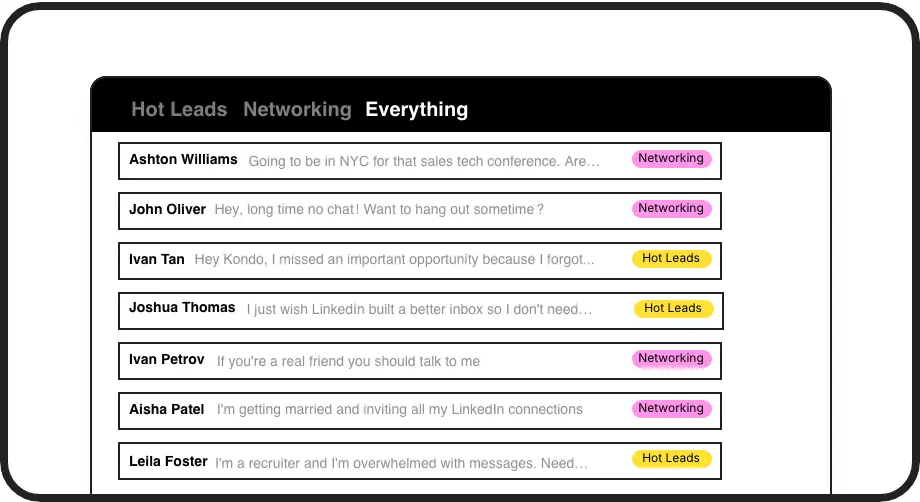
Organize Candidates
Label conversations by role, stage (e.g., 'Screening', 'Interviewing'), or priority. View candidates in dedicated, clutter-free inboxes. This structured approach ensures no promising applicant gets overlooked, helping you build a stronger talent pipeline.
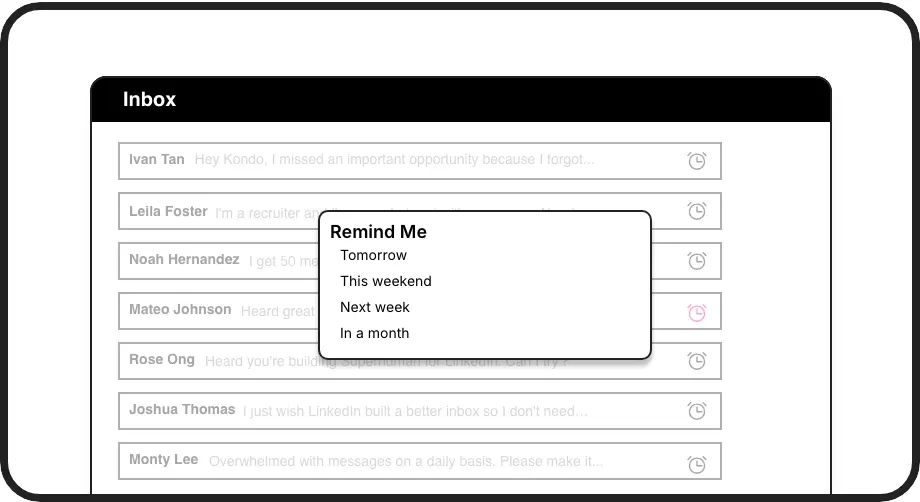
Never Miss Follow-ups
Set critical reminders for candidate follow-ups or next steps directly within LinkedIn. Snooze conversations and have them reappear at the top of your inbox exactly when needed, keeping your recruitment pipeline consistently moving forward.
Sync to ATS/CRM
Automatically push candidate conversation data, notes, and labels to your ATS (e.g., Greenhouse) or CRM. Keep records updated effortlessly, saving hours on manual entry and ensuring team visibility.
Give Your AI Access to Your LinkedIn Inbox
Let Claude, ChatGPT, or Cursor triage your LinkedIn inbox. Your agent reads messages on your computer, can draft replies, add labels, and set reminders.
Explore the LinkedIn MCP serverlist_chats “pricing”6 foundread_chat× 6set_chat_draft× 6set_chat_label “Hot”× 6
LinkedIn left your inbox in 2000. Bring it into 2026.
Get the upgrade every power user's been waiting decades for.


Hire Faster, Lose Fewer Candidates
50%
Fewer Missed Candidates
5+ hrs
Saved Weekly
2x
Faster Candidate Engagement
FAQs
How does Kondo help track candidates specifically?
Kondo allows you to create custom labels (e.g., 'Java Dev Q3', 'Screened', 'Offer Stage') and view candidates in separate, organized inboxes. You can set reminders for follow-ups at each stage. Combined with CRM/ATS sync, you get a powerful candidate tracking hub right within LinkedIn.
Can I integrate Kondo with my ATS like Greenhouse?
Yes! Kondo offers integrations (native for some, or via Zapier/Make.com for others like Greenhouse) to sync conversation data, notes, and labels. This keeps your ATS updated with the latest candidate interactions from LinkedIn, reducing manual data entry and ensuring system-wide visibility.
Is Kondo safe to use with LinkedIn Recruiter?
Kondo is designed with safety in mind. It doesn't scrape profiles, modify LinkedIn's UI directly in a risky way, or perform automation that violates LinkedIn's terms. It enhances your existing browser session securely. For more details, check our safety documentation.
How do labels work for candidate pipelines?
You can label a conversation with multiple tags, for example, by role ('Frontend Engineer') and by stage ('Initial Contact', 'Tech Screen Scheduled'). This allows granular organization and filtering. You can then focus on candidates in a specific role at a specific stage.
What if I manage candidates for many roles?
Kondo's split inboxes for labels are perfect for this. Each role or priority can have its own inbox view, making it easy to switch context and manage high volumes of candidates without getting overwhelmed. The 'Clean Up My Inbox' feature also helps manage backlog.