Stop Losing Candidates in LinkedIn DM Clutter.
Kondo syncs LinkedIn to your ATS/CRM, organizing candidates and saving hours.
What people say
LinkedIn Inbox Costing You Top Recruits?
Chaotic DMs lead to missed talent, slow hiring, and manual ATS updates.
Candidate DM Overload
Juggling DMs for multiple roles? Important candidates get lost, slowing down your hiring pipeline and causing frustration.
Forgotten Follow-Ups
Promising candidates disengage from inconsistent follow-ups. Missed opportunities due to LinkedIn's lack of native reminders.
Manual ATS Drudgery
Wasting hours copying candidate updates and conversation notes to your ATS? This tedious work is slow and error-prone.
Recruit Smarter with Kondo on LinkedIn.
Organize candidates, automate follow-ups, and integrate with your ATS. Don't let top talent slip through the cracks.
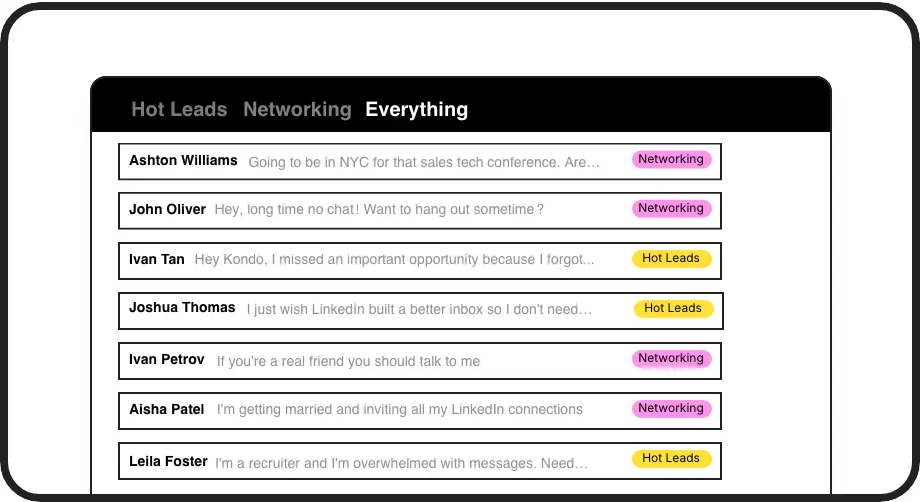
Categorize Candidates Instantly
Apply labels like 'Role: Java Dev' or 'Stage: Screening'. View candidates in dedicated inboxes, focus on the right talent, and track progress effortlessly. Kondo helps you manage multiple searches.
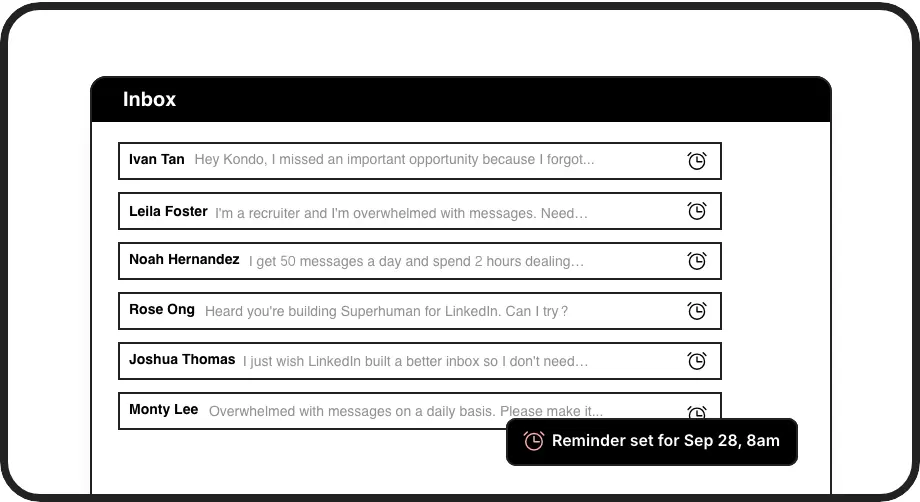
Never Miss Follow-ups
Set reminders for candidate follow-ups directly within LinkedIn DMs. Kondo brings messages back to your attention when due, ensuring timely engagement and a positive candidate experience.
Sync to Your ATS
Automatically push LinkedIn DM details, notes, and candidate status to your ATS (e.g., Greenhouse, Lever) via webhooks or Zapier/Make. Eliminate manual data entry and keep records updated.
Give Your AI Access to Your LinkedIn Inbox
Let Claude, ChatGPT, or Cursor triage your LinkedIn inbox. Your agent reads messages on your computer, can draft replies, add labels, and set reminders.
Explore the LinkedIn MCP serverlist_chats “pricing”6 foundread_chat× 6set_chat_draft× 6set_chat_label “Hot”× 6
LinkedIn left your inbox in 2000. Bring it into 2026.
Get the upgrade every power user's been waiting decades for.


Hire Faster, Reclaim Your Time.
5+ hrs
saved per week
30%+
faster candidate responses
Zero
lost top candidates
FAQs
How does Kondo handle high-volume candidate DMs?
Kondo uses labels (e.g., by role/stage), reminders for follow-ups, and an Inbox Zero approach to manage many DMs. Keyboard shortcuts speed up processing, ensuring you efficiently track every candidate and don't miss opportunities. It declutters your LinkedIn inbox.
Can Kondo integrate with recruitment ATS like Greenhouse?
Yes, Kondo integrates with ATSs like Greenhouse, Lever, and others. Using webhooks (Business Tier), Zapier, or Make.com, you can sync LinkedIn conversation data, notes, and labels automatically. This saves time on manual updates and centralizes candidate information.
Is Kondo safe for my LinkedIn Recruiter account?
Kondo prioritizes account safety. It operates via a browser extension and doesn't perform risky actions like scraping or unauthorized automation. It uses your existing LinkedIn session, enhancing your inbox without violating LinkedIn's terms. Many recruiters use it daily.
How to manage DMs for multiple job requisitions?
Kondo's labeling is perfect for this. Create distinct labels for each job (e.g., 'SWE-Backend', 'Product Manager') or stage ('Sourced', 'Interviewing'). Each label acts as a separate inbox, keeping your candidate pipelines organized and easily manageable within LinkedIn.
How does Kondo help recruiters maintain candidate relationships over time?
Kondo excels at long-term candidate relationship management through its reminder system and organizational tools. Recruiters can label passive candidates by expertise or potential fit, then set strategic follow-up reminders that bring conversations back to the top of their inbox at ideal times (quarterly check-ins, after company funding rounds, etc.). This systematic approach ensures you maintain warm connections with high-value candidates even when you don't have immediate openings. The snippets feature also enables personalized-feeling check-ins at scale, allowing recruiters to nurture talent pools efficiently while maintaining the human touch that distinguishes great recruiters.