Automated LinkedIn Message Chaos? Kondo Organizes It.
Kondo tames your chaotic LinkedIn inbox with smart organization, reminders, and fast workflows.
What people say
Drowning in DMs? Losing leads and time?
Your LinkedIn inbox is a battlefield. Important replies are lost, follow-ups forgotten.
Opportunities Missed Daily
Critical lead responses and candidate replies vanish in clutter, costing you deals and hires.
Follow-ups Forgotten
Manual tracking fails. Promising conversations go cold, wasting outreach efforts and potential revenue.
Hours Wasted Sorting
You spend hours manually sifting through messages instead of engaging with key contacts.
Automate Your LinkedIn Inbox Workflow with Kondo.
Transform LinkedIn messaging from a time-sink into a streamlined, automated powerhouse for lead engagement and follow-up.
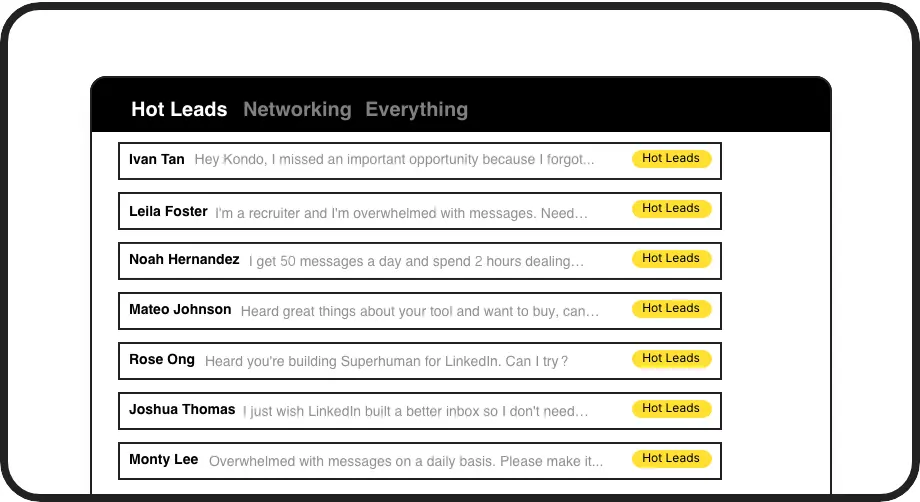
Smart Message Triage
Automatically categorize DMs with custom labels. View focused inboxes (e.g., 'Hot Leads', 'Follow Up Soon') to instantly see what needs attention, automating your prioritization.

Automated Follow-Up Reminders
Never forget a follow-up. Set reminders in seconds; Kondo brings conversations back to you automatically. Ensure timely engagement without manual tracking.
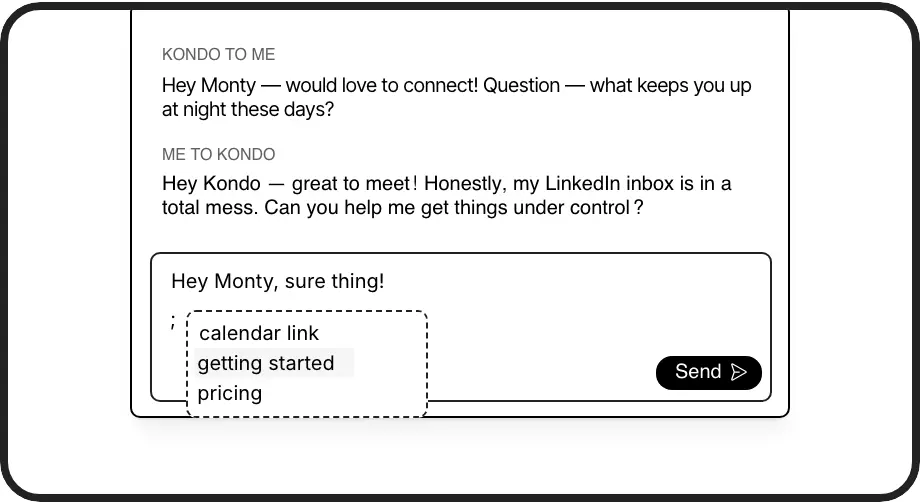
Instant Personalized Replies
Respond faster with pre-saved message snippets. Insert personalized common replies instantly, automating repetitive typing and saving hours weekly.
Give Your AI Access to Your LinkedIn Inbox
Let Claude, ChatGPT, or Cursor triage your LinkedIn inbox. Your agent reads messages on your computer, can draft replies, add labels, and set reminders.
Explore the LinkedIn MCP serverlist_chats “pricing”6 foundread_chat× 6set_chat_draft× 6set_chat_label “Hot”× 6
LinkedIn left your inbox in 2000. Bring it into 2026.
Get the upgrade every power user's been waiting decades for.


Reclaim Time, Close More Deals with Automation.
50%+
Less Inbox Time
2x
Faster Follow-ups
0
Missed Hot Leads
FAQs
How does Kondo automate LinkedIn messages?
Kondo automates your LinkedIn message *management*. It doesn't send messages for you. Features like smart labeling, automatic reminders for follow-ups, and quick snippets streamline your workflow, reducing manual effort and ensuring you prioritize and respond efficiently. This helps you manage high volume without missing key conversations.
Is Kondo safe to use with LinkedIn?
Yes, Kondo is designed for safety. It doesn't scrape profiles, inject code, or perform risky automation that violates LinkedIn's terms. It enhances your existing LinkedIn experience by organizing your inbox and making you more efficient, working through your browser like a productivity tool.
Can I connect Kondo to my CRM?
Yes, Kondo's Business tier offers integrations with CRMs like HubSpot and Salesforce (via Zapier/Make), plus Notion and Google Sheets. This allows you to automatically sync LinkedIn conversation data, saving manual entry and providing team visibility on lead interactions.
What if I get too many LinkedIn messages?
Kondo is built for this! Use labels to categorize, reminders to schedule follow-ups, and the 'Clean Up My Inbox' command to bulk archive old messages. Kondo helps you achieve 'Inbox Zero' on LinkedIn, turning chaos into an organized, actionable to-do list.
How does Kondo help with LinkedIn message follow-ups?
Kondo's Reminders feature archives conversations and resurfaces them at scheduled times, ensuring important follow-ups aren't missed.