
Sync LinkedIn Messages to HubSpot Automatically
Stop manually copying LinkedIn conversations into your CRM. Kondo seamlessly pushes your LinkedIn messages to HubSpot, ensuring every lead interaction is captured without the busy work.
What people say
LinkedIn Messages Lost in CRM
Sales teams lose valuable context when LinkedIn conversations never make it to HubSpot.
Manual Data Entry Burden
Hours wasted copy-pasting LinkedIn conversations into HubSpot, leading to inconsistent tracking and rep burnout.
Missed Follow-Up Opportunities
Critical LinkedIn messages get buried in cluttered inboxes, causing delayed responses and lost deals.
Incomplete Contact Records
LinkedIn conversations remain siloed from your HubSpot contact history, creating blind spots in customer journey.
Seamless LinkedIn to HubSpot Integration
Kondo bridges the gap between LinkedIn and HubSpot, ensuring your CRM data is always complete without manual effort.
Automated HubSpot Sync
Push LinkedIn conversations, labels, and notes directly to HubSpot in real-time or on-demand. Eliminate manual data entry and ensure complete visibility of lead interactions.
Smart Lead Labeling
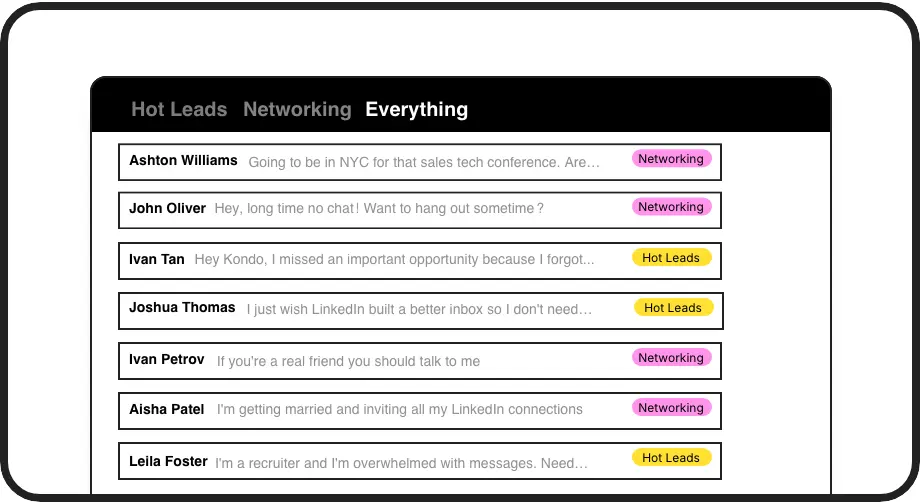
Categorize LinkedIn conversations with custom labels like 'Hot Lead' or 'Prospect' and view them in prioritized inboxes. Sync these labels to HubSpot for consistent lead tracking.
Timed Follow-up Reminders
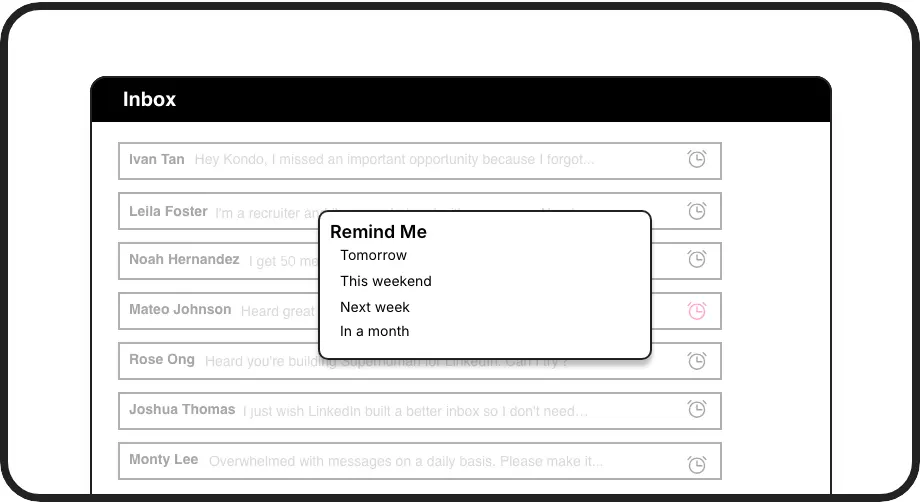
Set follow-up reminders that bring important conversations back to the top of your inbox at the perfect time. Never forget to respond to a hot lead again.
LinkedIn left your inbox in 2000. Bring it into 2026.
Get the upgrade every power user's been waiting decades for.


Save Time, Close More, Miss Nothing
4 hours
saved weekly on data entry
100%
LinkedIn messages captured
Zero
missed follow-ups
FAQs
How does Kondo sync LinkedIn messages to HubSpot?
Kondo connects to HubSpot via our native integration in the Business tier. Once connected, LinkedIn conversations, labels, and notes can be automatically synced to your HubSpot CRM in real-time or on-demand. You can choose to sync the latest message or the entire conversation history.
Do I need to install anything to use the LinkedIn to HubSpot sync?
Yes, Kondo is a desktop application that works alongside LinkedIn in your browser. It's a native app that securely connects to LinkedIn without scraping or injecting prohibited code, ensuring compliance with LinkedIn's terms of service.
Can I choose which LinkedIn conversations sync to HubSpot?
Absolutely. Using Kondo's labeling system, you can categorize conversations (e.g., 'Hot Lead', 'Client', 'Prospect') and selectively sync based on these labels. This ensures only relevant conversations make it to your HubSpot CRM.
Will Kondo work with my Sales Navigator messages?
Yes, Kondo unifies your regular LinkedIn inbox and Sales Navigator inbox in a single view. All messages, regardless of which LinkedIn inbox they came from, can be synced to HubSpot with our integration.
What information from LinkedIn conversations transfers to HubSpot?
Kondo syncs message content, timestamps, labels you've applied, and any notes you've added to conversations. This creates a complete record of LinkedIn interactions directly in your HubSpot contact records, ensuring your team has full context for every lead.