
LinkedIn Sales Pipeline Management That Syncs to Your CRM
Kondo transforms your chaotic LinkedIn inbox into a streamlined sales pipeline tool. Never miss a lead, automate CRM updates, and close more deals with organized conversations.
What people say
LinkedIn Messaging Chaos Costs Sales
Sales teams lose opportunities daily in cluttered LinkedIn inboxes.
Lost Sales Opportunities
Hot leads and follow-ups get buried under notifications, causing missed connections and revenue loss.
Manual CRM Updates
Copy-pasting LinkedIn conversations into your CRM wastes valuable selling time and creates incomplete records.
Disorganized Pipelines
Without structure, your LinkedIn conversations become a scattered mess with no clear prioritization or follow-up system.
Transform LinkedIn into Your Sales Command Center
Kondo brings organization, automation, and speed to your LinkedIn sales pipeline with powerful tools designed for closers.
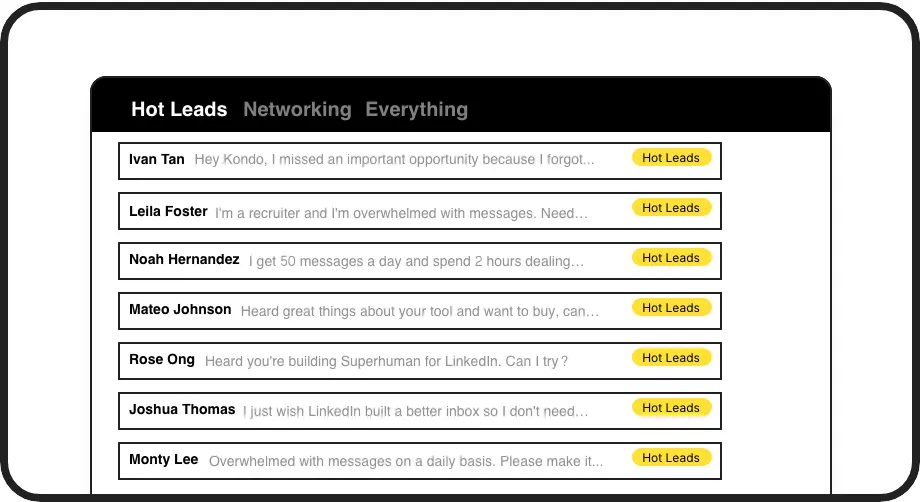
Organize Your Sales Pipeline
Label conversations with 'Hot Lead', 'Nurturing', or 'Client' and view them in separate inboxes. No more losing track of priority prospects in your message chaos.
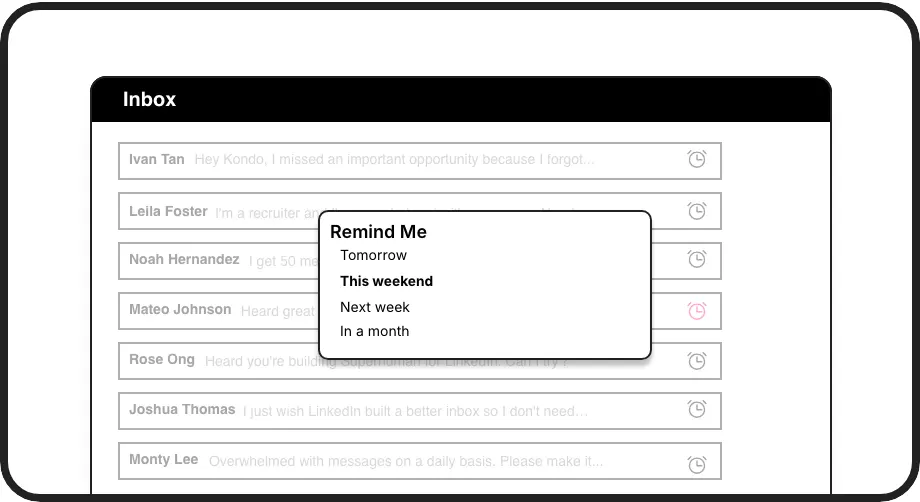
Never Miss Follow-ups
Set reminders on conversations and they'll resurface exactly when needed. Perfect for multi-touch sequences and keeping your sales pipeline moving forward.
Automatic CRM Updates
Sync LinkedIn conversations directly to HubSpot, Salesforce, or other CRMs via webhooks. Maintain complete pipeline visibility without the manual data entry.
LinkedIn left your inbox in 2000. Bring it into 2026.
Get the upgrade every power user's been waiting decades for.


Close More Deals, Save More Time
72%
fewer missed leads
5hrs
saved weekly
100%
CRM visibility
FAQs
How does Kondo connect LinkedIn to my CRM?
Kondo connects to your CRM through webhooks or native integrations. For systems like HubSpot, we offer direct integration. For Salesforce and others, we support connections via Zapier or Make.com. You can sync either the latest message or entire conversation history, with options for manual or automatic streaming updates.
Can I organize leads by different stages in my pipeline?
Yes! Kondo's labeling system allows you to create custom labels for different pipeline stages (e.g., 'New Lead', 'Meeting Scheduled', 'Proposal Sent'). You can apply multiple labels to conversations and view them in dedicated inboxes, making it easy to track prospects through your sales pipeline.
Does Kondo work with Sales Navigator?
Absolutely! Kondo combines your regular LinkedIn inbox with your Sales Navigator inbox into a single, unified view. This eliminates the need to switch between two separate inboxes and provides a holistic view of all your LinkedIn communications in one place.
How does Kondo help with follow-ups in my sales pipeline?
Kondo's reminder feature lets you snooze conversations to reappear at a specific time. Simply use the 'H' shortcut to set a reminder, and the conversation will automatically resurface at the top of your inbox when it's time to follow up. The reminder cancels if a new message arrives before the due time.
Is Kondo compliant with LinkedIn's terms of service?
Yes, Kondo is a native desktop application that works alongside LinkedIn without scraping data or injecting code. We don't automate prohibited LinkedIn actions and focus on enhancing your experience within LinkedIn's guidelines while keeping your communications safe and secure.