
Pipedrive LinkedIn Integration That Automates Your Workflow
Stop manually logging LinkedIn conversations in Pipedrive. Kondo automatically syncs your LinkedIn messages with your CRM, saving hours and ensuring no lead ever falls through the cracks.
What people say
LinkedIn-to-Pipedrive Frustrations
Manual data entry is killing your sales productivity and leading to costly mistakes.
Lost Sales Opportunities
Important LinkedIn messages get buried in cluttered inboxes, causing missed follow-ups and lost revenue.
Tedious Manual Updates
Copying LinkedIn conversations into Pipedrive wastes hours weekly and introduces human error.
Disconnected Sales Data
When LinkedIn activity isn't synced with Pipedrive, your sales pipeline becomes fragmented and unreliable.
Seamless LinkedIn-Pipedrive Connection
Kondo bridges the gap between LinkedIn messaging and your Pipedrive CRM, creating a unified workflow that saves time and captures every opportunity.
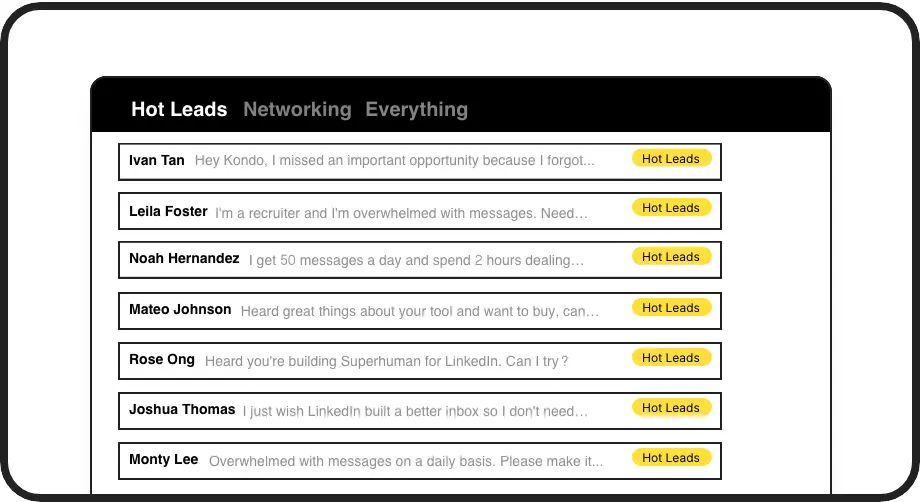
Organize LinkedIn Leads
Label conversations with 'Hot Lead', 'Client', or custom tags to prioritize and track opportunities before syncing them to Pipedrive.
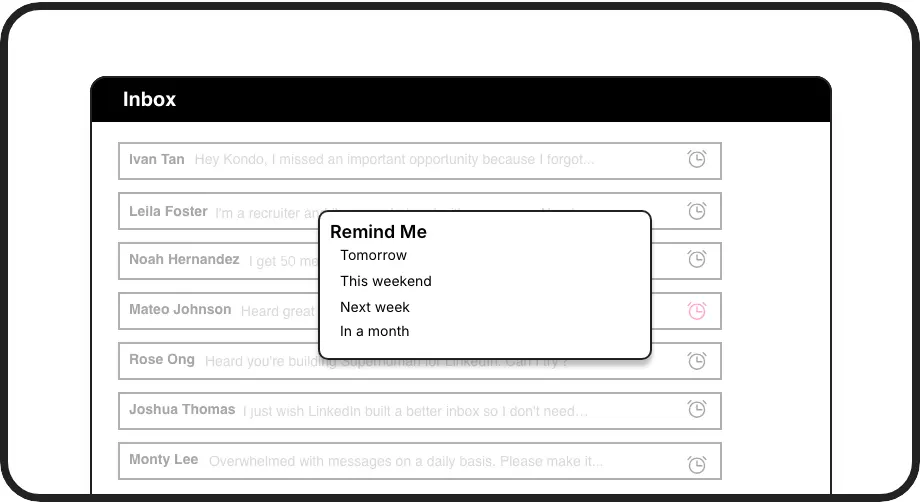
Never Miss Follow-ups
Set reminders to bring important LinkedIn conversations back to the top of your inbox at the perfect time, ensuring timely engagement with prospects.
Automatic Pipedrive Sync
Connect Kondo to Pipedrive via Zapier or Make to automatically push LinkedIn conversations, notes, and labels, keeping your CRM current without manual entry.
LinkedIn left your inbox in 2000. Bring it into 2026.
Get the upgrade every power user's been waiting decades for.


Boost Sales, Save Time, Close More
100%
LinkedIn lead visibility
5+ hrs
saved weekly
0
missed opportunities
FAQs
How does Kondo integrate LinkedIn with Pipedrive?
Kondo connects to Pipedrive through Zapier or Make.com integrations. Our CRM & System Sync feature (available on the Business tier) uses webhooks to automatically push LinkedIn conversation data, including messages, labels, and notes, directly to your Pipedrive account without any manual copying and pasting.
What LinkedIn data can I sync to Pipedrive?
You can sync LinkedIn messages, conversation labels, notes, and contact information to Pipedrive. Kondo gives you the option to sync either the latest message or the entire conversation history, with the ability to configure manual syncing or automatic streaming updates that push data whenever changes occur.
Is Kondo compliant with LinkedIn's terms of service?
Yes, Kondo is fully compliant with LinkedIn's terms of service. Our native desktop app doesn't scrape data, inject code, or automate prohibited LinkedIn actions. We prioritize safety and security while enhancing your productivity.
Can I organize LinkedIn leads before syncing to Pipedrive?
Absolutely. Kondo's labeling system lets you categorize conversations with custom labels like 'Hot Lead', 'Client', or 'Prospect' and view them in separate, prioritized inboxes. These labels can then be synced to Pipedrive, maintaining your organizational structure across platforms.
How will Kondo save me time compared to manual Pipedrive updates?
Kondo eliminates the need to copy-paste LinkedIn conversations into Pipedrive manually. With keyboard shortcuts, you can quickly navigate your inbox, set reminders for follow-ups, and label important conversations. The automatic CRM sync ensures your Pipedrive is always up-to-date without tedious data entry, saving hours weekly.