
LinkedIn Messaging Management Tool for Small Business
Kondo helps small business owners organize and prioritize LinkedIn DMs with custom labels and reminders. Never miss important leads or client messages buried in your cluttered inbox again.
What people say
LinkedIn DM Chaos
Small businesses lose opportunities daily due to disorganized LinkedIn messaging
Buried Leads
Critical messages from potential clients get lost under notifications and spam, causing missed sales opportunities.
Delayed Responses
Without a system to track important conversations, response times lag, creating poor impressions with prospects.
Time Wasted
Small business owners spend hours manually sorting through LinkedIn messages instead of focusing on revenue-generating activities.
Organize Your LinkedIn Inbox Like a Pro
Kondo transforms your chaotic LinkedIn inbox into a streamlined communication hub with powerful organization tools designed for small business owners.
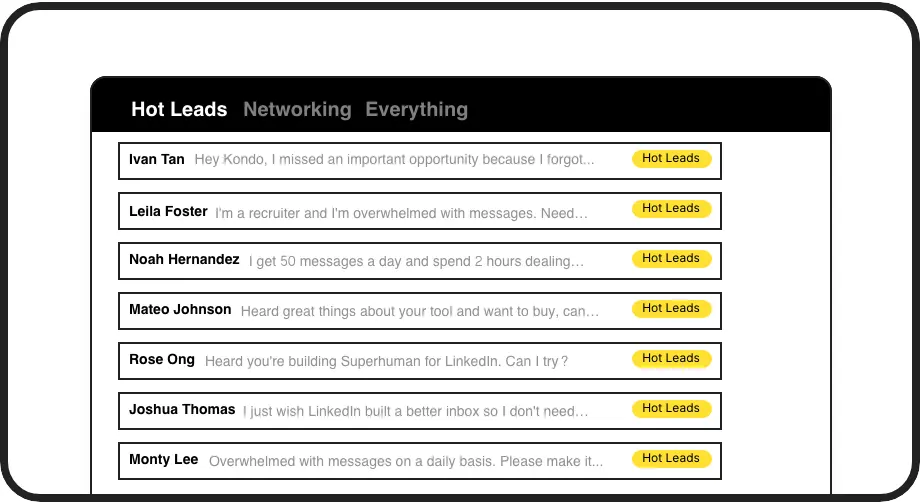
Label Important Messages
Create custom labels for leads, clients, and candidates. View conversations in separate inboxes so hot opportunities never get buried again.

Smart Reminders
Set follow-up reminders that bring conversations back to the top of your inbox exactly when needed. Never forget to follow up with a potential client.
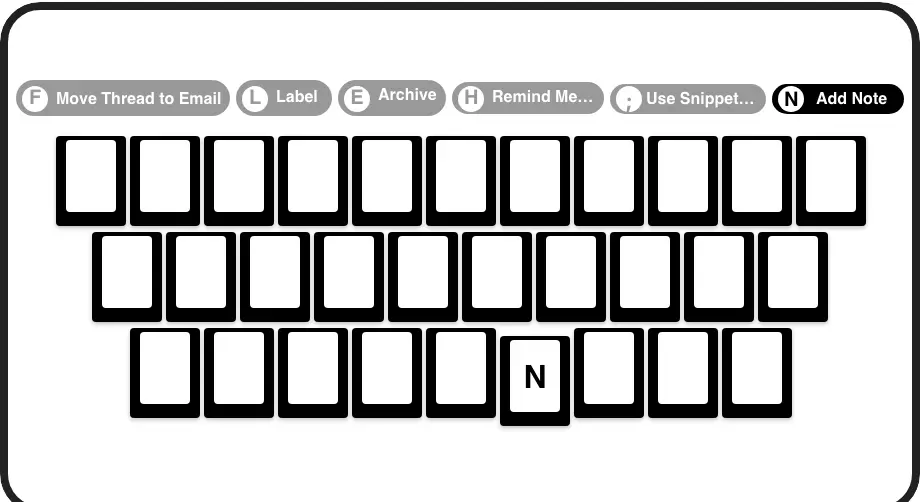
Speed Through Messages
Process your LinkedIn inbox at lightning speed with keyboard shortcuts for everything. Archive, snooze, or label conversations with a single keypress.
LinkedIn left your inbox in 2000. Bring it into 2026.
Get the upgrade every power user's been waiting decades for.


Save Time, Close Deals, Grow Business
50%
Less Time Sorting
3x
Faster Response Time
Zero
Missed Opportunities
FAQs
How does Kondo help small businesses manage LinkedIn messages?
Kondo helps small businesses organize LinkedIn messages with custom labels, split inboxes, and reminders. You can categorize conversations (leads, clients, vendors), set follow-up reminders, and use keyboard shortcuts to process messages faster. This prevents important messages from getting buried and ensures timely follow-ups with potential clients.
Is Kondo safe to use with my LinkedIn account?
Yes, Kondo is completely safe. It's a native desktop application that doesn't scrape data, inject code, or automate prohibited LinkedIn actions. Kondo works within LinkedIn's terms of service to enhance your messaging experience without putting your account at risk.
Can I integrate Kondo with my CRM system?
Yes, Kondo's Business tier offers CRM & System Sync capabilities. You can integrate with HubSpot, Salesforce (via Zapier/Make), Google Sheets, Notion, and more using webhooks or native integrations. This allows you to log LinkedIn activity and conversation details automatically, saving manual data entry time.
What features make Kondo ideal for small business owners?
Kondo offers features specifically valuable to small businesses: custom labels to organize leads/clients, reminder system for timely follow-ups, keyboard shortcuts for rapid inbox processing, message snippets for consistent communication, and CRM integration. These tools help small business owners manage relationships efficiently without missing opportunities.
Can I create templates for common messages I send on LinkedIn?
Absolutely! Kondo's Snippets feature allows you to save frequently used messages as templates that can be quickly inserted into replies. You can use variables like {firstName} for personalization. This saves significant time on repetitive typing and ensures consistency in your communications with leads and clients.