
LinkedIn Inbox Management Tool for Sales Teams
LinkedIn's native inbox has no sales workflow. Kondo adds labels, reminders, and CRM sync so every lead gets followed up.
What people say
Your LinkedIn Inbox Is Losing Deals
Sales reps lose opportunities daily because LinkedIn has no built-in sales workflow or prioritization.
No Way to Prioritize Leads
Hot leads, cold outreach, and spam share one undifferentiated LinkedIn inbox. Critical sales conversations get buried and missed.
Follow-Ups Fall Through Cracks
Without reminders, reps forget to circle back on sales leads. Prospects go cold while still interested.
LinkedIn Activity Is Invisible
Conversations that drive revenue never reach your CRM. Managers have no pipeline visibility into LinkedIn sales activity.
Turn LinkedIn Into a Real Sales Channel
Kondo layers a proper sales workflow on top of your LinkedIn inbox. Prioritize leads, automate follow-up cadence, and close the CRM data loop.
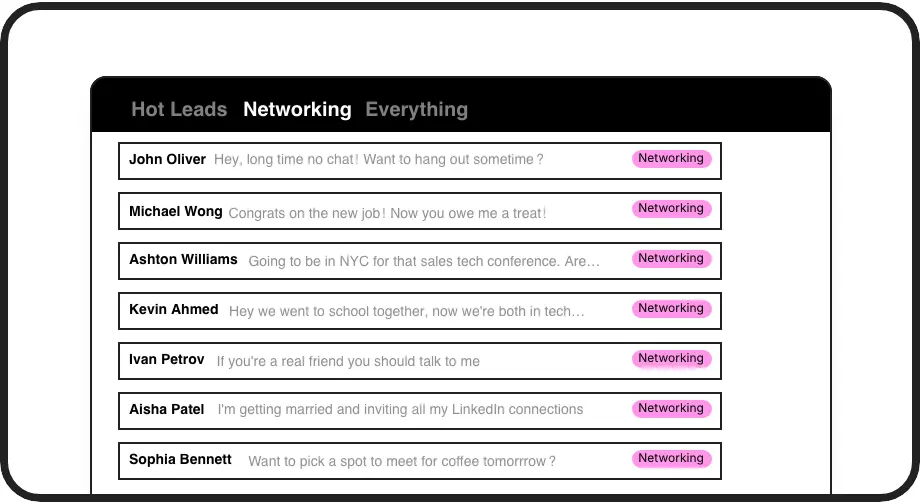
Triage Your Sales Inbox
Tag conversations as Hot Lead, Follow Up, or Closed and manage each in a dedicated split inbox. Stop losing high-priority sales leads in the noise.
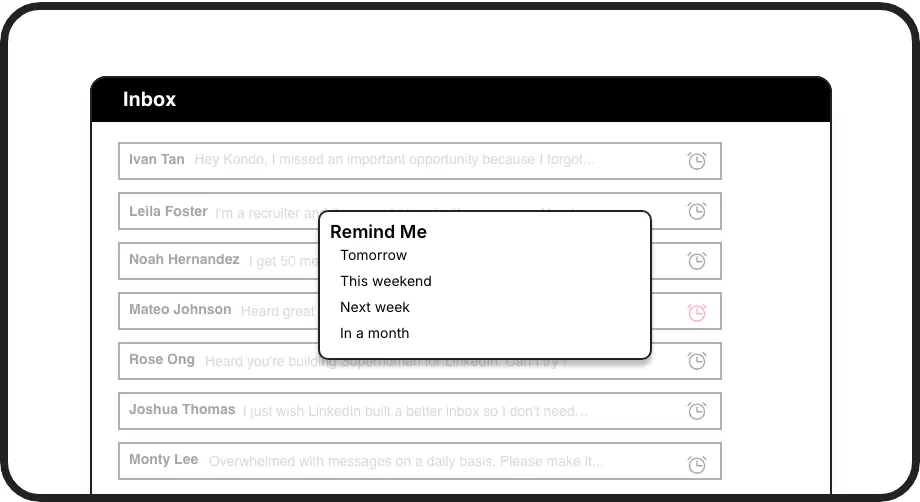
Never Miss a Follow-Up
Snooze any prospect thread and it resurfaces at the top of your LinkedIn inbox when it is time to re-engage. Build a reliable follow-up cadence without external tools.
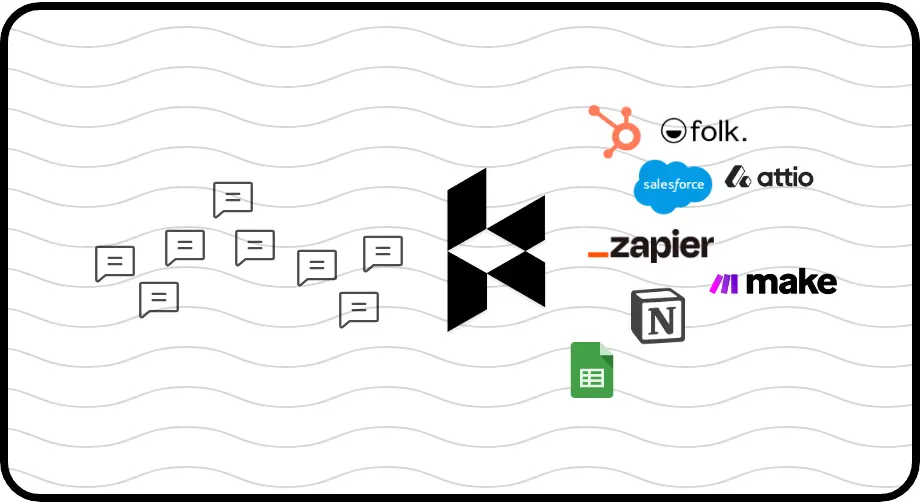
Sync LinkedIn to Your CRM
Push LinkedIn conversations to HubSpot, Salesforce, Notion, Google Sheets, and more. Every sales interaction is logged automatically, eliminating manual data entry and pipeline blind spots.
LinkedIn left your inbox in 2000. Bring it into 2026.
Get the upgrade every power user's been waiting decades for.


More Deals. Fewer Missed Leads. Less Wasted Time.
0
Missed Follow-Ups
100%
LinkedIn Activity Logged
Hours
Saved on Inbox Sorting
FAQs
How do I prioritize LinkedIn leads with Kondo?
Kondo lets you apply custom labels like Hot Lead or Follow Up to any LinkedIn conversation and view them in dedicated split inboxes. Your most important sales conversations are always visible at the top, separated from networking noise and spam, so you work your hottest opportunities first.
Can Kondo remind me to follow up with prospects?
Yes. You can snooze any prospect thread for tomorrow, three days, next week, or a custom date. The conversation disappears from your inbox and automatically resurfaces at the top when it is due. If the prospect replies before the reminder fires, it cancels automatically so you are never double-notified.
How does CRM sync work in Kondo?
Kondo connects to HubSpot, Salesforce (via Zapier or Make), Notion, Google Sheets, Attio, Clarify, and more. You can sync the latest message or full conversation history, either manually or via streaming updates. Every LinkedIn sales interaction is logged to your CRM without copy-pasting or manual data entry. CRM sync is available on the Business tier.
Does Kondo work with Sales Navigator?
Yes. Kondo combines your regular LinkedIn inbox and your Sales Navigator inbox into a single unified view. You can see and manage all DMs from both in one place, eliminating the need to toggle between two separate inboxes. This feature requires the Business plan and a one-time setup step.
Is Kondo safe for my LinkedIn account?
Kondo is a native desktop app. It does not scrape LinkedIn data, inject unauthorized code, or automate actions that violate LinkedIn's terms of service. Your account activity stays within normal usage patterns, so you can use Kondo confidently as part of your daily sales workflow.