
The LinkedIn Inbox Tool Built for Speed
Kondo adds labels, keyboard shortcuts, and reminders to your LinkedIn inbox. Stop losing hot leads in the clutter.
What people say
Your LinkedIn Inbox Is Broken
Power users need more than LinkedIn offers. The default inbox costs you deals.
No Structure for Power Users
LinkedIn's inbox has no labels, no shortcuts, no archive system. Critical messages from leads get buried under noise.
Every Message Looks the Same
Hot leads, cold outreach, and spam sit in one unmanageable stream. Finding the right thread means endless scrolling.
No Follow-Up System Built In
LinkedIn has no reminders or snooze. Important conversations get buried and forgotten, costing you the deal.
Everything Your LinkedIn Inbox Is Missing
Kondo adds the inbox tools LinkedIn never built. Labels, shortcuts, and reminders that turn chaos into a clean, fast workflow.
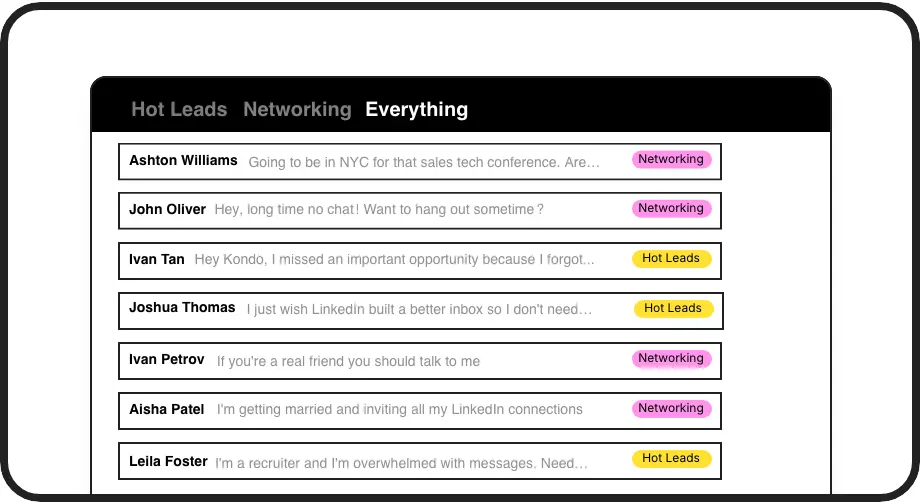
Instant Inbox Structure
Label conversations as Hot Lead, Candidate, or Client and view each group in its own inbox. Find any thread in seconds, not minutes.
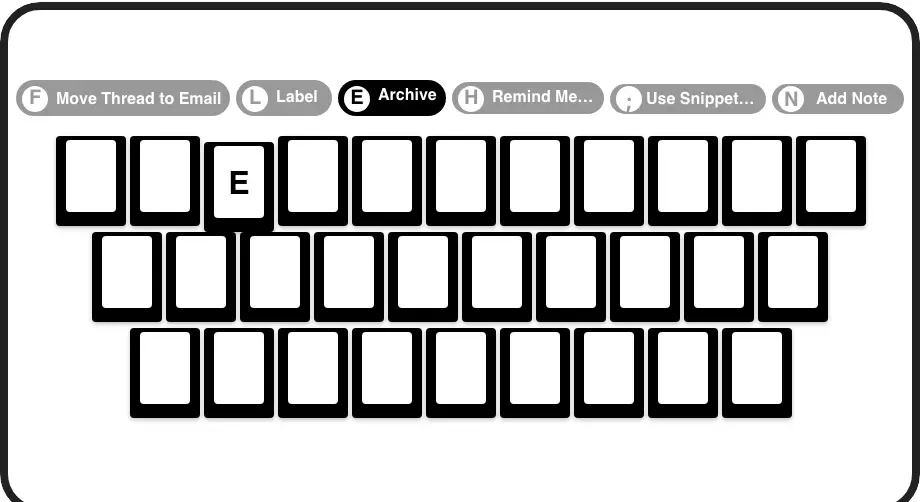
Process Messages Faster
J/K to navigate, E to archive, H to snooze, L to label. Power through your LinkedIn inbox in a fraction of the time, no mouse needed.
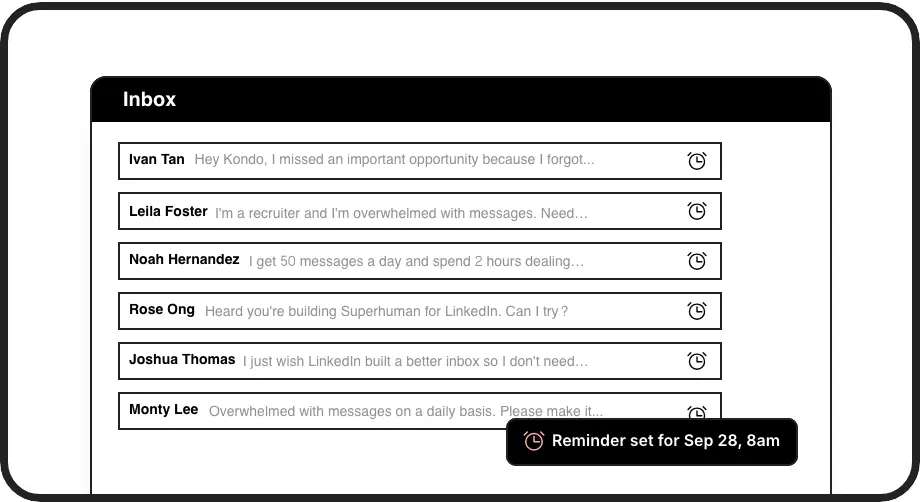
Never Miss a Follow-Up
Snooze any conversation to resurface at the top of your inbox when it is due. Your LinkedIn inbox becomes a reliable follow-up list.
LinkedIn left your inbox in 2000. Bring it into 2026.
Get the upgrade every power user's been waiting decades for.


Faster Inbox. Zero Missed Threads. More Deals.
0
Hot Leads Slipping Through
2x
Faster Inbox Processing
100%
Follow-Ups Actioned
FAQs
What does Kondo actually add to the LinkedIn inbox?
Kondo adds labels, split inboxes, keyboard shortcuts, reminders, snippets, and CRM sync — everything the native LinkedIn inbox is missing. It is a desktop app that sits on top of your LinkedIn messaging workflow and transforms it into a fast, structured communication hub.
How fast can I process messages with Kondo?
With keyboard shortcuts for every action — navigate with J/K, archive with E, snooze with H, label with L — you can power through your LinkedIn inbox without touching the mouse. Users who rely on LinkedIn messaging daily process their inbox in a fraction of the time compared to the native interface.
Is Kondo a Chrome extension or a standalone app?
Kondo is a native desktop app, not a Chrome extension. This means it operates cleanly without injecting code into your browser, giving you a more stable and secure experience for managing your LinkedIn inbox tool workflow.
Does Kondo work with Sales Navigator?
Yes. Kondo can combine your regular LinkedIn inbox and your Sales Navigator inbox into a single unified view. This is available on the Business plan and eliminates the need to switch between two separate inboxes when managing outreach and follow-ups.
Is Kondo safe for my LinkedIn account?
Yes. Kondo is a native desktop app that does not scrape data, inject code, or automate any actions that violate LinkedIn's terms of service. It is designed to enhance your manual messaging workflow with speed and organization, keeping your account safe.