
LinkedIn Inbox Organization Software for Small Business Marketing
Kondo organizes your LinkedIn inbox so marketing leads, partners, and collaborators never get lost. One inbox, zero chaos.
What people say
Your LinkedIn Inbox Is Costing You
Small business marketers juggle too much in one inbox. Organization software fixes that.
One Inbox, Too Many Hats
Marketing leads, partner requests, and customer messages all land together. Without organization software, small businesses can't tell what needs attention first.
Follow-Ups Fall Through Cracks
Small business marketers juggle LinkedIn outreach with a dozen other tasks. Promising marketing conversations go cold with no system to circle back.
No Visibility Into Marketing Conversations
Using LinkedIn for marketing with no way to categorize conversations means partners, leads, and collaborators blur together in your inbox.
Organize Your LinkedIn Marketing Inbox With Kondo
Kondo gives small business marketers the tools to label, follow up, and sync LinkedIn conversations without added complexity or big budgets.
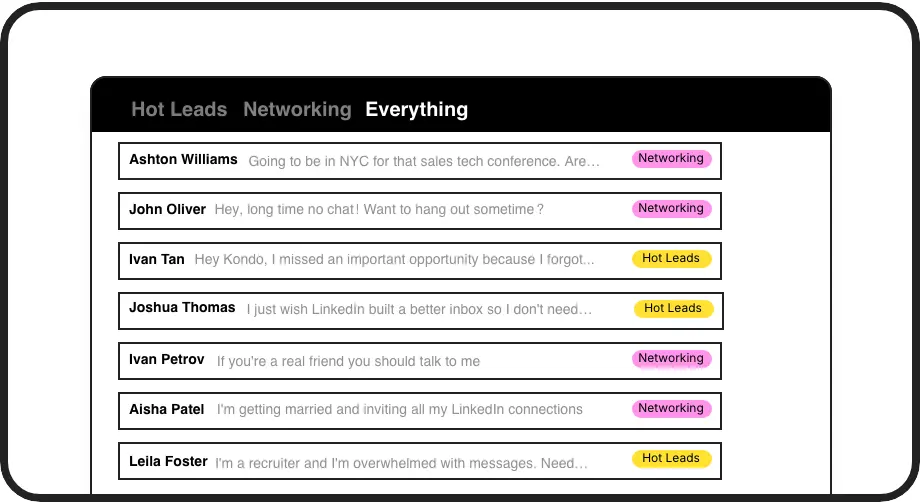
Organize by Marketing Priority
Tag conversations as Partner, Lead, or Collaborator and view each in a split inbox. Finally see what your LinkedIn marketing pipeline actually looks like.
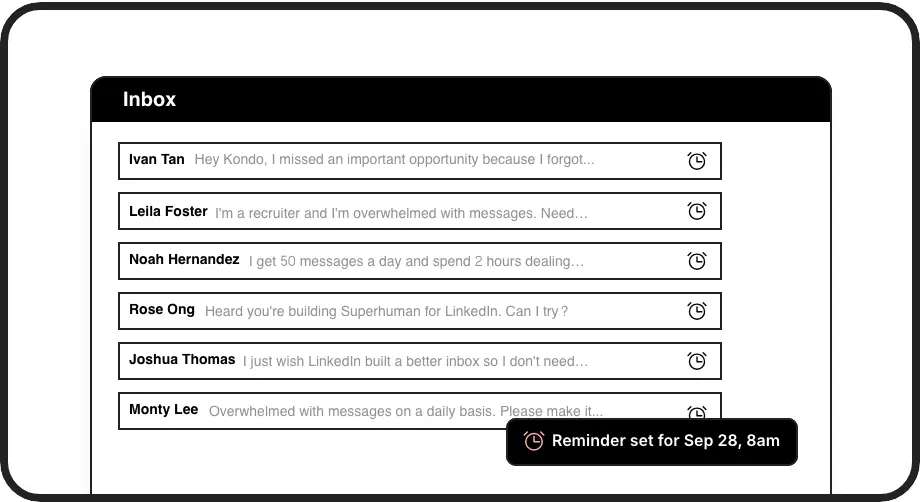
Marketing Follow-Up on Autopilot
Snooze conversations to resurface when it is time to follow up. Keep every marketing relationship moving without relying on memory or sticky notes.
Sync to Small Business Tools
Push LinkedIn conversations to Notion, Google Sheets, or HubSpot. No expensive CRM required. Works with tools small businesses already use.
LinkedIn left your inbox in 2000. Bring it into 2026.
Get the upgrade every power user's been waiting decades for.


Organized Inbox. Completed Follow-Ups. Protected Marketing ROI.
0
Marketing Conversations Lost
100%
Follow-Ups Completed
1
Inbox for Everything
FAQs
Is Kondo affordable for small businesses?
Kondo is built for professionals and small teams who need real inbox organization without enterprise pricing. Core features like labels, reminders, and keyboard shortcuts are available without a big budget. Check trykondo.com for current plan details and pricing that fits small business needs.
Can I organize LinkedIn messages by marketing campaign or type?
Yes. Kondo lets you create custom labels like Partner, Lead, or Collaborator and view each group in its own split inbox. This means your LinkedIn marketing inbox is finally organized by conversation type, not just chronological order, so you can act on what matters most.
Does Kondo sync with tools small businesses already use?
Yes. Kondo integrates with HubSpot, Google Sheets, Notion, and more via native integrations, Zapier, or Make.com. You can push LinkedIn conversation data directly into the tools your small business already relies on, eliminating manual data entry and keeping your marketing records up to date.
Do I need Sales Navigator to use Kondo?
No. Kondo works with your standard LinkedIn inbox without requiring Sales Navigator. If you do use Sales Navigator, Kondo can combine both inboxes into a single unified view, but it is not a requirement to get started or access core organization features.
Is Kondo safe for my LinkedIn account?
Yes. Kondo is a native desktop app that does not scrape data, inject unauthorized code, or automate actions that violate LinkedIn's terms of service. It is designed to keep your LinkedIn account safe while giving you the organization tools your small business marketing workflow needs.