
LinkedIn Shared Inbox Alternatives That Boost Sales
Stop losing leads in your messy LinkedIn inbox. Kondo helps sales teams organize conversations with labels, set timely reminders, and sync to CRM for complete visibility and faster follow-ups.
What people say
LinkedIn Inbox Chaos Costs Sales
Your team's biggest opportunities are getting buried and forgotten in the LinkedIn inbox clutter.
Missed Lead Opportunities
Important messages from hot prospects get buried under notifications and low-priority conversations, leading to lost deals.
Inconsistent Follow-ups
Without reminders, critical follow-ups fall through the cracks, causing prospects to go cold or choose competitors who responded faster.
No Team Visibility
LinkedIn conversations exist in isolation from your CRM, creating data silos that prevent managers from tracking team performance.
Organize, Prioritize, and Never Miss a Lead
Kondo transforms your chaotic LinkedIn inbox into a streamlined sales machine with powerful features designed for high-performing teams.
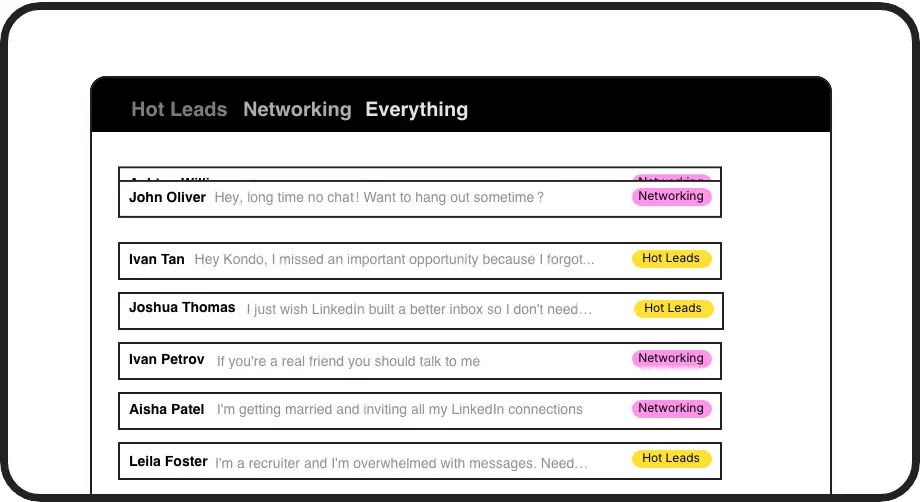
Smart Inbox Organization
Apply custom labels like 'Hot Lead' or 'Follow Up' to categorize conversations into separate, prioritized inboxes so important messages never get lost again.
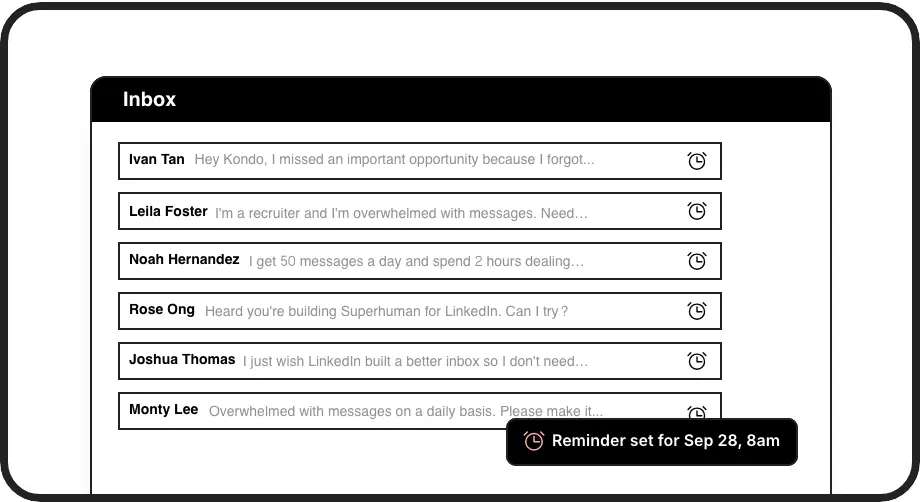
Automated Follow-ups
Set reminders that bring conversations back to the top of your inbox exactly when needed. No more manual tracking or missed follow-up opportunities.
Seamless CRM Integration
Automatically sync LinkedIn conversations to HubSpot, Salesforce, or other systems to maintain complete visibility of prospect interactions without manual data entry.
LinkedIn left your inbox in 2000. Bring it into 2026.
Get the upgrade every power user's been waiting decades for.


More Leads, Less Work, Better Results
70%
Fewer Missed Opportunities
3x
Faster Response Time
8 hours
Saved Weekly Per Rep
FAQs
How is Kondo different from LinkedIn's native inbox?
Kondo adds powerful productivity features missing from LinkedIn's native inbox: custom labels for organizing conversations, automated reminders for timely follow-ups, keyboard shortcuts for faster processing, reusable message templates, and CRM integration. These tools help sales teams prioritize hot leads and never miss important follow-ups.
Can my entire sales team use Kondo for our shared LinkedIn communications?
Yes, Kondo is designed for team usage. Each team member can organize their own LinkedIn inbox with labels and reminders, while the CRM sync feature (Business tier) gives managers complete visibility into all LinkedIn conversations across the team without manual data entry.
Is Kondo compliant with LinkedIn's terms of service?
Yes, Kondo is a native desktop application that works alongside LinkedIn without scraping data or automating prohibited actions. It enhances the LinkedIn experience without violating LinkedIn's terms of service.
Which CRM systems does Kondo integrate with?
Kondo offers native integrations with HubSpot, Notion, Google Sheets, Attio, and Clarify. Additionally, you can connect to Salesforce and other systems via Zapier, Make.com, or webhooks. Both manual and automatic streaming sync options are available.
How quickly can our team get started with Kondo?
Getting started with Kondo takes minutes. Download the desktop app, connect to your LinkedIn account, and immediately begin organizing your inbox with labels, reminders, and shortcuts. CRM integrations (Business tier) require minimal setup through our guided integration process.