
LinkedIn Message Templates with Variable Fields for Personalized Outreach
Save hours with Kondo's smart snippets that auto-fill {firstName} variables and boost response rates.
What people say
LinkedIn Outreach Struggles
Generic messaging kills your response rates. Manual personalization steals your time.
Copy-Paste Fatigue
Repeatedly typing the same outreach messages with minor changes wastes hours of productive time weekly.
Lost Opportunities
Generic messages get ignored, while manual personalization for each prospect is too time-consuming to scale.
Disorganized Follow-ups
Important conversations get buried in a cluttered inbox, causing missed follow-ups and lost deals.
Personalize LinkedIn Outreach at Scale
Kondo transforms your LinkedIn messaging with powerful tools that save time while maintaining the personal touch that drives responses.
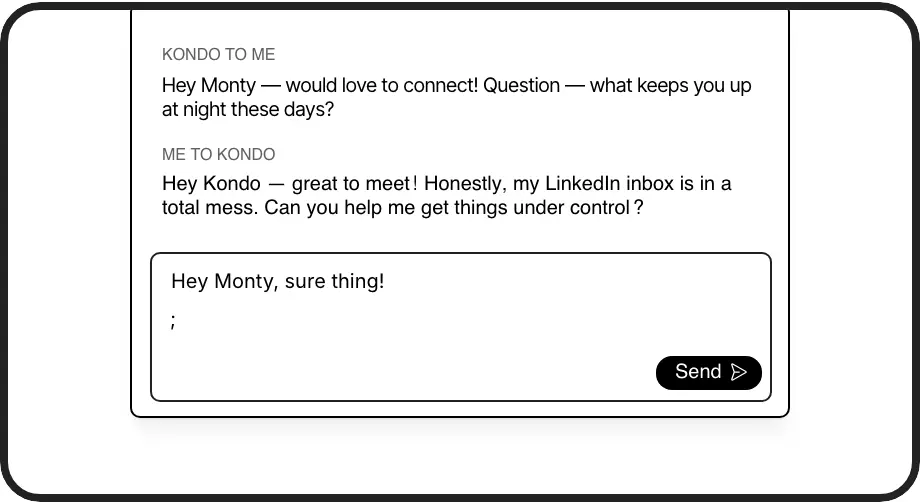
Variable-Rich Templates
Create reusable message templates with dynamic fields like {firstName}, {company}, and {position}. Insert them instantly with a simple ';' command to personalize at scale.
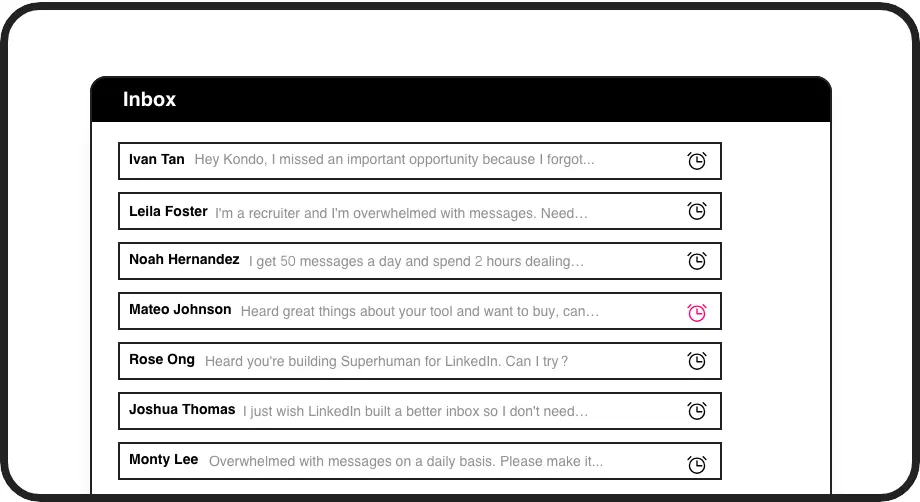
Smart Follow-ups
Set reminders that bring important conversations back to the top of your inbox exactly when needed. Never miss a follow-up opportunity again.
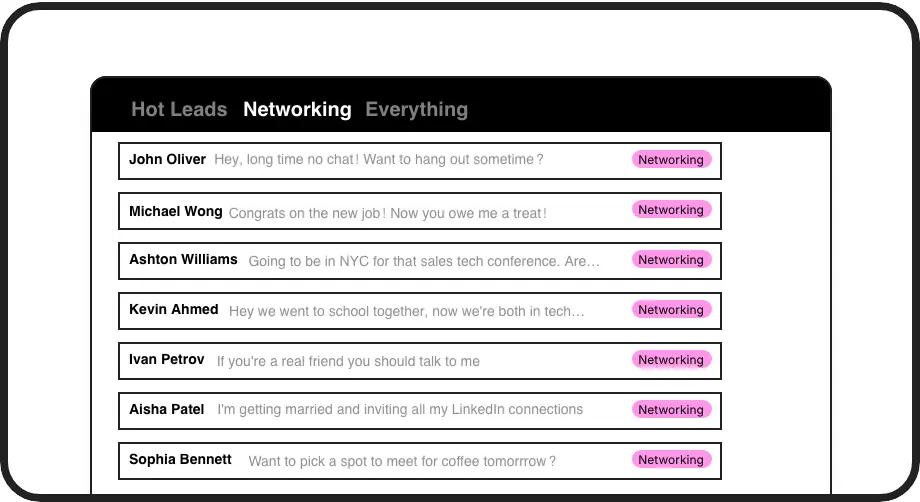
Organized Outreach
Label and sort conversations into separate inboxes by prospect type, deal stage, or priority. Find any conversation instantly without endless scrolling.
LinkedIn left your inbox in 2000. Bring it into 2026.
Get the upgrade every power user's been waiting decades for.


Personalize More, Work Less, Convert Better
70%
Higher response rates
5hrs
Saved weekly
100%
Follow-ups delivered
FAQs
What variable fields can I use in LinkedIn message templates with Kondo?
Kondo's Snippets feature supports variable fields like {firstName}, {lastName}, {company}, {position}, and other custom variables you define. Simply create your template once with these variables, and Kondo automatically fills them when you use the template, personalizing each message without manual typing.
How do I insert a LinkedIn message template with variable fields?
Using Kondo, press the semicolon key (';') while composing a message to access your saved templates. Select the desired template, and Kondo will automatically insert it with all variable fields populated based on the recipient's information.
Can I organize my LinkedIn outreach messages by campaign or prospect type?
Yes. Kondo's Labels feature lets you categorize conversations with custom labels like 'Prospect,' 'Hot Lead,' or 'Campaign A.' You can then view all related conversations in dedicated inboxes, making campaign management and follow-ups much more organized.
Is Kondo safe to use with my LinkedIn account?
Absolutely. Kondo is a native desktop application that doesn't scrape data, inject code, or automate prohibited LinkedIn actions. It enhances your LinkedIn messaging experience while maintaining compliance with LinkedIn's terms of service.
How does Kondo help with follow-ups for LinkedIn outreach?
Kondo's Reminder feature lets you set specific times for conversations to resurface at the top of your inbox. Simply press 'H' and select when you want to follow up. The message disappears until the scheduled time, ensuring timely follow-ups without cluttering your main inbox.